

Introduction
Actions are public methods in an MVC controller, that respond to a URL request. Action Selectors are attributes that can be applied to action methods and are used to influence or control which action method gets invoked in response to a request. It helps the routing engine to select the correct action method to handle a particular request.
ASP.NET MVC 5 includes the following action selector attributes.
- ActionName
- ActionVerbs
- NonAction
Step 1
Step 2
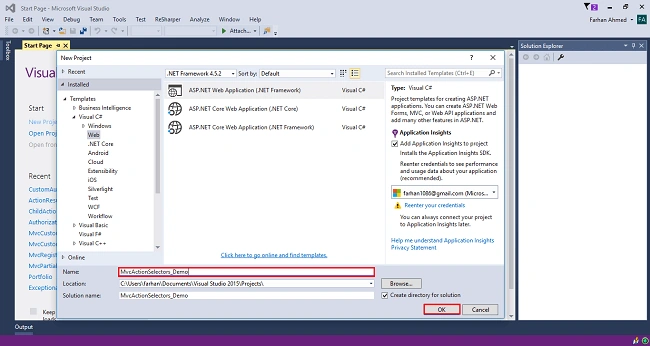
Step 3
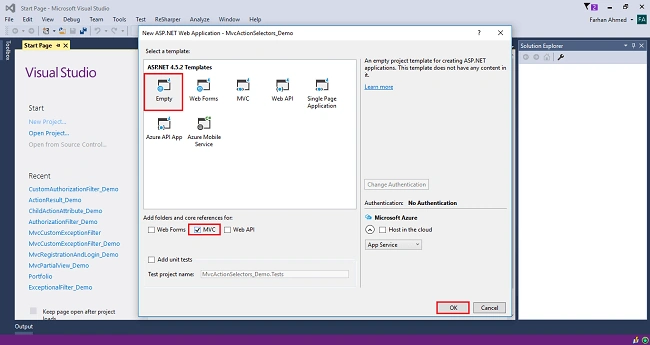
Step 4
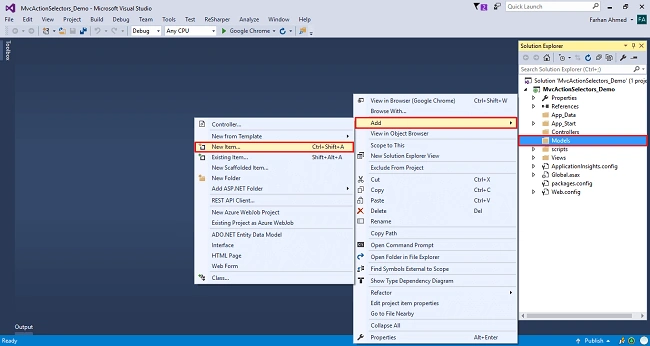
You will get a window; from there, select Data from the left panel and choose ADO.NET Entity Data Model, give it the name EmployeeModel (this name is not mandatory, you can give any name) and click "Add".
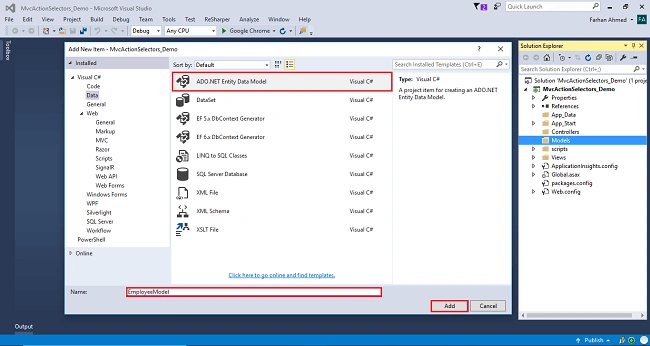
After you click on "Add a window", the wizard will open. Choose EF Designer from the database and click "Next".
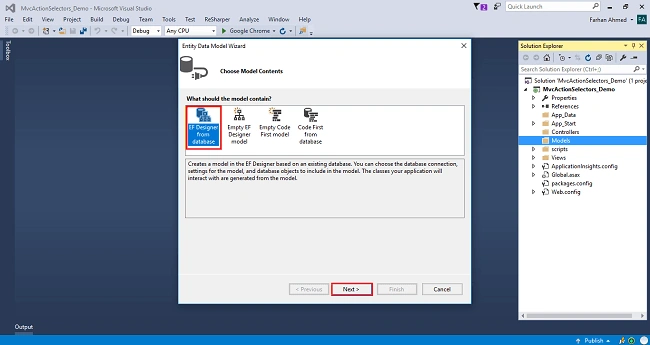
After clicking on "Next", a window will appear. Choose "New Connection". Another window will appear. Add your server name - if it is local, then enter a dot (.). Choose your database and click "OK".
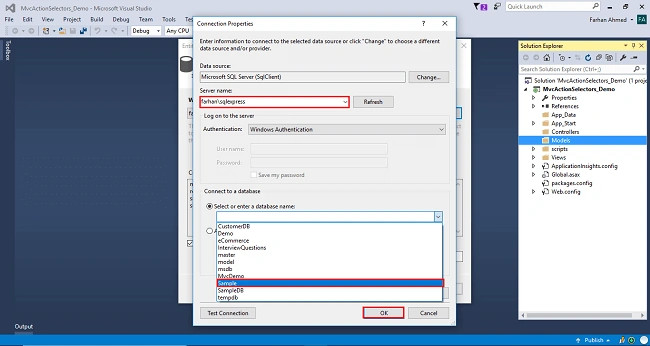
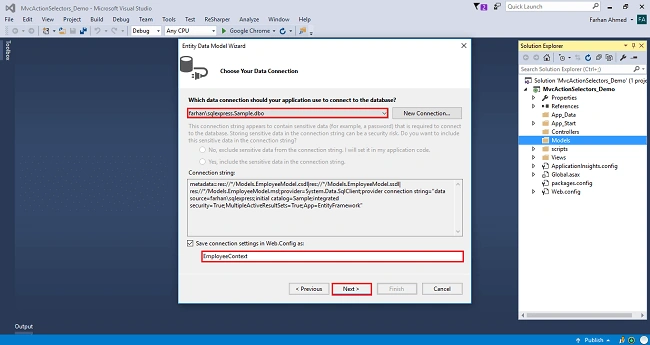
The connection will be added. If you wish, save the connection name as you want. You can change the name of your connection below. It will save the connection in the web config. Now, click "Next".
After clicking on NEXT, another window will appear. Choose the database table name as shown in the below screenshot and click "Finish".
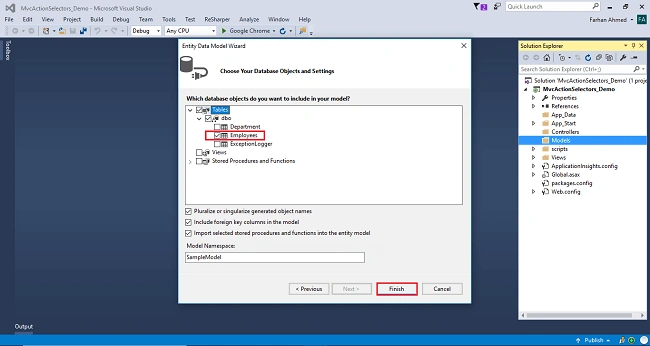
Entity Framework gets added and the respective class gets generated under the Models folder.
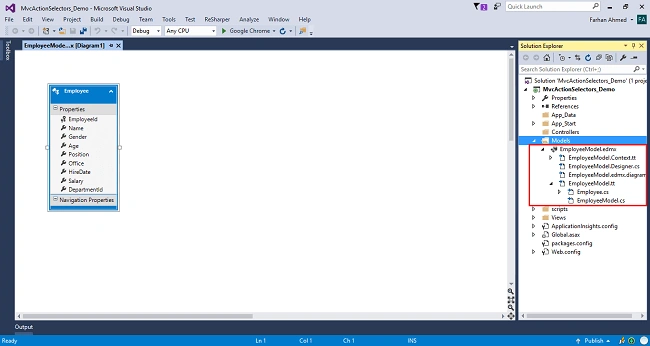
Step 5
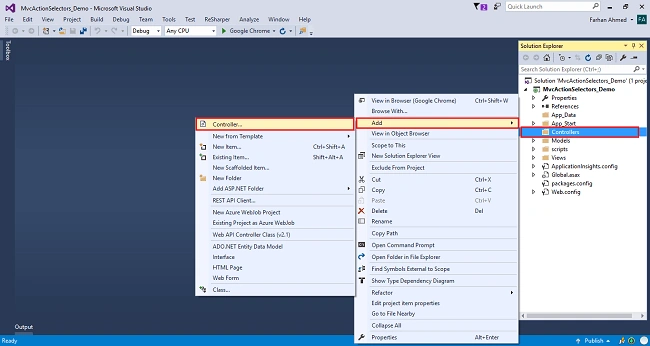
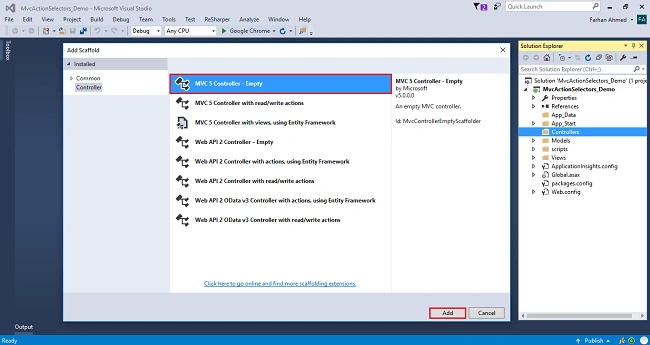
A window will appear. Choose MVC5 Controller-Empty and click "Add".
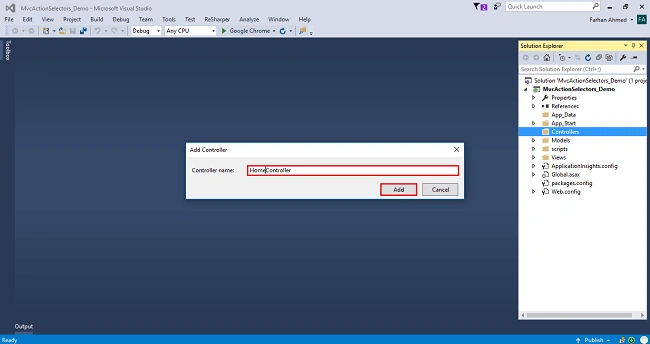
After clicking on "Add", another window will appear with DefaultController. Change the name to HomeController and click "Add". The HomeController will be added under the Controllers folder. Don’t change the Controller suffix for all controllers, change only the highlight, and instead of Default, just change Home;
The complete code for HomeController
- using System;
- using System.Collections.Generic;
- using System.Linq;
- using System.Web;
- using System.Web.Mvc;
- using MvcActionSelectors_Demo.Models;
- namespace MvcActionSelectors_Demo.Controllers
- {
- public class HomeController : Controller
- {
- private readonly EmployeeContext _dbContext=new EmployeeContext();
- [ActionName("EmployeeList")]
- public ActionResult Index()
- {
- var employee = _dbContext.Employees.ToList();
- return View(employee);
- }
- }
- }
Now, for some reason, if we want to use Index as the view name, then modify the controller action method as shown below.
- using System;
- using System.Collections.Generic;
- using System.Linq;
- using System.Web;
- using System.Web.Mvc;
- using MvcActionSelectors_Demo.Models;
- namespace MvcActionSelectors_Demo.Controllers
- {
- public class HomeController : Controller
- {
- private readonly EmployeeContext _dbContext=new EmployeeContext();
- [ActionName("EmployeeList")]
- public ActionResult Index()
- {
- var employee = _dbContext.Employees.ToList();
- return View("Index",employee);
- }
- }
- }
Step 6

Code for Index View
- @model IEnumerable<MvcActionSelectors_Demo.Models.Employee>
- @{
- ViewBag.Title = "Index";
- }
- <h2>List of Employee</h2>
- <table class="table table-bordered">
- <thead>
- <tr>
- <th>@Html.DisplayNameFor(m=>m.Name)</th>
- <th>@Html.DisplayNameFor(m=>m.Gender)</th>
- <th>@Html.DisplayNameFor(m=>m.Age)</th>
- <th>@Html.DisplayNameFor(m=>m.Position)</th>
- <th>@Html.DisplayNameFor(m=>m.Office)</th>
- <th>@Html.DisplayNameFor(m=>m.HireDate)</th>
- <th>@Html.DisplayNameFor(m=>m.Salary)</th>
- </tr>
- </thead>
- <tbody>
- @foreach (var emp in Model)
- {
- <tr>
- <td>@emp.Name</td>
- <td>@emp.Gender</td>
- <td>@emp.Age</td>
- <td>@emp.Position</td>
- <td>@emp.Office</td>
- <td>
- @if (emp.HireDate != null)
- {
- @emp.HireDate
- }
- </td>
- <td>@emp.Salary</td>
- </tr>
- }
- </tbody>
- </table>
Step 7
Code for EmployeeList view
- @model IEnumerable<MvcActionSelectors_Demo.Models.Employee>
- @{
- ViewBag.Title = "Index";
- }
- <h2>List of Employee</h2>
- <table class="table table-bordered">
- <thead>
- <tr>
- <th>@Html.DisplayNameFor(m=>m.Name)</th>
- <th>@Html.DisplayNameFor(m=>m.Gender)</th>
- <th>@Html.DisplayNameFor(m=>m.Age)</th>
- <th>@Html.DisplayNameFor(m=>m.Position)</th>
- <th>@Html.DisplayNameFor(m=>m.Office)</th>
- <th>@Html.DisplayNameFor(m=>m.HireDate)</th>
- <th>@Html.DisplayNameFor(m=>m.Salary)</th>
- </tr>
- </thead>
- <tbody>
- @foreach (var emp in Model)
- {
- <tr>
- <td>@emp.Name</td>
- <td>@emp.Gender</td>
- <td>@emp.Age</td>
- <td>@emp.Position</td>
- <td>@emp.Office</td>
- <td>
- @if (emp.HireDate != null)
- {
- @emp.HireDate
- }
- </td>
- <td>@emp.Salary</td>
- </tr>
- }
- </tbody>
- </table>
Step 7
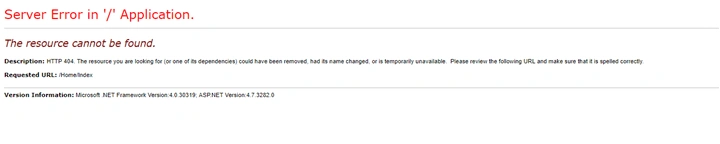
Now, if you navigate to /Home/Index, you will get an error - "The resource cannot be found".
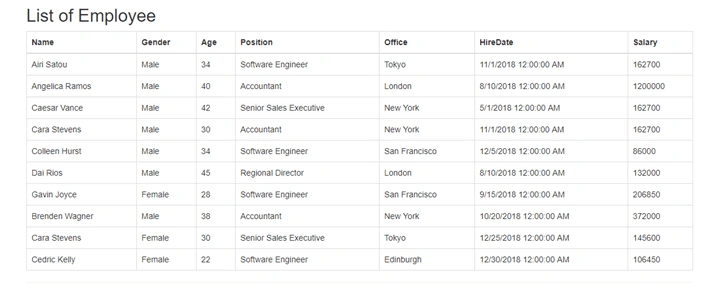
http://localhost:56100/Home/EmployeeList
Join the conversation! Your thoughts help the community grow.