

AJAX Slideshow extender control is used to display more then one images in the form of Powerpoint slide show style. AJAX SlideShow extender takes the ID of image control to display the images in it according to the time interval fixed for it. You can also specify the auto start event to change the images in SlideShow extender when the page loads. Also you can enable the loop to run the SlideShow in continuous manner that loads the first image again after displaying the last image and plays the SlideShow repeatedly.
Example:
<%@ Page Language="C#" AutoEventWireup="true" CodeFile="SlideShow.aspx.cs" Inherits="SlideShow" %>
<%@ Register Assembly="AjaxControlToolkit" Namespace="AjaxControlToolkit" TagPrefix="ajaxToolkit" %>
<!DOCTYPE html PUBLIC "-//W3C//DTD XHTML 1.0 Transitional//EN" "http://www.w3.org/TR/xhtml1/DTD/xhtml1-transitional.dtd">
<html xmlns="http://www.w3.org/1999/xhtml">
<head runat="server">
<title>SlideShow</title>
<script runat="Server" type="text/C#">
[System.Web.Services.WebMethod]
[System.Web.Script.Services.ScriptMethod]
public static AjaxControlToolkit.Slide[] GetSlides()
{
AjaxControlToolkit.Slide[] slides = new AjaxControlToolkit.Slide[5];
slides[0] = new AjaxControlToolkit.Slide("images/Image1.jpg", "First image of my album", "First Image");
slides[1] = new AjaxControlToolkit.Slide("images/Image2.jpg", "Second image of my album", "Second Image");
slides[2] = new AjaxControlToolkit.Slide("images/Image3.jpg", "Third image of my album", "Third Image");
slides[3] = new AjaxControlToolkit.Slide("images/Image4.jpg", "Fourth image of my album", "Fourth Image");
slides[4] = new AjaxControlToolkit.Slide("images/Image5.jpg", "Fifth image of my album", "Fifth Image");
return (slides);
}
</script>
</head>
<body>
<form id="form1" runat="server">
<table width="400px" align="center" height="350px" bgcolor="silver">
<tr align="center">
<td>
<asp:ScriptManager ID="ScriptManager2" runat="server" />
<asp:Label ID="lableImageDetail" runat="server" ForeColor="#000000" />
</td>
</tr>
<tr align="center">
<td>
<asp:Image runat="server" ID="image1" Height="250" Width="300" />
</td>
</tr>
<tr align="center">
<td>
<asp:Button ID="buttonPrev" runat="Server" Text="Previous" Width="80px" />
<asp:Button ID="buttonPlay" runat="server" Text="Play" Width="80px" />
<asp:Button ID="buttonNext" runat="Server" Text="Next" Width="80px" />
</td>
</tr>
</table>
<ajaxToolkit:SlideShowExtender ID="slideShowExtender1" runat="Server" TargetControlID="image1"
ImageDescriptionLabelID="lableImageDetail" Loop="true" AutoPlay="true" StopButtonText="Stop"
PlayButtonText="Play" NextButtonID="buttonNext" PreviousButtonID="buttonPrev"
PlayButtonID="buttonPlay" SlideShowServiceMethod="GetSlides" />
</form>
</body>
</html>
Output: when you run this application you will get the following result and image will be change automatically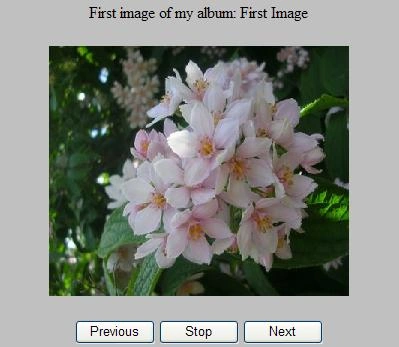
Figure 1
If you click on stop button then you can change image manually by clicking 'Next' and 'Previous' button. 
Figure 2
AJAX SlideShowExtender Control
This article demonstrates how to use AJAX SlideShowExtender control in ASP.NET applications.
Join the conversation! Your thoughts help the community grow.
Sign in to leave a comment
It is the same account you read, post and publish with — and you will come straight back to this page.
Waqas AliPosted Oct 4, 2017, 1:12 PM
Any body please tell Is there any other method to make slider by using just Css and bootstrap?
Rick WarnerPosted Feb 23, 2012, 10:49 AM
Very well written. I have web site and want to add this code, but it conflicts with masterpage.
Yuanmao WangPosted Dec 20, 2010, 5:19 PM
thank you a lot! but If I want to show Images which from the database ... Can you give me some advices? thanks again.
khamuPosted Oct 27, 2010, 3:32 AM
fffffffffffffffffffffffffffffffffffffffffffffffffffffffffffffffffffffffffffffffffff gggggggggggggggggggggggggggggggggggggggggg jjjjjjjjjjjjjjjjjjjjjjjjjjjjjjjjjjjjjjjjjjjjjjjjjjjjjjjjjjjjjjjjjjjjjjjjjjjjjjjjjjjjj ttttttttttttttttttttttttttttttttttttttttttttttttttttttttttttttttttttt
SumitPosted May 20, 2009, 8:03 AM
Good article! .....Carry on posting!!