

Window Phone 7 (Mango) provides the Fast Application Switching (FAS). With FAS, the user can start a new application and then return to your application without seeing the "resuming…" screen and without a discernable pause. Going into the details, there's a lifecycle which executes in a flow that can be handled to save and retrieve the state of pages during the Switching.
Here's the diagram of the events and methods available to manage the execution model.
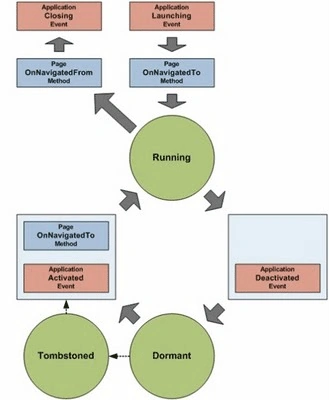
Before we start I would like to discuss two terms used in Windows Phone 7 because this something that might be confusing as they are almost the same thing but treated differently by the Window Phone 7.
Dormant Vs. Tombstoned
Tombstoned/Tombstoning: "Tombstoning", describes the process of your application being suspended and removed from the running processes (think hibernate) to free resources on the phone. The application can be "revived" later when the user navigates back to it. It's the developer's responsibility to create a user experience that gives the appearance of a seamless transition between applications even when tombstoning happens. If the user never returns to the application or after a long time the deactivated application will be silently thrown away. Here's the situation when you need to store the persistent state to isolated storage.
Dormant(New Mango Feature):
The documentation stated that if the user hits the start and back buttons in quick succession, tombstoning might not happen also the tombstoning either does not occur or is less likely to occur for certain choosers and launchers. And of course, if your application runs on a device that has the Windows Phone "Mango" update applied, will not get tombstoned right away even if it is the default behavior. Instead, in the new Mango platform the application is first put in a new state named "dormant", where it stays fully intact in memory (but without being granted any processing cycles).
Dormant to Tombstoned transition
When the operating system needs to free memory for other tasks and applications later, your application is eventually tombstoned. If the user returns to your dormant application before actual tombstoning happens, your application will be (almost) as if they never left, without the need to restore it manually for a persisted state. The OS can manage storing the states of up to 5 applications at a time.
In a Silverlight application, this situation is handled by the PhoneApplicationService class. This class has a number of events that are raised at different phases of the application lifecycle: Launching, Deactivated, Activated, NavigatedTo, NavigatedFrom and Closing.
Here's the details of all the events happens during the Application life cycle in Windows Phone 7:
|
Launching event |
The Launching event is raised when a new application instance is launched by the user from the installed applications list or from a tile on Start in addition to other means, such as tapping on a toast notification associated with an application or selecting an application from an Extras menu. |
|
OnNavigatedTo method |
Is called when the user navigates to a page. |
|
Deactivated Event |
Is raised when the user navigates forward, away from your application, by pressing the Start button or by launching another application. |
|
Dormant |
When the user navigates forward, away from an application, after the Deactivated event is raised, the operating system will attempt to put the application into a dormant state. In this state, all of the application's threads are stopped and no processing takes place, but the application remains intact in memory. If the application is reactivated from this state, the application does not need to recreate any state, because it has been preserved. |
|
Tombstoned |
A tombstoned application has been terminated, but information about its navigation state and state dictionaries populated by the application during Deactivated are preserved. The device will maintain tombstoning information for up to five applications at a time. If an application is tombstoned and the user navigates back to the application, it will be relaunched and the application can use the preserved data to restore state. Otherwise, the application is simply terminated. |
|
Activated event |
The Activated event is called when the user returns to a dormant or tombstoned application. |
|
OnNavigatedFrom method |
Is called whenever the user navigates away from an application page. |
|
Closing event |
Save persistent application data to isolated storage. |
Before starting with any development you should aware about the application life cycle. It helps to make decisions for saving, retrieving state information when required. In the next part of this post we'll be developing an application that will manage the state information when user switch between applications.
:)
Dinesh BeniwaleditedPosted Aug 10, 2011, 5:18 AMEdited Aug 10, 2011, 8:01 AM
Thanks for sharing
Amit ChoudharyPosted Aug 10, 2011, 3:01 AM
Thanks Dan :)
Dan SullivanPosted Aug 10, 2011, 1:06 AM
Amit, thanks for this. Great for anyone looking towards Mango for development.