
In ASP.NET we can bind data to a Data View. A Data View is used to view the Data of a DataTable in a customized view. It can be bound to a Grid View. To use a Data View in a Web Application we need to use the System.Data namespace in the Web Application. In our example we will show the product id along with the product no.
Let's have a look at the following steps.
Step 1
Go to Visual Studio 2010.
Step 2
Now click on File -> New -> Web Site.
Step 3
Now select ASP.NET Web Site: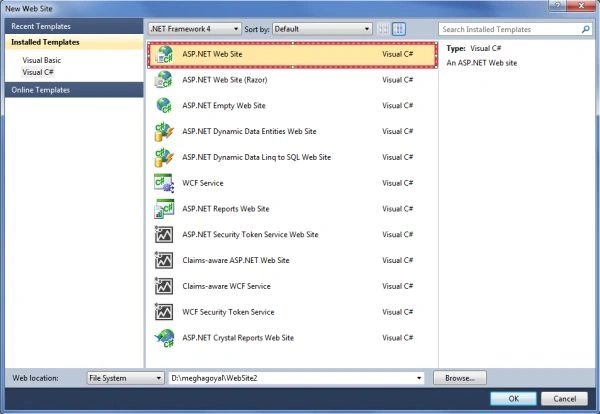
Step 4
Now give the name to your application and click on the ok button.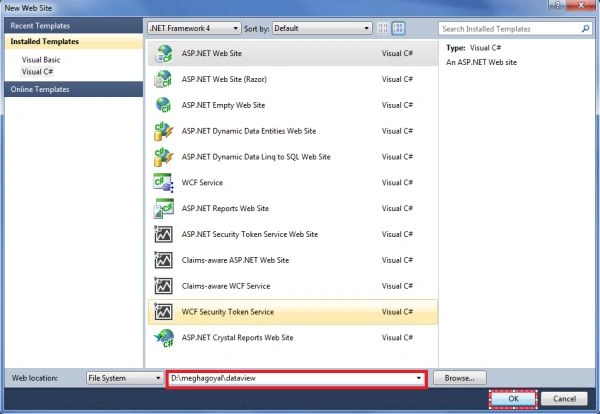
Step 5
Now add a Grid View on the Web Form.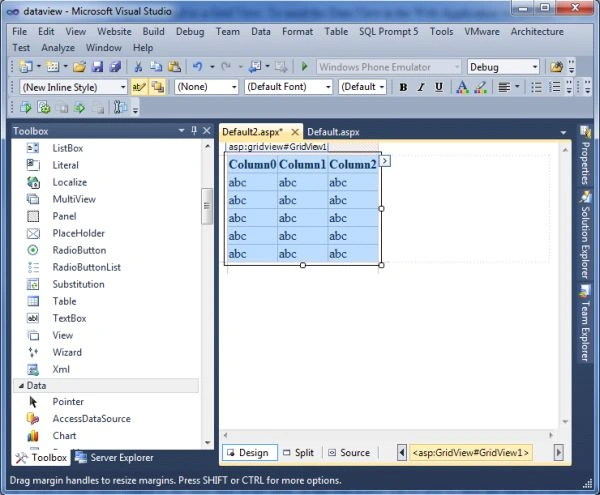
Step 6
Now add the following code for the page load event:
using System;
using System.Collections.Generic;
using System.Linq;
using System.Web;
using System.Web.UI;
using System.Web.UI.WebControls;
using System.Data;
using System.Data.SqlClient;
public partial class Default2 : System.Web.UI.Page
{
protected void Page_Load(object sender, EventArgs e)
{
if (!IsPostBack)
{
DataTable dt = new DataTable();
DataRow dr;
dt.Columns.Add(new DataColumn("Product No.",typeof(string)));
dt.Columns.Add(new DataColumn("Product ID", typeof(string)));
for (int i = 0; i < 5; i++)
{
dr = dt.NewRow();
dr[0] = i;
dr[1] = "P00" + (i + 1);
dt.Rows.Add(dr);
GridView1.DataSource = new DataView(dt);
GridView1.DataBind();
}
}
}
}
In the preceding code we create a DataTable .i.e. dt and add five rows of data in it. After that we will bind a Grid View control to the data view of the table. In this way a user will be able to view the data in a tabular format from a data view.
Step 7
The output will be like this:
Join the conversation! Your thoughts help the community grow.