

Here you will learn how to broadcast SQL data using SignalR. When a database field changes you don't need to refresh or reload the page, it will be automatically broadcast.
SignalR: SignalR is an ASP.NET server library for adding real-time functionality to a web application. This includes client libraries for JavaScript and other clients.
Getting started
To get started with SignalR:
- Start Visual Studio 2013
- Create a new website
- Provide the name and location of website
- Click "Next"
Install SignalR
Click "Tools" | "Library Package Manager" | "Package Manager Console" and run the command: "install-package Microsoft.AspNet.SignalR".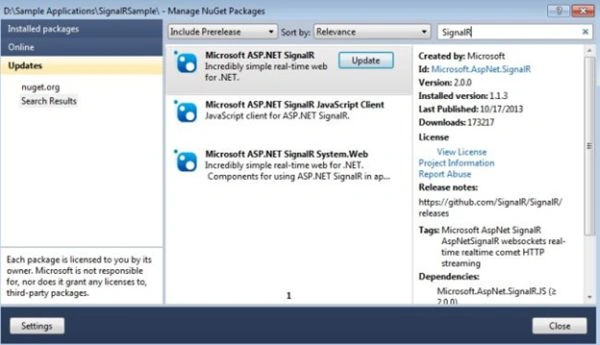
Screenshot 1
Or install using the NuGet package Manager. Do that by right-clicking on "Project" and click on "Manage Nuget packages" and search for "SignalR" then click "Install".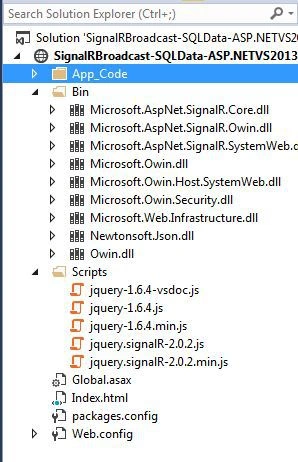
Screenshot 2
This is my database table screenshot.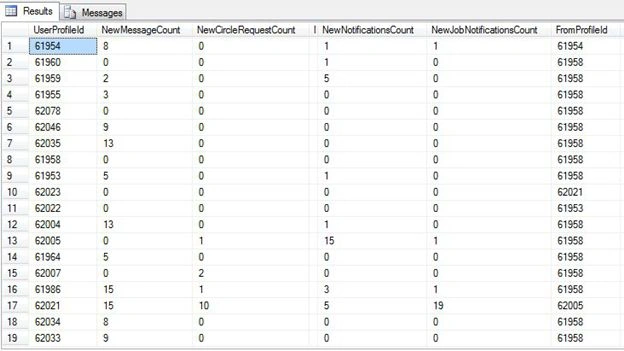
Screenshot 3
Now create a connection string in web.config.
<connectionStrings>
<add name="DefaultConnection" connectionString="data source=SERVER-NAME;
database=DATABASENAME;user id =USERID;password=PASSOWRD"
providerName="System.Data.SqlClient" />
</connectionStrings>
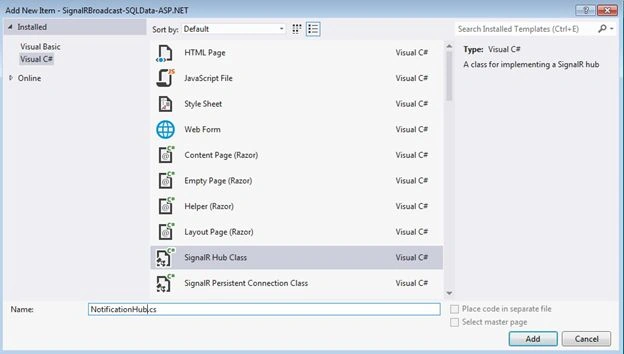
Screenshot 4
NotificationHub.cs
using Microsoft.AspNet.SignalR;
using Microsoft.AspNet.SignalR.Hubs;
[HubName("notificationHub")]
public class NotificationHub : Hub
{
private static readonly ConcurrentDictionary<string, User> Users = new ConcurrentDictionary
<string, User>(StringComparer.InvariantCultureIgnoreCase);
#region Methods
/// <summary>
/// Provides the handler for SignalR OnConnected event
/// supports async threading
/// </summary>
/// <returns></returns>
public override Task OnConnected()
{
string profileId = "111"; //Context.QueryString["id"];
string connectionId = Context.ConnectionId;
var user = Users.GetOrAdd(profileId, _ => new User
{
ProfileId = profileId,
ConnectionIds = new HashSet<string>()
});
lock (user.ConnectionIds)
{
user.ConnectionIds.Add(connectionId);
Groups.Add(connectionId, user.ProfileId);
}
return base.OnConnected();
}
/// <summary>
/// Provides the handler for SignalR OnDisconnected event
/// supports async threading
/// </summary>
/// <returns></returns>
public override Task OnDisconnected()
{
string profileId = Context.QueryString["id"];
string connectionId = Context.ConnectionId;
User user;
Users.TryGetValue(profileId, out user);
if (user != null)
{
lock (user.ConnectionIds)
{
user.ConnectionIds.RemoveWhere(cid => cid.Equals(connectionId));
Groups.Remove(connectionId, user.ProfileId);
if (!user.ConnectionIds.Any())
{
User removedUser;
Users.TryRemove(profileId, out removedUser);
}
}
}
return base.OnDisconnected();
}
/// <summary>
/// Provides the handler for SignalR OnReconnected event
/// supports async threading
/// </summary>
/// <returns></returns>
public override Task OnReconnected()
{
return base.OnReconnected();
}
/// <summary>
/// Provides the facility to send individual user notification message
/// </summary>
/// <param name="profileId">
/// Set to the ProfileId of user who will receive the notification
/// </param>
/// <param name="message">
/// set to the notification message
/// </param>
public void Send(string profileId, string message)
{
//Clients.User(profileId).send(message);
}
/// <summary>
/// Provides the facility to send group notification message
/// </summary>
/// <param name="username">
/// set to the user groupd name who will receive the message
/// </param>
/// <param name="message">
/// set to the notification message
/// </param>
public void SendUserMessage(String username, String message)
{
Clients.Group(username).sendUserMessage(message);
}
/// <summary>
/// Provides the ability to get User from the dictionary for passed in profileId
/// </summary>
/// <param name="profileId">
/// set to the profileId of user that need to be fetched from the dictionary
/// </param>
/// <returns>
/// return User object if found otherwise returns null
/// </returns>
private User GetUser(string profileId)
{
User user;
Users.TryGetValue(profileId, out user);
return user;
}
/// <summary>
/// Provide theability to get currently connected user
/// </summary>
/// <returns>
/// profileId of user based on current connectionId
/// </returns>
public IEnumerable<string> GetConnectedUser()
{
return Users.Where(x =>
{
lock (x.Value.ConnectionIds)
{
return !x.Value.ConnectionIds.Contains(Context.ConnectionId, StringComparer.InvariantCultureIgnoreCase);
}
}).Select(x => x.Key);
}
#endregion
Int16 totalNewMessages = 0;
Int16 totalNewCircles = 0;
Int16 totalNewJobs = 0;
Int16 totalNewNotification = 0;
[HubMethodName("sendNotifications")]
public string SendNotifications()
{
using (var connection = new SqlConnection(ConfigurationManager.ConnectionStrings["DefaultConnection"].ConnectionString))
{
string query = "SELECT NewMessageCount, NewCircleRequestCount, NewNotificationsCount, NewJobNotificationsCount FROM [dbo].[Modeling_NewMessageNotificationCount] WHERE UserProfileId=" + "62021";
connection.Open();
using (SqlCommand command = new SqlCommand(query, connection))
{
try {
command.Notification = null;
DataTable dt = new DataTable();
SqlDependency dependency = new SqlDependency(command);
dependency.OnChange += new OnChangeEventHandler(dependency_OnChange);
if (connection.State == ConnectionState.Closed)
connection.Open();
var reader = command.ExecuteReader();
dt.Load(reader);
if (dt.Rows.Count > 0)
{
totalNewMessages = Int16.Parse(dt.Rows[0]["NewMessageCount"].ToString());
totalNewCircles = Int16.Parse(dt.Rows[0]["NewCircleRequestCount"].ToString());
totalNewJobs = Int16.Parse(dt.Rows[0]["NewJobNotificationsCount"].ToString());
totalNewNotification = Int16.Parse(dt.Rows[0]["NewNotificationsCount"].ToString());
}
connection.Close();
}
catch(Exception ex)
{
throw;
}
}
}
IHubContext context = GlobalHost.ConnectionManager.GetHubContext<NotificationHub>();
return context.Clients.All.RecieveNotification(totalNewMessages, totalNewCircles, totalNewJobs, totalNewNotification);
}
private void dependency_OnChange(object sender, SqlNotificationEventArgs e)
{
if (e.Type == SqlNotificationType.Change)
{
NotificationHub nHub = new NotificationHub();
nHub.SendNotifications();
}
}
}
Startup.cs
[assembly: OwinStartup("TestingConfiguration", typeof(EmployeeStartup))]
public class EmployeeStartup
{
public void Configuration(IAppBuilder app)
{
app.MapSignalR();
}
}
#region Properties
/// <summary>
/// Property to get/set ProfileId
/// </summary>
public string ProfileId
{
get;
set;
}
/// <summary>
/// Propoerty to get/set multiple ConnectionId
/// </summary>
public HashSet<string> ConnectionIds
{
get;
set;
}
#endregion
}
<head>
<title>New Notifications</title>
<script src="Scripts/jquery-1.6.4.min.js"></script>
<script src="Scripts/jquery.signalR-2.0.2.min.js"></script>
<script src="signalr/hubs"></script>
<script type="text/javascript">
$(function () {
// Declare a proxy to reference the hub.
var notifications = $.connection.notificationHub;
debugger;
// Create a function that the hub can call to broadcast messages.
notifications.client.recieveNotification = function (totalNewMessages, totalNewCircles, totalNewJobs, totalNewNotifications) {
// Add the message to the page.
$('#spanNewMessages').text(totalNewMessages);
$('#spanNewCircles').text(totalNewCircles);
$('#spanNewJobNotifications').text(totalNewJobs);
$('#spanNewNotifications').text(totalNewNotifications);
};
// Start the connection.
$.connection.hub.start().done(function () {
notifications.server.sendNotifications();
}).fail(function (e) {
alert(e);
});
//$.connection.hub.start();
});
</script>
</head>
<body>
<h1>Broadcast Realtime SQL data using SignalR</h1>
<div>
<p>You have <span id="spanNewMessages">0</span> New Message Notification.</p>
<p>You have <span id="spanNewCircles">0</span> New Circles Notification.</p>
<p>You have <span id="spanNewJobNotifications">0</span> New Job Notification.</p>
<p>You have <span id="spanNewNotifications">0</span> New Notification.</p>
</div>
</body>
Global.asax
void Application_Start(object sender, EventArgs e)
{
// Code that runs on application startup
System.Data.SqlClient.SqlDependency.Start(ConfigurationManager.
ConnectionStrings["DefaultConnection"].ConnectionString);
}
void Application_End(object sender, EventArgs e)
{
// Code that runs on application shutdown
System.Data.SqlClient.SqlDependency.Stop(ConfigurationManager.
ConnectionStrings["DefaultConnection"].ConnectionString);
}
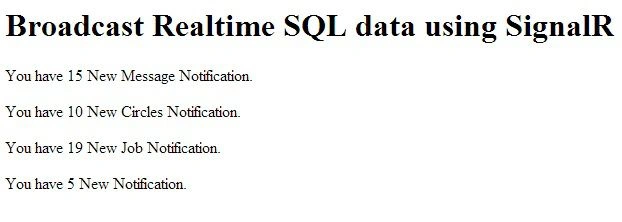
Screenshot 5
Now let me change the notification from 5 to 50 in the database and without refreshing or reloading the page.
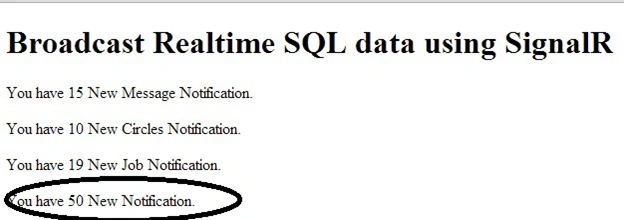
Screenshot 6
Shashikant TripathiPosted Feb 21, 2016, 4:54 AM
Its not pulling new data, if I directly change values in DB.
Shashikant TripathiPosted Feb 21, 2016, 3:59 AM
getting Cannot implicitly convert type 'System.Threading.Tasks.Task<object>' to 'string'.
Madhv KushawahPosted Jan 4, 2016, 1:04 PM
not working proper
chmusichPosted Feb 17, 2015, 2:46 PM
I got the next error message : JavaScript runtime error: Unable to get property 'client' of undefined or null reference :(
lizhong huangPosted Jan 8, 2015, 7:02 PM
I can not update data in signalr page, what is missing?