

In this article we will learn how to call web service using the ScriptManager,their is often need to call web service using Ajax but its very time consuming and require lots to script to write so to avoid this we can also call web service using the ScriptManager.
So how to call let us learn step by step so beginners also can understand.
Per-requirement to Understand this tutorial
If you are a beginner and you need to understand what a web service,so to learn about it refer my below article
I hope you read it if you are unfamiliar with web services,so let us i briefly define what a web service and ScriptManager,
What is web services ?
A "web service is the communication platform between two different or same platform applications that allows to use their web method."
What is ScriptManager ?Basically When we use any Ajax control then there is a requirement to use the ScriptManager to handle the Scripting on the client side; without the ScriptManager Ajax controls are not run but also ScriptManager is used to call web service ,to handle errors and on.
So let us demonstrate this concept which help of one web application as
Step 1:
Create a Web Service as
Now the solution explorer will look like as follows Step 4:
In the above code, I have created one method named GetAddition which takes the two integer type parameter that is a,b and returns the sum of two integer variable.
- "Start" - "All Programs" - "Microsoft Visual Studio 2010".
- "File" - "New Project" - "C#" - "Empty Web Application" (to avoid adding a master page).
- Provide the web site a name such as "CallingWebServiceUsingScriptManager" or another as you wish and specify the location.
- Then right-click on Solution Explorer - "Add New Item" - you see the web service template then click on add
Step 2:
Add Web Page in Created Web application as - Right-click on Solution Explorer - "Add New Item" - you see the Web Form template then click on add
- Now drag in drop one ScriptManager,two textBoxes ,one button on Default.aspx Page ,then the source code of the Default.aspx page will be look like as follows
Default.aspx
- <%@ Page Language="C#" AutoEventWireup="true" CodeFile="Default.aspx.cs" Inherits="_Default" %>
- <!DOCTYPE html PUBLIC "-//W3C//DTD XHTML 1.0 Transitional//EN" "http://www.w3.org/TR/xhtml1/DTD/xhtml1-transitional.dtd">
- <html xmlns="http://www.w3.org/1999/xhtml">
- <head runat="server">
- <title></title>
- </head>
- <body bgcolor="black">
- <form id="form1" runat="server">
- <asp:ScriptManager ID="ScriptManager1" runat="server">
- <Services>
- <asp:ServiceReference Path="~/WebService.asmx" />
- </Services>
- </asp:ScriptManager>
- <br />
- <h2 style="color: #808000; font-size: medium; font-weight: bolder;">
- Article by vithal wadje</h2>
- <br />
- <br />
- <br />
- <table style="width: 73%; color: White;">
- <tr>
- <td>
- Enter First Number
- </td>
- <td>
- <asp:TextBox ID="TextBox1" runat="server"></asp:TextBox>
- </td>
- </tr>
- <tr>
- <td>
- Enter Second Number
- </td>
- <td>
- <asp:TextBox ID="TextBox2" runat="server"></asp:TextBox>
- </td>
- </tr>
- <tr>
- <td>
- </td>
- <td>
- </td>
- </tr>
- <tfoot>
- <tr>
- <td>
- </td>
- <td colspan="3">
- <input id="Savebtn" type="button" value="Calculate" onclick="GetDetails();" />
- </td>
- </tr>
- </tfoot>
- </table>
- </form>
- </body>
- </html>
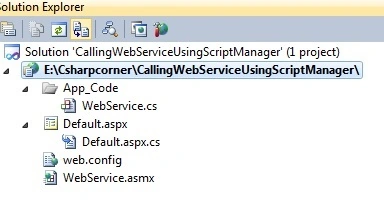
In the above solution explorer you have seen that in App code folder there is WebService class added and out of that there is Default.aspx page from which we will call web service using script Manager and another is .asmx file which is a our web service.
Step 3:
Create method in WebService.cs Class as
- [WebMethod]
- public int GetAddition(int a, int b)
- {
- //returning sum of given input numbers
- return a + b;
- }
To allow calling web service from JavaScript,Jquery or scriptManager,we need to uncomment the following line of web service which is
- //To allow this Web Service to be called from script, using ASP.NET AJAX, uncomment the following line.
- [System.Web.Script.Services.ScriptService]
Now whole code of WebService.cs class will be look like as follows
- using System;
- using System.Collections.Generic;
- using System.Linq;
- using System.Web;
- using System.Web.Services;
- /// <summary>
- /// Summary description for WebService
- /// </summary>
- [WebService(Namespace = "http://tempuri.org/")]
- [WebServiceBinding(ConformsTo = WsiProfiles.BasicProfile1_1)]
- // To allow this Web Service to be called from script, using ASP.NET AJAX, uncomment the following line.
- [System.Web.Script.Services.ScriptService]
- public class WebService : System.Web.Services.WebService
- {
- [WebMethod]
- public int GetAddition(int a, int b)
- {
- //returning sum of given input numbers
- return a + b;
- }
- }
Let us see the UI of .aspx Page
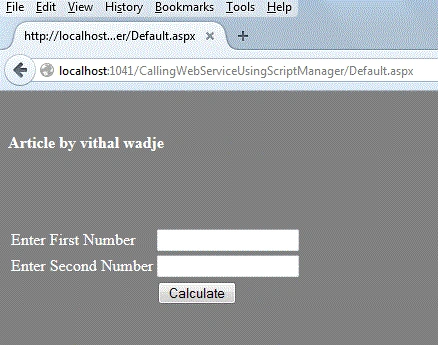
In the above UI you have seen that there two textboxes which accepts the two numbers and there is calculate HTML button which calls the javascript function to call web service using script manager.
Step 5:
Refer Service Path using Script manager as
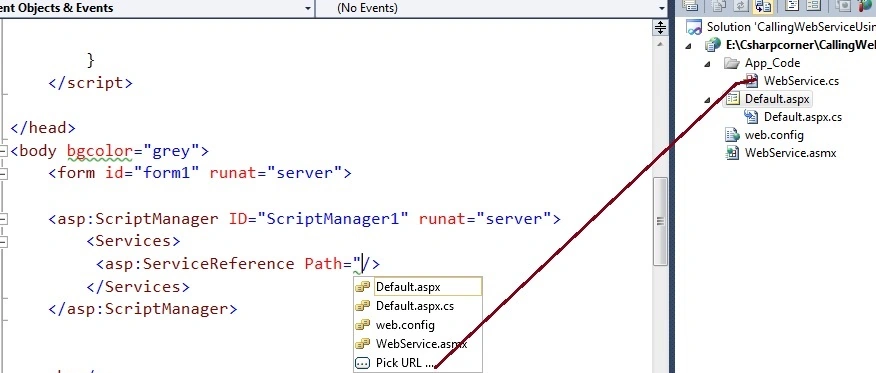
In the above source code ,there is Services tag under the script manager control which allows to set the web service reference,now click on pick url or above option to set the path of web service.
After setting the path of web service the script manager tag will be look like as follows.
- <asp:ScriptManager ID="ScriptManager1" runat="server">
- <Services>
- <%-- web service reference --%>
- <asp:ServiceReference Path="~/WebService.asmx"/>
- </Services>
- </asp:ScriptManager>
Create JavaScript function to call service Method as
- function GetDetails()
- {
- //reads the values to textboxes
- var a = document.getElementById('TextBox1').value;
- var b = document.getElementById('TextBox2').value;
- // the value to Web method
- WebService.GetAddition(a, b, SuccessCallback, OnfailureCallback);
- }
in the above code ,i have read the values of two textboxes and storing in a and b variable and after that i am ing those variable to the web service method which takes the four parameter which are input parameters,SuccessCallback,OnfailureCallback and usercontext as given in the following image.

In the above image you have seen that GetAddition methods takes the two parameter as input and additional to that it takes OnSucess,OnFailed,Usercontext parameters ,let us briefly i will explain what they are ?
- OnSucess -> this returns the results after successfully executing the web services method,this parameter is an optional.
- Onfailed -> Due to the some reason web service method failed to execute then its returns the error details,it accepts the error object as a parameter ,this parameter is an optional.
- usercontext -> This is used to provide some additional information,this parameter is an optional.
I hope you understand about the parameter details,now similarly we will create methods for OnSucess and onfailed as.
OnSucess
- //returns output from service
- function SuccessCallback(AddResult)
- {
- //displaying output on alertbox
- alert(AddResult);
- }
- //returns the error after web service failed to execute
- function OnfailureCallback(error)
- {
- //displaying error on alert box
- alert(error);
- }
- <script type="text/javascript">
- function GetDetails()
- {
- //reads the values to textboxes
- var a = document.getElementById('TextBox1').value;
- var b = document.getElementById('TextBox2').value;
- // the value to Web method
- WebService.GetAddition(a, b, SuccessCallback, OnfailureCallback);
- }
- //returns output from service
- function SuccessCallback(AddResult)
- {
- //displaying output on alertbox
- alert(AddResult);
- }
- //returns the error after web service failed to execute
- function OnfailureCallback(error)
- {
- //displaying error on alert box
- alert(error);
- }
- </script>
Now call GetDetails() function on Calculate html input button click which calls web service method without postback as
- <input id="Savebtn" type="button" value="Calculate" onclick="GetDetails();" />
Now click F5 to run application,enter some number into two textboxes and click on calculate button ,it will shows the following output as
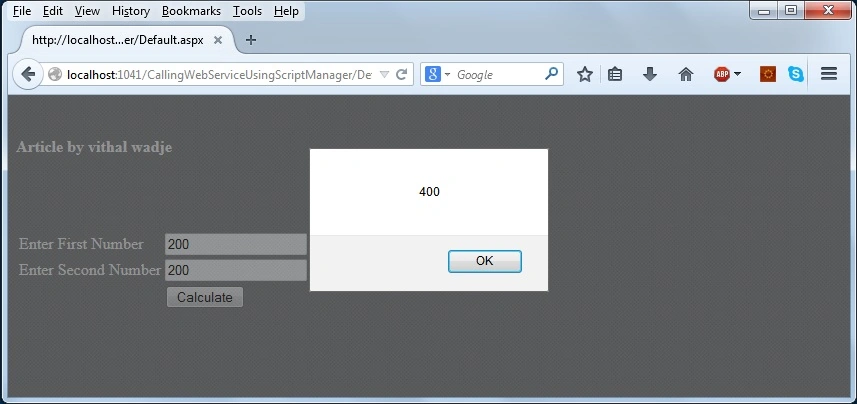
In the above Image the output is return from the web service as 400 now its clear that we can also call the web service using Scriptmanager and we will avoid time of to write JSON code to call service.
Note:
- For detailed code please download the Zip file attached above.
Summary
From all the examples above we seen that how to call web service using script manager and how reduce the code which required to call service with the help of JSON. I hope this article is useful for all students and beginners. If you have any suggestion related to this article then please contact me.
syed ibrahimPosted Sep 18, 2018, 12:39 AM
WebService is not defined error in java script used visual studio 2017
Vithal WadjePosted Apr 25, 2015, 9:51 PM
thanks
Gowtham RajamanickamPosted Apr 25, 2015, 6:30 AM
good
Gowtham RajamanickamPosted Apr 25, 2015, 6:30 AM
good