
Introduction : The Workflow defines a variable that is a collection of classes.The variable can be any typeof collection that supports the interface. The LambdaValue Represents a lambda expression used as an r-value, which supports the binding of In arguments so it is bound to the default value. Different types of collections like add, remove and delete, sorting, searching and clearing collection.
Collection Classes :
- System.Collections.
- .System.Collection.Generic.
- Most collection classes derive from the interfaces ICollection, IComparer, IEnumerable, IList, IDictionary, and IDictionaryEnumerator and their generic equivalents.
- Generic collection classes provide increased type-safety and in some cases can provide better performance, especially when they store value types.
Step 1 : Open Visual Studio 2010.
- Go to File->New-> Project.
- Select Workflow ConsoleApplication.
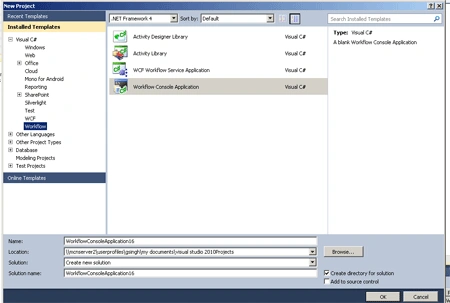
Step 2 : Drag activity from Toolbox.
- Drag the WriteLine, Sequence, Collection activities.
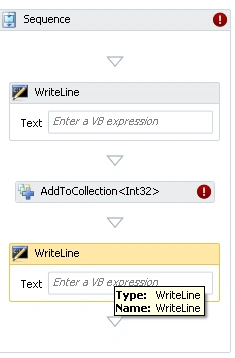
Step 3 : Go to the program.cs file and write the below code.
Code :
using
System;
using
System.Collections.Generic;
using
System.Linq;
using
System.Text;
using
System.Workflow.Activities;
namespace
ConsoleApplication1
{
class Program
{
public class
litem
{
public
string Description { get;
set; }
public int
Quantity { get; set;
}
public
decimal UnitPrice { get;
set; }
public int
Priority { get; set;
}
public
string Comments { get;
set; }
public litem(string
description, int quantity,
decimal unitPrice,
int priority,
string comments)
{
Description = description;
Quantity = quantity;
UnitPrice = unitPrice;
Priority = priority;
Comments = comments;
}
public litem(string
description)
{
Description = description;
}
}
}
}
Step 4 : Press F6 and build
the application.
Step 5 : Go to Solution Explorer.
- Right-Click->Add->New Item.
- Select Class.
- Click OK.
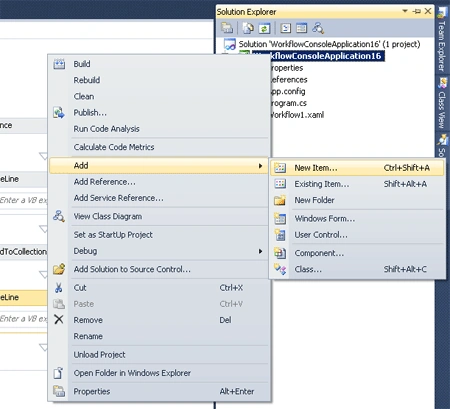
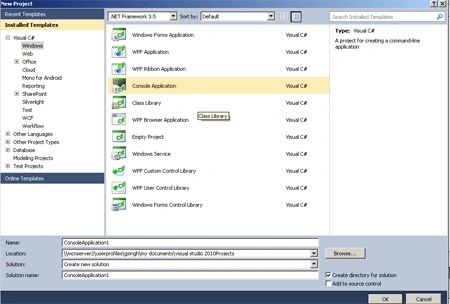
Step 6 : Add the following namespace to the program.cs file.
"using System.Activities.Expressions;"
Step 7 : Write the below code and implement a simple Workflow.
Code :
using System;
using System.Linq;
using System.Activities;
using System.Activities.Statements;
using System.Activities.Expressions;
namespace WorkflowConsoleApplication1
{
private static
WorkflowElement CollectionWF()
{
Variable<ICollection<ListItem>> myList =
new Variable<ICollection<litem>>()
{
Name = "MyList",
Default = new LambdaValue<ICollection<litem>>
(env => new List<litem>())
};
return new Sequence
{
Variables = { myList },
Activities = { new WriteLine { Text = "Workflow starting..."},
new AddToCollection<litem>
{
Collection = myList,
Item = new LambdaValue<litem>
(env => new litem("Milk",
1, 3.99m, 2, "")) },
new AddToCollection<litem>
{
Collection = myList,
Item = new LambdaValue<litem>
(env => new litem("Bread",
2, 2.95m, 1,
"Get 100% Whole Wheat, if possible"))},
new AddToCollection<litem>
{
Collection = myList,
Item = new LambdaValue<litem>
(env => new litem("Cheese",
1, 1.75m, 4, ""))},
static void Main(string[]
args)
{
WorkflowInvoker.Invoke(new Workflow1());
}
}
}
}
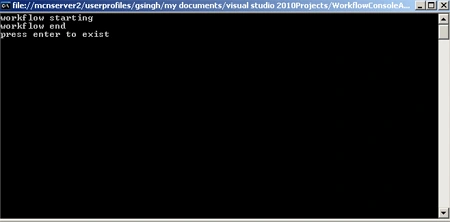
Step 8 : Press F5 to run it.
Join the conversation! Your thoughts help the community grow.