

We know that Angular is a component-based framework. All the logics are associated with the View (HTML files) that we have written in a component (typescript file). We have many ways to pass the data from component to view and view to the component, but now the question is how can we pass data from one component to another component.
Most of the time we have the following architecture of components in our applications,
- Parent to Child
- Child to Parent
- Child to Child
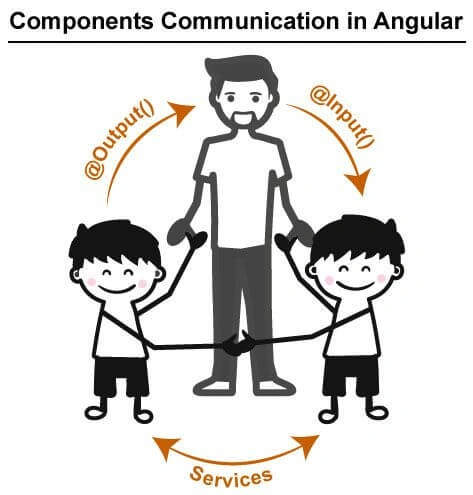
Let’s understand how we can communicate (pass data) between the components if they follow the above architecture.
Passing data from PARENT COMPONENT to CHILD COMPONENT.
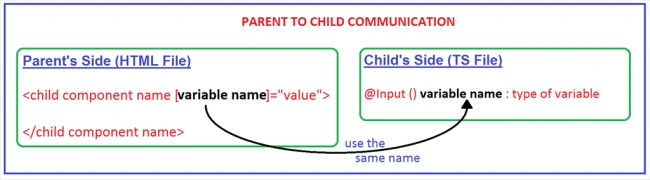
As per the above picture, it’s very easy to pass data from Parent to Child, just remember the following steps,
- At the parent side, Declare a variable & use it as a Property Binding and assign a value, when parent call it, like <child component [variable name]=”value”> </child component>
- At child side, catch this variable in component (ts file) using @Input decorator function, like @Input () variable name: type of variable
- Use it into child’s HTML page.
Let's understand the above-mentioned steps with an example:
Create a component called “first” by using the following command,
- ng g c first
- <app-first></app-first>
What if we want to pass data from app.component (parent) to first.component.ts (child) file, for this we can use “@Input”.
And, if we want to pass a static value then use it like this,
- <app-first [childValue]="'String comes from Parent (app.component.html) file'"></app-first>
- export class FirstComponent {
- @Input() childValue:string; //catch the value comes from app component (parent)
- }
- <div class="alert alert-primary" role="alert">
- {{childValue}}
- </div>
Save it, and run it, it will show the following output,

We can also pass multiple values, just assign value to variable names and catch the same variable inside child component using @Input, like this,
In app.component.html file,
- <app-first [childValue]="'String comes from Parent (app.component.html) file'"
- [xyz]="'My name is Mahesh Verma'"
- ></app-first>
- export class FirstComponent {
- @Input() childValue:string; //catch the value comes from app component (parent)
- @Input('xyz') mahesh:string; //rename the variable name xyz to mahesh
- }
- <div class="alert alert-primary" role="alert">
- {{childValue}}
- </div>
- <div class="alert alert-success" role="alert">
- {{mahesh}} (comes from Parent Component)
- </div>

Similarly, if we want to pass value from app.component.ts file then pass it into without using single inverted comma, like if we store “My name is Mahesh Verma” into myValue (inside app.component.ts file) then pass it like this.
- <app-first [childValue]="'String comes from Parent (app.component.html) file'"
- [xyz]="myValue"
- ></app-first>
myValue is a property that is defined in app.component.ts file and "xyz" is a property (variable) name used to store the value of myValue and pass it into child’s component.
Now, it is clear to us that how we can communicate between Parent to Child and what is the use of @Input decorator function.
Now, it is clear to us that how we can communicate between Parent to Child and what is the use of @Input decorator function.
Passing data from CHILD COMPONENT to PARENT COMPONENT.
Now, what do we do if we want to pass data from First component (child) to App component (parent). For this, we use @Output() decorator function with EventEmitter.
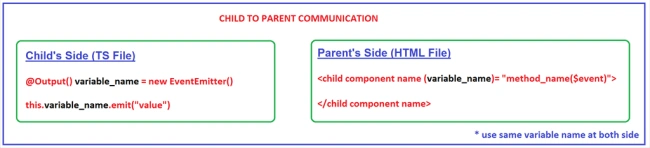
As per the above picture, it’s very easy to pass data from Child to Parent, just remember the following steps :
Child’s Side
- Go to the HTML page, use event binding and call a function to set the value.
- Go to component page (ts) and declare a property with @Output() like,
@Output () variable name=new EventEmitter();
And emit data using this variable like this.variablename.emit(passing-data)
Parent’s Side
- Go to the HTML page, use the same variable name as it is defined in child component with @Output(), as an event binding <child component selector (variable name)= ”method name ($event)”>
- Go to the component page and set the value inside the method and use it into parent’s HTML.
Now, understand the above mentioned points with an example,
Go to the “first.component.html” page, and write the below code.
Go to the “first.component.html” page, and write the below code.
- <div class="alert alert-info" role="alert">
- <input type="text" placeholder="write anything" #myValue>
- <button class="btn btn-primary" (click)="setValue(myValue)">
- Click Me
- </button>
- </div>
After that, go to “first.component.ts” page and write the below code.
- @Output() passingValue=new EventEmitter();
- setValue(myVariable){
- this.passingValue.emit(myVariable.value);
- }
In the above lines, we have declared a variable “passingValue” as EventEmitter() with @Output decorator function. passingValue is EventEmitter type so, with the help of this variable (property) we can pass (emit) our data to the parent component.
[EventEmitter is an object in the Angular framework which allows us to emit our own events.]
Go to the app.component.html file, to receive the above passing value.
[EventEmitter is an object in the Angular framework which allows us to emit our own events.]
Go to the app.component.html file, to receive the above passing value.
- <app-first [childValue]="'String comes from Parent (app.component.html) file'"
- [xyz]="myValue"
- (passingValue)="xyz($event)"> <!--Received value from child-->
- </app-first>
- <div class="alert alert-danger" role="alert">
- Parent's Div
- <br>
- Value come from Child's Component :- <b>{{receivingValue}}</b>
- </div>
- xyz(data:any){
- this.receivingValue=data;
- }

Conclusion
Now, we have learned how to pass data from Parent to Child (@Input) and Child to Parent (@Output). However, if we want to communicate between the same levels (among siblings ) then we use Services. We will learn more about services in my next article. For practice purposes, the sample project called “ComponentCommunication” is attached which covers all the pieces of code. You can download and modify this as per your requirement. All your queries related to this article and sample project are always welcome. Thanks for reading.
Now, we have learned how to pass data from Parent to Child (@Input) and Child to Parent (@Output). However, if we want to communicate between the same levels (among siblings ) then we use Services. We will learn more about services in my next article. For practice purposes, the sample project called “ComponentCommunication” is attached which covers all the pieces of code. You can download and modify this as per your requirement. All your queries related to this article and sample project are always welcome. Thanks for reading.
Ramzanali MominPosted Jul 17, 2019, 11:23 AM
Superb Article sir
Akhilesh TripathiPosted Mar 28, 2019, 7:32 AM
Nice Explained every step
Reena LakraPosted Dec 21, 2018, 5:05 AM
Awsum explaination with best pictures....Keep it up, thanks for sharing.....
Sergey KzkvPosted Nov 14, 2018, 11:13 AM
Thanks. Nice article, I like your explanation style and waiting for next one about communication between the same levels components ( using Services).
Hadshana KamalanathanPosted Sep 3, 2018, 1:33 PM
Nice article thank you for sharing...
Bhairab DuttPosted Aug 31, 2018, 11:51 PM
Great explanation about communication between component ....
Mahesh ChandPosted Aug 31, 2018, 9:47 AM
Nice :) I laughed at the image ..
Deepak VermaPosted Aug 31, 2018, 8:42 AM
Great article with fab explanation...................great job :)