

Introduction
Many users know how to create code library using Visual Studio IDE in GUI environment for making code reusable code so that multiple application can use that dll.but here I am writing something by which after reading this article you will be able to compile DLL using just command line C# compiler without opening Visual Studio IDE.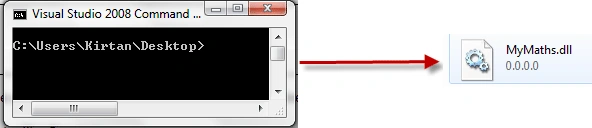
Language:
C# .net 2.0/3.5
Prerequisites:
Basic knowledge of DOS(cmd.exe) and C#.
Implementation
First let you tell what is out target is to compile a DLL (reusable code library) using command line c# compiler that is csc.exe.
Fire up Notepad or any other your favorite text editor Program.
As example we will build simple dll that will contain methods like add() , substract() multiply().
using System;
namespace SimpleMaths
{
public class Operations
{
public static int add(int a, int b)
{
return a + b;
}
public static int substract(int a, int b)
{
return a - b;
}
public static int multiply(int a, int b)
{
return a * b;
}
}
}
Save the file with <FileName>.cs
Now open Start>>VisualStudio2005/2008 >> Visual Studio tools>>Visual Studio Command Prompt.
Now in command Prompt Locate the Directory where you have saved the .cs file just created. Using CD command.
Here I have given myfile name "test.cs".
Now for compiling our dll using csc.exe we need to pass arguments you csc.exe like what type of file we want to generate, What will be name of output dll file and source file from which we are building our dll File.
csc /target:library /out:MyMaths.dll test.cs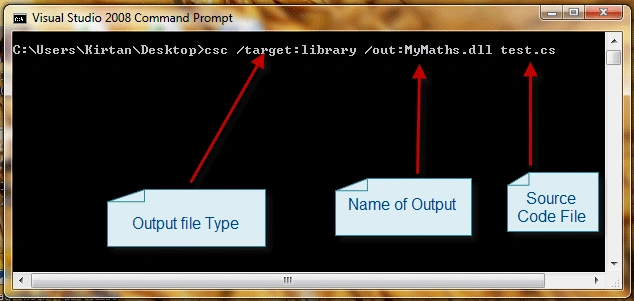
Press Enter and you will get your desired DLL file generated!!
You just have created DLL fFile with Command Line C# Compiler. Now use that dll file in any .net project !!
Now you will raise question how do I compile multiple source file (.cs) files?
Well simple just execute commad like below one pass 2 names of source files in command while compiling it.
csc /target:library /out:MyMaths.dll test.cs test2.cs
Conclusion
This article teaches how to compile dll file in c# using command line C# Compiler of .net.
Compile DLL using Command Line C# Compiler
This article show how to compile dll file in c# using command line C# Compiler of .Net.
Join the conversation! Your thoughts help the community grow.
Sign in to leave a comment
It is the same account you read, post and publish with — and you will come straight back to this page.
Gowtham RajamanickamPosted Apr 26, 2016, 3:12 AM
good article
Mohammad NourPosted Oct 16, 2011, 8:35 PM
Thank you but How can i use this dll (when i make dll with this way) in any C# program?
MonishaPosted May 5, 2010, 10:11 PM
Hi, I have created the dll using commandline and a texteditor. below is the code for my dll using System; using System.Collections; namespace myservice { public class service { public static void Main() { } public ArrayList l_authors() { ArrayList ar = new ArrayList(); ar.Add("xyz"); ar.Add("abc"); return ar; } } } the command used to create the dll is csc /t:library authors.cs. the dll was created successfully, refrence of this dll was added in bin folder of my website. but the problem is when i am trying to use this dll in one of my screens by using statement it is not showing up. Please Help. Thanks, Monisha.