

The basic definition of C#
It enables us to build a secure and robust application.
Derivation of C-sharp language
In C#, the # represents the musical notation, The C# language has a similar syntax as C and C++. It’s a multi-paradigm programming language. It’s also an object-oriented programming language like Java. It has the power to develop software. C# has redefined the programming landscape. It has numerous applications in various fields. The most recent form of the C# language is 7.2 which was released in 2017 along with Visual Studio 2017.
Similarity of C-sharp with other languages
It’s also an object-oriented programming language. It’s derived from C and C++ languages.
C# generates an MSL and Java generates the Java bytecode.
Differences between C# with other languages
Java doesn’t support operator overloading while C# supports operator overloading. C# uses CLR and java uses Java Virtual Machine. Java does not support delegates, while C# uses delegates, which are type-safe method pointers. These are used to implement event-handling.
Application
Software developed in C# language includes: Pinta (a bitmap image drawing and editing program), Visual Studio (which is written in both C# and C++) and Open Dental (Practice management software).
Nowaday’ most developers use the C# language.
Compiling a C# program
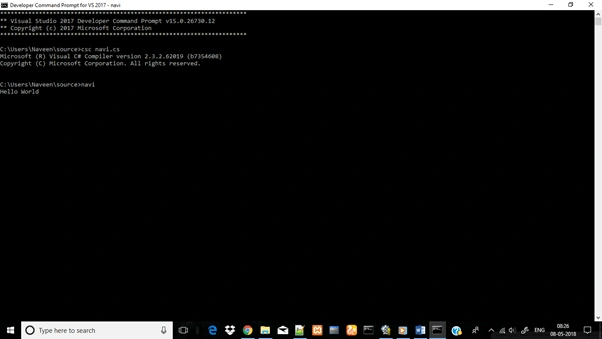
In this article, we will learn how to compile a C# program using command prompt for the below code.
- using System;
- namespace navi {
- Class Program {
- Public static void Main(string[] args) {
- Console.WriteLine("Hello World");
- Console.ReadLine();
- }
- }
- }
Save the file with extension .cs (c-sharp).For example, in this, I save my C# file as navi.cs.
Code explananation
In this file, I will explain my code:
- using System
The first line using used to work with the C# object and implement with I Disposable interface - namespace cs
The namespace is used to provide a "named space" in which your application resides. Without namespace, we cannot use Console. - class Program
A class is a construct which enables us to create our own custom types by grouping together variables of other types, methods, and events. - Console.WriteLine()
It's used to display the output to the user. For displaying the strings we must use that inside the double quotes. - Console.ReadLine()
It's used to get the input from the user.
For Windows 10
- Type Developer Command Prompt in the windows search bar and a console window appears
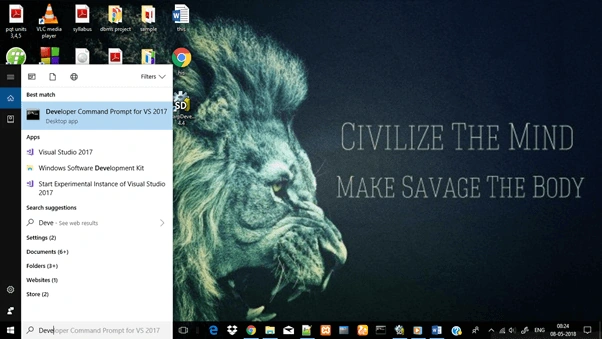
- In the console window navigate to the file location.
- Then simply use the file name for execution.
Viknaraj ManogararajahPosted Jul 21, 2018, 11:02 PM
Nice Article, Thank you for sharing
Tobias KarlssonPosted May 17, 2018, 1:02 AM
There is absolutely no info on how to compile a program in this article at all.
Kartik PawarPosted May 14, 2018, 12:10 PM
Thanks for sharing... It's nice article for beginners...