

Synopsis
- Introduction
- Definition of conditional statement
- Why "if" is as conditional statement
- Use of conditional statement
- Type of conditional statement
- Conclusion
Introduction
Conditional statements are primarily used in programs, their use is frequent. Without conditional statements we cannot check a condition in the program logic. This article explains where and how to use conditional statements in programs. It is the same in all languages, but there is a small difference in syntax.
Definition
Conditional statements execute a statement (or statement block) based on a condition. "If" is a conditional statement in all languages and it is a reserved word. In other words we can't use it for a variable name, function name and others.
Why "if" is a conditional statement
Normally, "if" as a conditional statement. We can say that in the English language "if" means "condition", so we use "if" as a conditional statement in programming languages.
Use of conditional statement
If we need to verify a condition in programs thenwe use a conditional statement. Use a conditional statement for various scenarios. It has two parts, one is for "true" and the other part is for "false". A conditional statement accepts two values, one is "true" and the other "false".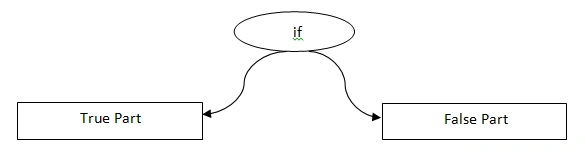
Figure 1: Conditional Statement Parts
Syntax
- if (condition)
- {
- True part statements;
- } else
- {
- False part statements;
- }
You can see the syntax of a conditional statement above. If the condition is true then the work flows directly to the true part otherwise the work flows to the false part. In a conditional statement the false part is optional, if we need the false part then we provide it otherwise we need not write it.
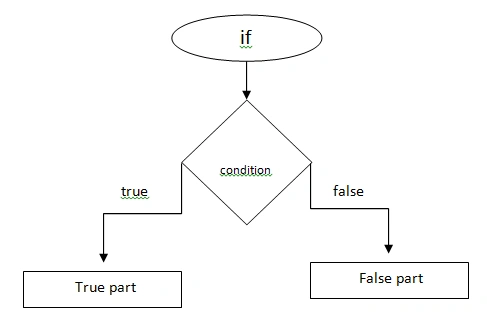
Figure 2: Work flow of conditional statement
Figure 2 shows the workflow of a conditional statement. If the check of the condition returns true the it executes the true part else it executes the false part.
Types of conditional statements
There are various types of conditional statements that we are following here as in the following:
- Simple if
- If else
- Nested if
- Else if later
- Ternary operator
Simple if
If we have only the true part then it is called a simple if. That only executes the true part and if the condition is false then nothing is executed.
Example
Type 1
- static void Main(string[] args)
- {
- int a, b;
- a = 10;
- b = 5;
- if (a > b) //condition true
- Console.WriteLine("A Value Is Greater");
- Console.Read();
- }
A Value Is Greater
Type 2
- static void Main(string[] args)
- {
- int a, b;
- a = 10;
- b = 5;
- if (a < b) // condition false
- Console.WriteLine("A Value Is Greater");
- Console.Read();
- }
If else conditional statement
An if else conditional statement is used in programs often. These conditional statements have two parts. One is the true part and the other is the false part.
Type 3
- static void Main(string[] args)
- {
- int a, b;
- a = 10;
- b = 5;
- if (a > b) // condition true
- Console.WriteLine("A Value Is Greater");
- else Console.WriteLine("B Value Is Greater");
- Console.Read();
- }
A Value Is Greater
In a type 3 the condition is true so it executes the true part else it executes the false part. In a type 4 we can see the false part as an output.
Type 4
- static void Main(string[] args)
- {
- int a, b;
- a = 10;
- b = 5;
- if (a < b) // condition false
- Console.WriteLine("A Value Is Greater");
- else Console.WriteLine("B Value Is Greater");
- Console.Read();
- }
B Value Is Greater
Nested If statement
When one if statement is inside another if statement then that is called a nested if. Each if statement has separate true and false parts.
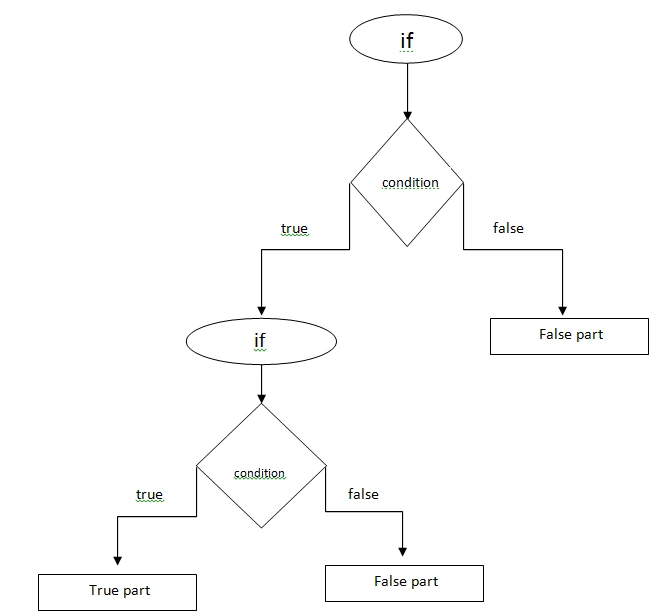
Figure 3: Work flow of nested if statement
Type 5
- static void Main(string[] args)
- {
- int a, b;
- a = 10;
- b = 5;
- if (a < b) // condition false
- Console.WriteLine("A Value Is Greater");
- else Console.WriteLine("B Value Is Greater");
- Console.Read();
- }
A Value Is Greater
The preceding program shows a nested if statement. Assume there is more than one line in the true part or the false part then we should use open parentheses and close otherwise it should make an error. For example:
- if (a > b)
- if (a > c) Console.WriteLine("A Value Is Greater");
- Console.WriteLine("A Value Is :" + a);
- Else // Invalide expression terms ‘else’
- Console.WriteLine("C Value Is Greater");
- else if (b > c)
- Console.WriteLine("B Value Is Greater");
- else
- Console.WriteLine("C Value Is Greater");
- if (a > b) if (a > c)
- {
- Console.WriteLine("A Value Is Greater");
- Console.WriteLine("A Value Is :" + a);
- }
- else Console.WriteLine("C Value Is Greater");
- else if (b > c) Console.WriteLine("B Value Is Greater");
- else Console.WriteLine("C Value Is Greater");
Else if later
Else if later is one of the important types of conditional statements. It has many conditional statements. It checks each condition step-by-step up to when it gets a true value. If once a condition is true then it prints the statement then comes out from the flow.
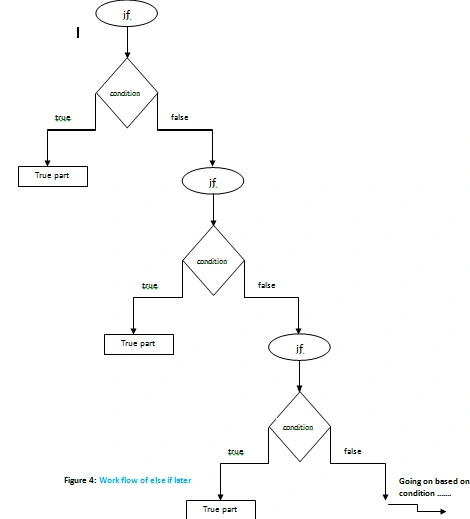
Figure 4: Work flow of else if later
Figure 4 shows the workflow of an else if later. Type 6 is an example for "else if later".
Type 6
- if (a > b) if (a > c)
- {
- Console.WriteLine("A Value Is Greater");
- Console.WriteLine("A Value Is :" + a);
- }
- else Console.WriteLine("C Value Is Greater");
- else if (b > c) Console.WriteLine("B Value Is Greater");
- else Console.WriteLine("C Value Is Greater");
First Greater
Here "Greater" is the value assigned to "O" so it should execute the statement "First Greate" and assuming there is not a matching condition it checks the next if condition, if it still does not match then it directly executes the first condition's else part.
Ternary operator
The Ternary operator is not a type of conditional statement but it is also used to check the conditions. It returns only one value based on conditions. Use the ternary operator to check many values in a single line of coding.
Two operators are used in the ternary operator. One is the question mark (?) and the other is a semicolon (:).
Syntax
Variable = condition? True Part : False Part;
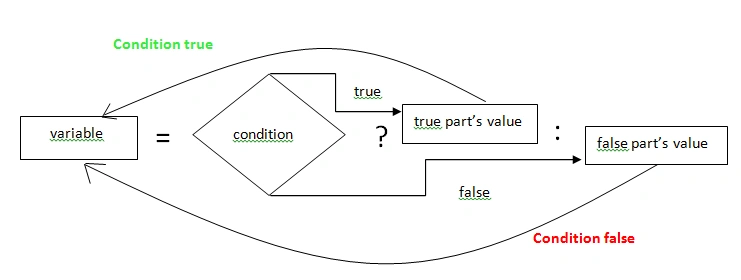
Figure 5: Workflow of the ternary operator
Figure 5 shows the workflow of the ternary operator. The Green color shows the return value of the true part and the Red color shows the return value of the false part. Both returns a true and false value based on the condition.
Type 6
- static void Main(string[] args)
- {
- int a, b, retValue;
- a = 10;
- b = 5;
- retValue = a > b ? a : b;
- Console.WriteLine("Greater Value:" + retValue);
- Console.Read();
- }
Greater Value: 10
Type 7
- static void Main(string[] args)
- {
- int a, b, retValue;
- a = 10;
- b = 5;
- retValue = a > b ? a : b;
- Console.WriteLine("Greater Value:" + retValue);
- Console.Read();
- }
Greater Value: 20
Type 8
- static void Main(string[] args)
- {
- int a, b, c, retValue;
- a = 10;
- b = 20;
- c = 30;
- retValue = a > b ? a > c ? a : c : b > c ? b : c;
- Console.WriteLine("Greater Value:" + retValue);
- Console.Read();
- }
Greater Value: 30
It is possible to create a nested ternary operator. For example, the nested ternary operator shown above for Type 8.
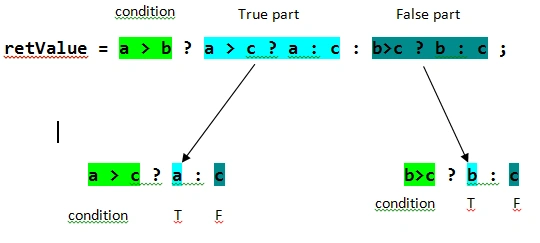
Figure 6 shows a nested ternary operator. In a nested ternary operator, we have more than one condition and more than one true and false part based on conditions.
Conclusion
There are various types of conditional statements available. Each type of conditional statement uses a different scenario. It is the same in all programming languages, but only the syntax is different. Without a conditional statement we cannot complete the program logic that is very important.
Shobana JPosted Jul 13, 2016, 2:58 AM
Great..Nice explanation
Sonu ChaudharyPosted Mar 18, 2016, 3:14 PM
thanks
Vignesh ManiPosted Aug 12, 2015, 8:39 AM
Thank You To All
Vignesh ManiPosted Jul 12, 2015, 1:30 PM
Thank You Sir
Pankaj BajajPosted Jul 12, 2015, 7:56 AM
nice written Vicky
Santhakumar MunuswamyPosted Jul 11, 2015, 3:02 AM
Good article! Thanks for sharing
Pooja BaraskarPosted Jul 10, 2015, 1:08 PM
Well explained.
Dominique CejaPosted Jul 10, 2015, 10:37 AM
Great article
Former memberPosted Jul 10, 2015, 9:50 AM
Good one
Gareth BradleyPosted Jul 10, 2015, 6:39 AM
One of the best articles I have read about conditional statements :)
Vignesh ManiPosted Jul 10, 2015, 5:41 AM
Thank You To all
Vipul MalhotraPosted Jul 10, 2015, 5:22 AM
Nice
Gowtham RajamanickamPosted Jul 10, 2015, 5:04 AM
Good one..
Debasis SahaPosted Jul 10, 2015, 4:56 AM
Good One..
Sibeesh VenuPosted Jul 10, 2015, 4:49 AM
God one.
RakeshPosted Jul 10, 2015, 2:15 AM
Good
Rakesh KalluriPosted Jul 10, 2015, 2:13 AM
Good one..
vinoth kumarPosted Jul 10, 2015, 2:02 AM
Nice one vignesh , its appreciable one. i want SQL queries too
Danny SchneiderPosted Jul 10, 2015, 1:39 AM
Nice introduction, but as already said, you have to figure out the usage of curly braces. In good style you should always all blocks. And if not, you should discuss, that only the first statement belongs to the if or else.
Vignesh ManiPosted Jul 10, 2015, 1:22 AM
Thank you to every one
Rosi Sreenivasa ReddyPosted Jul 10, 2015, 1:15 AM
nice and superb for beginners.nice Explanation in various aspects
Nilesh JadavPosted Jul 10, 2015, 12:07 AM
Nice information sir
Afzaal Ahmad ZeeshanPosted Jul 9, 2015, 11:53 PM
Good start Vignesh, but let me stop you right there and guide you even more. What you have written is good, and legal; in coding. You can right away use a conditional statement, and ignore using curly braces for the statements. But, NEVER DO SO! You should always wrap your statements in between two curly braces, even IF THERE IS ONLY ONE STATEMENT TO EXECUTE. Most of the times, you fall upon such statements, or conditional statements, which require you to terminate the structure. If you don't, chances are that your logic is wrong or at worse you will have memory leak. That is why, it is always preferred to use curly braces to mark the start and end of the statements in a conditional operator; for example if(a > b) { if(b > c) {...} } This would be more readable code. As compared to what you have shared. I know compiler doesn't care, but there are many programmers who don't care and thus have to go through desperation. I hope you never have to go through such a desperation. Please update your article.
Rahul PrajapatPosted Jul 9, 2015, 11:10 PM
nice article sir
Pankaj Kumar ChoudharyPosted Jul 9, 2015, 8:29 PM
Nice Explain Sir..........