

Introduction
In the part II article we demonstrate how to create a custom section in the configuration file using the configuration section. In this part III article we will try to achieve, step by step, the same goal as in the Part II article, but using another tool, namely, the IConfigurationSectionHandler interface. Now, let us resume the situation treated in the previous article, I mean, we assume that there is an information system composed by a number of applications as a part of an enterprise planning resource ERP. The application F, used by the financial department, listens, via a given port, to the application A witch is used by the Account department. We want enable changing listen ports values outside the design time, exactly, when the application is already deployed. I gave solutions in the previous articles to do that using the ConfigurationSection class, but there is another way to achieve the same purpose, and this once, using the IConfigurationSectionHandler interface. It is more difficult than the previous solution because it needs little advanced programming skills. In general, this interface is used to access some sections more than to create them. But in this article I try to use this interface for a different purpose, I mean, I implement it in a new configuration section class in order to create an entire section profiting of its Create ( ) method. Of Course, it remains my strictly personal way to use the IConfigurationSectionHandler, but there are surely other ideas at least better than mine to deal with this interface. Before beginning, I have two suggestions. The first one is that the lector is strongly invited to read the previous articles in order to understand as well as possible the problem treated by this article and the resolution process proposed to deal with. The second one is that the lector has to have a minimum idea about what's the DOM (Document object model) and how to deal with this technology within a C# programming context. Now, let's begin.
Presentation of the IConfigurationSectionHandler Interface
The IConfigurationSectionHandler interface is an interface that handles the access to a certain sections; in addition to that, it is possible to use it in order to create new sections in the application configuration files.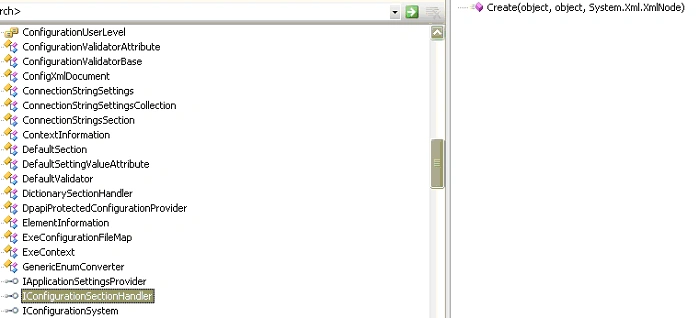
Figure 1
As the figure 1 shows, this interface contains a non implanted method witch is Create ( ), this method is overloaded by three arguments, the first one is supposed to represent the parent witch is the targeted configuration file. The second one is supposed to represent the configuration context object and the third one is intended to represent the section and it has an XmlNode as type. Generally, this method is used in a multithread context, I mean; the method is assumed to be callable from more than one thread simultaneously, but we assume, to do not take in consideration this aspect in order to simplify the situation already complicated. The IConfigurationSectionHandler interface is represented bellow: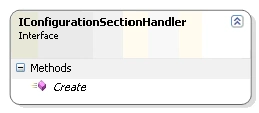
Figure 2
Now, this is the representation of the class that I proposed to create a section in the configuration file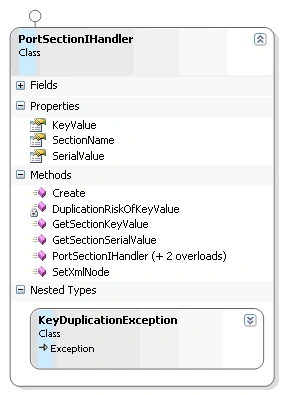
Figure 3
The configuration section class building steps
Now, let us explain the mechanism:
Preliminary steps
- Add a class to your project and name it PortSectionIHandler. Click Ok.
- In the previous article, we included our new configuration section class in the PortsSectionHandler namespace, if this last one doesn't exist then create it and put the PortSectionIHandler into it like the figure bellow:
namespace PortsSectionHandler
{
public class PortSectionIHandler : IConfigurationSectionHandler
{
}
}
We consider, as in the previous article, that a port section has some attributes witch are:
- Key
- Serial
Class members presentation
Properties
Name
Type
Visibility
Description
KeyValue
String
Public
Represents the key value witch is a string, it is used to identify a given port
SerialValue
String
Public
Represents the serial value witch is a number but represented with string format, it is used after its conversion to integer to set the key serial or number
SectionName
String
Public
Represents the section name
Constructors
I propose three constructors for use:
- PortSectionIHandler ( )
This constructor takes not arguments. The properties object can be defined after.
- PortSectionIHandler (string SectionName)
This constructor takes one argument witch is the section name.
- PortSectionIHandler(string KeyValue, string SerialValue, string SectionName)
This constructor takes all the properties object as arguments.
Methods
- SetXmlNode ( )
Because the XmlNode class has not constructor(s) and because we need to use it in the next method bellow as a "section" argument in the configuration files, we need to use this public method to ensure that "section" argument is initialized before any use.
/* The document that will be needed to apply the tools provided by DOM technology */<?xml:namespace prefix = o ns = "urn:schemas-microsoft-com:office:office" />
XmlDataDocument xmlDocument;
/* This method is used to initialise the XmlNode that will be used to create the section*/
public XmlNode SetXmlNode()
{
//Initialise the xmlDocument
xmlDocument = new XmlDataDocument();
//Create an XmlNode and set it as a xmlDocument element
XmlNode Section = xmlDocument.CreateElement(SectionName);
return Section;
}
Of Corse, this method is a function that returns an XmlNode.
- Create (object parent, object configContext, XmlNode section )
This is the principal method, it helps us create a section witch is an XmlNode in the configuration file profiting that the last one has an Xml format and it can be handled with tools provided by the DOM technology. The method is overloaded by three arguments and returns an object just as it is defined by the IConfigurationSectionHandler interface, but in our case we don't need really an object to be returned, because the final purpose here is only create a section in the configuration file. Therefore, I thought at the first time to set the returned object as null because the function must return something, otherwise, an exception will be thrown. But after a little brain storming, I have had an idea; we can create a Boolean witch called SectionCreated witch plays the role of the turned over object by the Create ( ) method, this last one is set as false at the beginning. Once the section is created and saved, it indicates to the developer and the user that a given section has been created successfully.
public object Create(object oParent, object configContext, XmlNode section)
{try
{
/* This boolean is used to indicate whether the section is created or not
* if there are not key duplication the corresponding value is true */
bool SectionCreated = false;
/* This variable represent the configuration file*/
configContext = new ExeConfigurationFileMap();
//Setting its path
(configContext as ExeConfigurationFileMap).ExeConfigFilename = Application.StartupPath + "\\" + Application.ProductName + ".exe.config";
// This oParent variable represents the configuration
oParent = ConfigurationManager.OpenMappedExeConfiguration((configContext as ExeConfigurationFileMap), ConfigurationUserLevel.None);
//Load the configuration file into the xmlDocument
xmlDocument.Load((oParent as Configuration).FilePath);
//Select the Root node using the SelectSingleNode DOM method
XmlNode Root = xmlDocument.SelectSingleNode("/configuration");
//Create the node element with the name given by the user
section = xmlDocument.CreateElement(SectionName);
//Add the 'section' node to Root nodes childs
Root.AppendChild(section);
//Create the key attribute for 'section' node
XmlNode Key = xmlDocument.CreateNode(XmlNodeType.Attribute, "key", "");
//Set its value as KeyValue
Key.Value = KeyValue;
//Create the 'serial' attribute for 'section' node
XmlNode serial = xmlDocument.CreateNode(XmlNodeType.Attribute, "serial", "");
//Set its value as SerialValue
serial.Value = SerialValue;
//Add the both attributes to section XmlNode
section.Attributes.SetNamedItem(Key);
section.Attributes.SetNamedItem(serial);
/* This condition is needed to avoid key value duplication*/
if (SectionSaved == true)
{
xmlDocument.Save((oParent as Configuration).FilePath);
SectionCreated = true;
}
/* If all is OK the bolean variable is true, it can indicate to the user that a given section has been added successfuly*/
return SectionCreated;
}
#region Create Exceptions
catch (NotSupportedException caught)
{
MessageBox.Show(caught.Message, caught.Message, MessageBoxButtons.OK, MessageBoxIcon.Information);
return null;
}
catch (ConfigurationErrorsException caught)
{
MessageBox.Show(caught.Message, caught.Message, MessageBoxButtons.OK, MessageBoxIcon.Information);
return null;
}
catch (XmlException caught)
{
MessageBox.Show(caught.Message, caught.Message, MessageBoxButtons.OK, MessageBoxIcon.Information);
return null;
}
catch (InvalidOperationException caught)
{
MessageBox.Show(caught.Message, caught.Message, MessageBoxButtons.OK, MessageBoxIcon.Information);
return null;
}
catch (ArgumentException caught)
{
MessageBox.Show(caught.Message, caught.Message, MessageBoxButtons.OK, MessageBoxIcon.Information);
return null;
#endregion
}
- DuplicationRiskOfKeyValue (string TestKeyValue, string SectionName)
I proposed this void method for one reason is that if a user enters the same value key more than once by carelessness, this can affect negatively the application performance and can cause troubles, therefore, the method mission is to avoid such situation and indicate to the user that the given key value is already been set by throwing a KeyDuplicationException that I derived from the Exception class especially for handling such situation. The method takes two arguments. The first one indicates the tested key value and the second one indicates the name of the targeted section. Of Corse, this method is void and private because the purpose here is that the situation will be handled by the object in the background.
private void DuplicationRiskOfKeyValue(string TestKeyValue, string SectionName)
{try
{
//This Boolean indicates whether a duplication was happened or not
bool KeyDuplication = false;
//This is the configuration path
string Path = Application.StartupPath + "\\" + Application.ProductName + ".exe.config";
//This is an XmlDataDocument in witch the configuration file is loaded
XmlDataDocument xmlDoc = new XmlDataDocument();
xmlDoc.Load(Path);
//The node list helps us select all created section nodes before
XmlNodeList oNodeList = xmlDoc.SelectNodes("/configuration/" + SectionName);
//This xml node is the key attribute of the section node
XmlNode oKey;
/* This loop help us compare each previous key value section node created before with one that will just been created. If there is values equality then the KeyDuplication Boolean will be set to true and then and exception will be thrown to indicate that a key duplication case has occured*/
foreach (XmlNode node in oNodeList)
{
oKey = xmlDoc.CreateNode(XmlNodeType.Attribute, "key", "");
node.Attributes.GetNamedItem(oKey.Name);
if (node.Attributes.GetNamedItem(oKey.Name).Value == TestKeyValue)
{
KeyDuplication = true;
}
}
// Throw the KeyDuplicationException
if (KeyDuplication == true) throw new KeyDuplicationException();
}
catch (InvalidOperationException caught) { }
catch (ArgumentException caught) { }
}
- GetSectionKeyValue ( string SectionName)
This is a public function that I proposed instead of the GetSection ( ) of the Configuration class, except that the first one doesn't return a section but the key value of the section as a string. I suggested that the function must be static for two reasons. The first one is that the method doesn't depend on the instantiated objects; the second one is that the static methods are better than the dynamic methods in terms of performance.
public static string GetSectionKeyValue(string SectionName)
{
try
{
//The path of the configuration file
string Path = Application.StartupPath + "\\" + Application.ProductName + ".exe.config";
//The xmlDocument in witch the configuration file will be loaded
XmlDataDocument xmlDoc = new XmlDataDocument();
xmlDoc.Load(Path);
//The targeted node
XmlNode oNode = xmlDoc.SelectSingleNode("/configuration/" + SectionName);
//The key attribute
XmlNode oKey = xmlDoc.CreateNode(XmlNodeType.Attribute, "key", "");
oNode.Attributes.GetNamedItem(oKey.Name);
//The key value of the targeted node returned as string
return oNode.Attributes.GetNamedItem(oKey.Name).Value;
}
#region Create Exceptions
catch (NotSupportedException caught)
{
MessageBox.Show(caught.Message, caught.Message, MessageBoxButtons.OK, MessageBoxIcon.Information);
return null;
}
catch (ConfigurationErrorsException caught)
{
MessageBox.Show(caught.Message, caught.Message, MessageBoxButtons.OK, MessageBoxIcon.Information);
return null;
}
catch (XmlException caught)
{
MessageBox.Show(caught.Message, caught.Message, MessageBoxButtons.OK, MessageBoxIcon.Information);
return null;
}
catch (InvalidOperationException caught)
{
MessageBox.Show(caught.Message, caught.Message, MessageBoxButtons.OK, MessageBoxIcon.Information);
return null;
}
catch (ArgumentException caught)
{
MessageBox.Show(caught.Message, caught.Message, MessageBoxButtons.OK, MessageBoxIcon.Information);
return null;
}
#endregion
}
- GetSectionSerialValue (string SectionName)
This public function helps us get the serial value of a targeted section. It returned the serial value as string object. And I have defined this function as static for the same suggestions as the previous one.
public static string GetSectionSerialValue(string SectionName)
{
try
{
//The path of the configuration file
string Path = Application.StartupPath + "\\" + Application.ProductName + ".exe.config";
//The xmlDocument in witch the configuration file will be loaded
XmlDataDocument xmlDoc = new XmlDataDocument();
xmlDoc.Load(Path);
//The targeted node
XmlNode oNode = xmlDoc.SelectSingleNode("/configuration/" + SectionName);
//The key attribute
XmlNode oKey = xmlDoc.CreateNode(XmlNodeType.Attribute, "Serial", "");
oNode.Attributes.GetNamedItem(oKey.Name);
//The key value of the targeted node returned as string
return oNode.Attributes.GetNamedItem(oKey.Name).Value;
}
#region GetSectionKeyValue Exceptions
catch (NotSupportedException caught)
{
MessageBox.Show(caught.Message, caught.Message, MessageBoxButtons.OK, MessageBoxIcon.Information);
return null;
}
catch (System.Xml.XPath.XPathException caught)
{
MessageBox.Show(caught.Message, caught.Message, MessageBoxButtons.OK, MessageBoxIcon.Information);
return null;
}
catch (ArgumentException caught)
{
MessageBox.Show(caught.Message, caught.Message, MessageBoxButtons.OK, MessageBoxIcon.Information);
return null;
}
catch (NullReferenceException caught)
{
MessageBox.Show(caught.Message, caught.Message, MessageBoxButtons.OK, MessageBoxIcon.Information);
return null;
}
#endregion
}
Exception
The KeyDuplicationException is especially derived from the Exception class to help avoid the situation when a key value is duplicated.
To use this class add, implement and call this followed method from your code:
private static void AddNewSection()
{
// Create a new PortSectionIHandler object
PortSectionIHandler CreateSection = new PortSectionIHandler("port", "key8", "9200");
// Create parent object witch is a configuration object in this context
object Parent = new object();
// Create configContext object witch indicates the targeted configuration file
object configContext = new object();
// Create the XmlNode witch indicates the section
section = CreateSection.SetXmlNode();
// Apply the Create () method provided by the IConfigurationSectionHandler interface
bool Created = (Boolean)CreateSection.Create(Parent, configContext, section);
// Profiting of the returned object to indicates that section has been created
if (Created == true) MessageBox.Show("The section has been created successfuly");
}
Join the conversation! Your thoughts help the community grow.