

As you all know a data reader is the most efficient way for looping through the data. Performance wise a data reader is faster than any of the other way like data adapter and cell set in MDX result. So in few situations you may need to convert this data reader to a data table. Here in this post we will discuss how we can convert it. I hope you will like it.
Background
For the past few months, I have been working with Microsoft ADOMD data sources. And I have written some articles also that will describe the problems I have encountered so far. If you are new to ADOMD I strongly recommend to read my previous articles that you may find useful when you work with ADOMD data sources. You can find those article links here.
Why
You might think, why I am not using other two ways (data adapter and cell set). I will answer it here. I am handling large set of data, so when I use data adapter and cell set it was a bit slow to get the output. So, I was just checking the performance using data reader. It was fast enough when I use data reader. So we can order these three as in the following by performance.
Data reader >> Data Adapter >> Cell Set
Using the code
The following is the function that does what was explained above:
- #region Convert Datareader toDatatable
- /// <summary>
- /// Convert Datareader toDatatable
- /// </summary>
- /// <param name="query"></param>
- /// <param name="myConnection"></param>
- public DataTable ConvertDataReaderToDataTable(string query, string myConnection)
- {
- AdomdConnection conn = new AdomdConnection(myConnection);
- try
- {
- try
- {
- conn.Open();
- }
- catch (Exception)
- {}
- using(AdomdCommand cmd = new AdomdCommand(query, conn))
- {
- AdomdDataReader rdr;
- cmd.CommandTimeout = connectionTimeout;
- using(AdomdDataAdapter ad = new AdomdDataAdapter(cmd))
- {
- DataTable dtData = new DataTable("Data");
- DataTable dtSchema = new DataTable("Schema");
- rdr = cmd.ExecuteReader();
- if (rdr != null)
- {
- dtSchema = rdr.GetSchemaTable();
- foreach(DataRow schemarow in dtSchema.Rows)
- {
- dtData.Columns.Add(schemarow.ItemArray[0].ToString(), System.Type.GetType(schemarow.ItemArray[5].ToString()));
- }
- while (rdr.Read())
- {
- object[] ColArray = new object[rdr.FieldCount];
- for (int i = 0; i < rdr.FieldCount; i++)
- {
- if (rdr[i] != null) ColArray[i] = rdr[i];
- }
- dtData.LoadDataRow(ColArray, true);
- }
- rdr.Close();
- }
- return dtData;
- }
- }
- }
- catch (Exception)
- {
- throw;
- }
- finally
- {
- conn.Close(false);
- }
- }
- #endregion;
Creating data tables:
- DataTable dtData = new DataTable("Data");
- DataTable dtSchema = new DataTable("Schema");
Now we will execute the reader as in the following:
- rdr = cmd.ExecuteReader();
To generate the schema, we can call the function GetSchemaTable() which is a part of your data reader.
To use this function, you must include Microsoft.AnalysisServices.AdomdClient.dll.
Adding the columns headers to the dtData
The next thing is to add the header names to the data table dtData.
- foreach(DataRow schemarow in dtSchema.Rows)
- {
- dtData.Columns.Add(schemarow.ItemArray[0].ToString(), System.Type.GetType(schemarow.ItemArray[5].ToString()));
- }
To load the data, we are using a function LoadDataRow() that expects an object as parameter. This will find and update a specific row, if the matching row is not found, it will create another row with the given values.
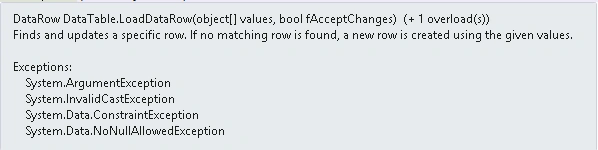
Convert data reader to data table
- object[] ColArray = new object[rdr.FieldCount];
- for (int i = 0; i < rdr.FieldCount; i++)
- {
- if (rdr[i] != null) ColArray[i] = rdr[i];
- }
- dtData.LoadDataRow(ColArray, true);
Conclusion
Have you ever gone through this kind of requirement. Did I miss anything that you may think which is needed?. I hope you liked this article. Please share me your valuable suggestions and feedback.
Your turn. What do you think?
A blog isn’t a blog without comments, but do try to stay on topic. If you have a question unrelated to this post, you’re better off posting it on C-Sharp Corner, Stack Overflow, ASP.NET Forums or Code Project instead of commenting here. Tweet or email me a link to your question there and I’ll definitely try to help if I am able to.
Please see this article in my blog here.
Arul RPosted Jan 17, 2016, 11:03 AM
Thanks for nice article
Sibeesh VenuPosted Dec 1, 2015, 3:44 AM
Banketeshvar Narayan Welcome :) Glad you are able to tag now :)
Banketeshvar NarayanPosted Dec 1, 2015, 3:43 AM
"Sibeesh Venu" Thanks...
Sibeesh VenuPosted Dec 1, 2015, 2:09 AM
Ankur Mistry Thank you
Sibeesh VenuPosted Dec 1, 2015, 2:09 AM
Santhakumar Munuswamy Thank you
Sibeesh VenuPosted Dec 1, 2015, 2:08 AM
Banketeshvar Narayan Thank you. To tag, you must type '@' then the name of the person you need to tag. NB: You and that person must be friends.
Ankur MistryPosted Dec 1, 2015, 1:32 AM
Nice Explanation
Santhakumar MunuswamyPosted Nov 20, 2015, 9:17 AM
Good One
Banketeshvar NarayanPosted Nov 18, 2015, 11:08 AM
Nice Article.. Thanks for Sharing.. Sibeesh Venu I have a query. How do you tag a user in this comment box? I am not able to do that. Could you please help me?
Sibeesh VenuPosted Nov 18, 2015, 8:19 AM
Shridhar Sharma Thank you
Sridhar SharmaPosted Nov 18, 2015, 8:15 AM
Nice one
Sibeesh VenuPosted Nov 18, 2015, 7:31 AM
Raja T Thank you
Raja TPosted Nov 18, 2015, 7:31 AM
Nice , Thanks for sharing
Sibeesh VenuPosted Nov 18, 2015, 7:26 AM
Harshad Pansuriya Thank you
Harshad PansuriyaPosted Nov 18, 2015, 7:25 AM
Nice one
Sibeesh VenuPosted Nov 18, 2015, 5:52 AM
Rajeesh Menoth Thanks a lot
Rajeesh MenothPosted Nov 18, 2015, 5:41 AM
Good One! Congrats for 1 Million Readers Club!!