

Introduction
MonoDevelop is a standalone Integrated Development environment from the Mono Project. Which allow cross platform development on Mono. It is Integrated Development Environment for .NET support languages. Using MonoDevelop one can write desktop application and ASP.NET application on Linux, Windows, and Macintosh operating system. Using MonoDevelopone can easily port .NET applications created with visual studio to Linux.
Feature of MonoDevelop
- Multi-platform
: MonoDevelop is multi platform that supports Linux, Windows and Mac
OSX.
- Advanced Text Editing :
MonoDevelop is
advance text editor i.e. code templates, code folding.
- Configurable workbench
: Using
MonoDevelop one can fully customizable window layouts, user defined key
bindings, external tools.
- Multiple language
support : MonoDevelop is multi language support like as C#, Visual Basic. Net,
C/C++, Vala.
- Integrated Debugger :
MonoDevelop is
integrated debugger.
- GTK# Visual Designer :
Using
MonoDevelop one can easily build GTK# applications.
- ASP.NET : Using MonoDevelop one can create web projects with full code completion support and test on XSP, the Mono web server.
Create Simple Console application In Mono develop step by step
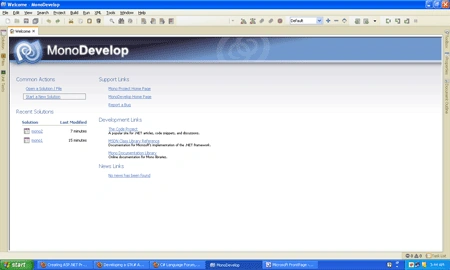
Step 1: First of all open the mono develop and click start new solution
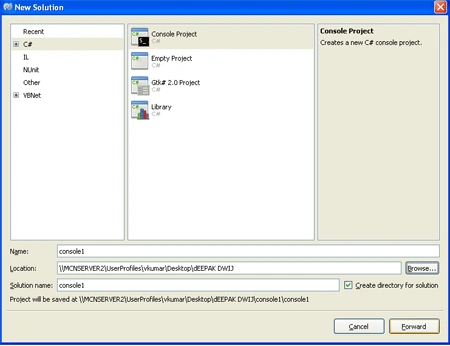
Step 2 : Choose C# language->Console Project->write solution name->give location->Forward
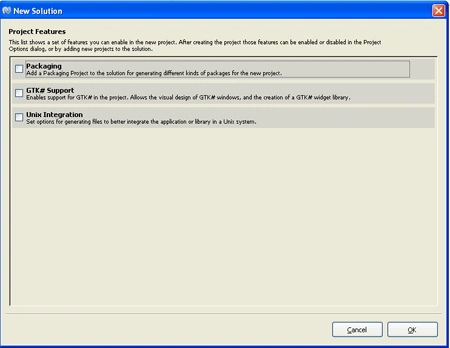
Step 3 : Then open a new solution window and choose the project feature then ok. There are three feature, which are as follows.
- Packaging : If we choose the packaging ,it means
add a packaging project to the solution for generating different kinds of
package for the new project.
- GTK# : If we choose GTK#, it means enable
support for GTK# in the project. Allow the visual design of GTK# windows and
the creation of a gtk# widget library.
- Unix Integration : If we choose Unix Integration, It means set option for generating files to better integrate the application or library in the Unix system.
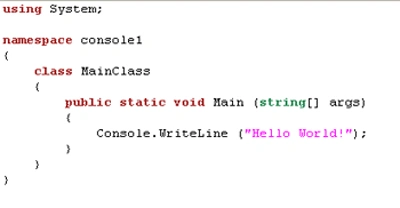
Step 4 : Now we write code on the .cs page
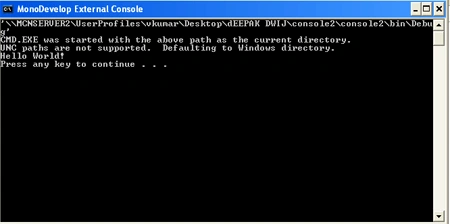
Step 5 : Run application (press Ctrl+F5)
Ashutosh PandeyPosted Dec 3, 2018, 10:45 PM
How , to run this application on linux