

I plan to cover the creation of sub-sites in SharePoint 2013 using the Rest API, AngularJS and jQuery in a 3-part series of articles.
- Create Web site using SharePoint 2013 REST API and AngularJS.
- Implement AngularJS validation to the website creation form.
- Convert this application to an app using NAPA in office 365.
To learn more about AngularJS, visit their site at https://angularjs.org/
Now we can jump to the first part of the series. Create a web site using the SharePoint REST API and AngularJS.
I have done some basic combination of both HTML and CSS stuff to do the following UI for a web site creation form.
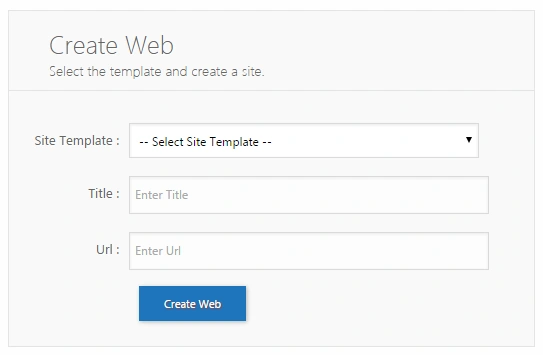
Here, the scenario is as follows:
- Populate the Web Templates for the site in a drop down box.
- Based on the site template selection and user entries, create a site.
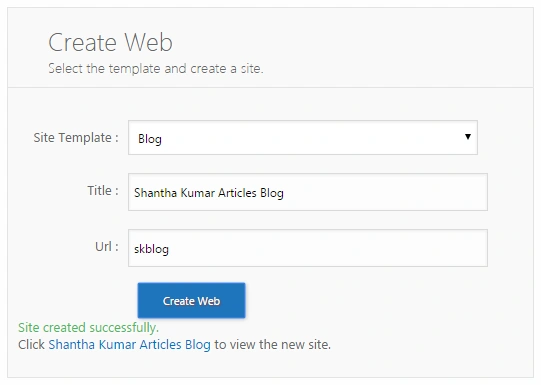
- After site creation, show the success message and newly created Site URL.
JavaScript Snippet
- $http(
- {
- method: "GET",
- url: "https://sharepointsite/_api/web/GetAvailableWebTemplates(1033)?$filter=(isHidden%20eq%20false)",
- headers:
- {
- "Accept": "application/json;odata=verbose"
- }
- }).success(function(data, status, headers, config)
- {
- $scope.wts = data.d.results;
- }).error(function(data, status, headers, config) {});
- //Method to split the string based on the character '#'
- $scope.mySplit = function(string, nb)
- {
- $scope.array = string.split('#');
- return $scope.result = $scope.array[nb];
- }
- The REST API URL returns only the visible site templates as a result
- The successful response stores the result (collection of site templates) in an Anugular js scope variable “wts”
- <select id="web-template" ng-model="_webTemplate" >
- <option selected="selected" value="">-- Select Site Template --</option>
- <option id="{{mySplit(_wt.Name,0)}}" ng-repeat="_wt in wts | orderBy:'Title'">{{_wt.Title}}</option>
- </select>
- Option tag has an ng-repeat attribute. This tells the AngularJS to create an option element for each (web template) _wt in the array (web template collection) _wts using the option as template.
- orderBY: "Title" tells the Angular to order the array based on the Web Template Title.
- _wt.Name returns the Web Template Name in the format STS#0. So we have used the custom method to split the string variable and store the first array from the value.
- _wt.Title was the title of the Web Template.
HTML Snippet
- <label>
- <span>Title :</span>
- <input type="text" ng-model="_webTitle" placeholder="Enter Title"/>
- </label>
- <label>
- <span>Url :</span>
- <input type="text" ng-model="_webUrl" placeholder="Enter Url"/>
- </label>
- <label>
- <span> </span>
- <input type="button" ng-click="createweb()" class="button" value="Create Web"/>
- </label>
- <label ng-bind-html="_message" ></label>
- $scope.createweb = function()
- {
- $scope._message = $sce.trustAsHtml("<img src='/_layouts/images/loadingcirclests16.gif'/>");
- var selectedOption = $("#web-template option:selected");
- var selectedTemplate = selectedOption.attr('id');
- $http({
- method: "POST",
- url: "https://sharepointsite/_api/web/webs/add",
- data:
- {
- 'parameters':
- {
- '__metadata':
- {
- 'type': 'SP.WebCreationInformation'
- },
- 'Title': $scope._webTitle,
- 'Url': $scope._webUrl,
- 'WebTemplate': selectedTemplate,
- 'UseSamePermissionsAsParentSite': true
- }
- },
- headers:
- {
- "Accept": "application/json;odata=verbose",
- "content-type": "application/json;odata=verbose",
- "X-RequestDigest": $('#__REQUESTDIGEST').val(),
- }
- }).success(function(data, status, headers, config)
- {
- $scope._message = $sce.trustAsHtml("<div class='success'>Site created successfully. </div> Click <a href='" + data.d.Url + "'>" + data.d.Title + "</a> to view the created site.");
- }).error(function(data, status, headers, config)
- {
- $scope._message = "<div class='error'>Problem in creating site.</div>";
- });
- }
The $sce.trustAsHtml Angular method transforms the HTML content and binds it to the element that has the attribute ng-bind-html="<variable name>". We need to pass the $sce as a parameter in the controller function during the initialize.
The $scope._webTitle variable get the values from the Title TextBox.
The $scope._webUrl variable has the URL value from the URL TextBox.
We used jQuery to retrieve the selected Web Template option to pass that in the REST API to create a site. I have 3 simple files, for scripting is “createweb.js”, for presenting is “createweb.html” and for styling is “createweb.css”. Download the source code and upload the files to any Document Library and map the HTML file to the Content Editor / Script Editor to have a working form.
Dinesh GabhanePosted Nov 18, 2019, 3:55 AM
Nice One. Thanks for Sharing
Hans Kristian KristoffersenPosted Sep 26, 2016, 7:43 AM
It seems to work great when logged in as Site Collection owner, or SP Install account. But for a normal user it hangs, and keeps asking for Windows Credentials. Where to look for the source of error?
Vinodh NarayananPosted Sep 1, 2016, 11:30 AM
Good one
Akash NaginaPosted May 29, 2015, 10:51 AM
Good one
Shantha Kumar TPosted Apr 3, 2015, 6:50 AM
Thanks to all
Karthik Muthu KaruppanPosted Mar 27, 2015, 11:53 AM
nice
Santhakumar MunuswamyPosted Mar 27, 2015, 8:12 AM
Thanks for nice article
Vijay SPosted Mar 27, 2015, 2:28 AM
Nice article ..
Tom MohanPosted Mar 26, 2015, 11:05 PM
good part1
Gowtham RajamanickamPosted Mar 26, 2015, 10:11 PM
great work...we can learn ANgular js and Sharepoint in same place..