

This article is the second part of the series of "Creating Accounting Application swith C#". If you have not read the first part, please have a look at it before continuing.
In the previous article, we discussed some fundamental accounting principles and about downloading and installing Visual Studio in the system. In this article, finally, we are starting the development.
Topics covered in this article
- Multiple Document Interface (MDI)
- MenuStrip
- ToolStrip
- ToolTip
- StatusStrip
- ContextMenuStrip
Multiple Document Interface
A Multiple Document Interface (MDI) is a graphical user interface in which multiple windows reside under a single parent window. An example of MDI is given below.
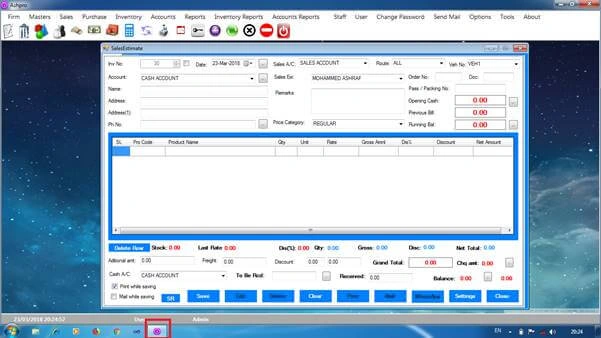
While in the case of single document interface (SDI) where all windows are independent of each other, we get the SDI as given below.
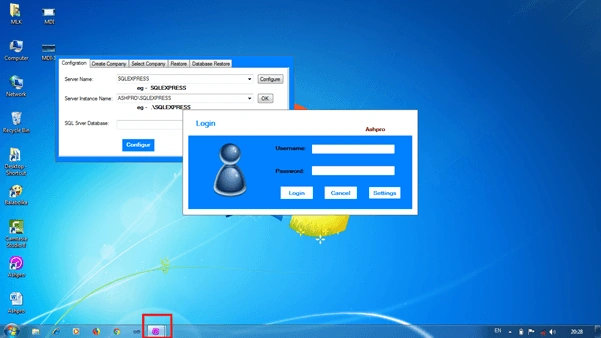
In our project, the main window is the MDI Parent and most of the windows are MDI children. And we will also use SDI.
By default, a new window is in SDI format. For changing it to MDI, we need to modify the Form property isMdiContainer to True.
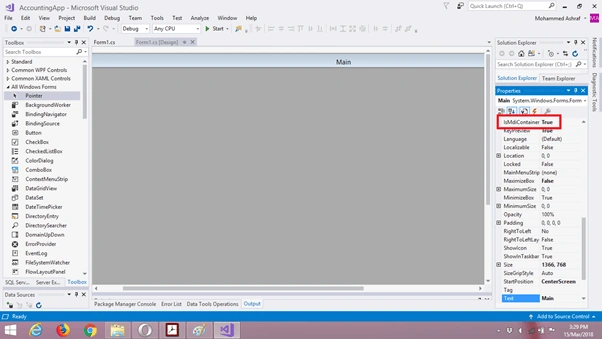
By adding the following code in Form Load event, you can change the form to MDI Container while running the application.
- private void Form1_Load(object sender, EventArgs e) {
- //For changing the form to MDI Container.
- this.IsMdiContainer = true;
- }
Menu Strip
You can drag and drop the MenuStrip control from ToolBox.
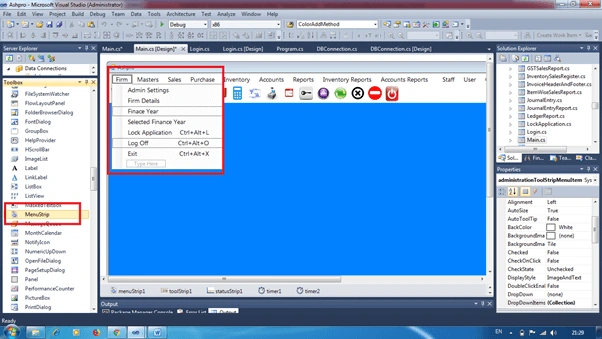
What is MenuStrip and for what purpose are we using this control? In Windows Form applications, MenuStrip is used as the navigation menu. To open other forms (like Sales Invoice and Sales Return Invoice), we useMenuStrip. To know more about MenuStrip, please click on the link
Add the following items to the MenuStrip.
| Company | Masters | Sales | Purchase | Inventory | Accounts |
| Admin Settings | Accounts Group | Sales Invoice | Purchase Invoice | Packing | Payment |
| Company Details | Account Creation | Sales Estimate | Purchase Return | Stock Adjust | Receipt |
| Financial Year | Product Group | Sales Return | Purchase Order | Damage Entry | Bank Deposit |
| Selected FY | Product Creation | Sales Order | Bill Print | Stock Transfer | Bank Withdrawal |
| Lock Application | Brand | Sales Quotation | Product Editing | Journal Entry | |
| Log Off | Unit | Sales View | Combination | Opening Balance | |
| Exit | Godown | Bill Print | Barcode Design | Debit Note | |
| Shelf | Credit Note | ||||
| Price Category | Bank Reconciliation | ||||
| Tax Category | Post Dated Check Receivable | ||||
| Route | Post Dated Check Payable | ||||
| Vehicle | |||||
| Employee Details |
| Report | Inventory Report | Accounts Report | Tools | Help |
| Sales Report | Stock Report | Accounts Ledger | Create User | About |
| Sales Return Report | Damage Stock Report | Cash Book | Change Password | Application Settings |
| Purchase Report | Expiry Stock Report | Day Book | User Privilege | Video Tutorial |
| Purchase Return Report | Godown Stock Report | Payment Register | Calculator | User Manual |
| Sales Order Report | Unsold Product Report | Receipt Register | Mail Settings | Contact Us |
| Sales Quotation Report | Product Flow Report | Journal Register | Remainder | Report Bugs |
| Sales Estimate Report | Product wise Sales Report | Trail Balance | Calendar | Activation |
| Purchase Order Report | Product wise Purchase Report | Trading Profit and Loss Account | Send Mail | |
| Party List | Inventory Sales Register | Balance Sheet | Print Designer | |
| Price List | Inventory Sales Return Register | GST Sales Report | Change Database | |
| Account Payable And Receivable | Inventory Purchase Register | GST Purchase Report | Database Backup | |
| Transaction Report | Inventory Purchase Return Register | GST-R1 Report | Day Close |
ToolStrip
Like MenuStrip, we want to use ToolStrip control in the main form of the application. You can drag and drop the same from ToolBox.
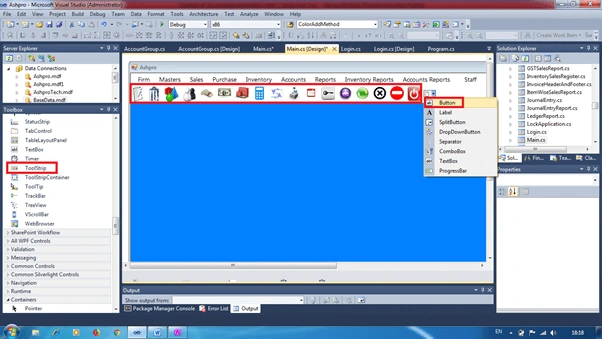
Please change RenderMode property of ToolStrip control System, unless the ToolStrip button gets hidden when the mouse is over it. Add seven ToolStripButtons. Details are below:
- Sales
- Purchase
- Payment
- Receipt
- Ledger
- Product
- Stock Report
- Calculator
- Date Change
- Send Mail
- Bill Print
- Lock Application
- Refresh
- About
- Log Off
- Minimize
- Exit
You can change the background image of the button as shown in the picture by downloading it from the internet. To know more about ToolStrip control, please click the link.
ToolTip Control
After adding seventeen buttons to theToolStrip menu, we have to add tooltip text to every button.
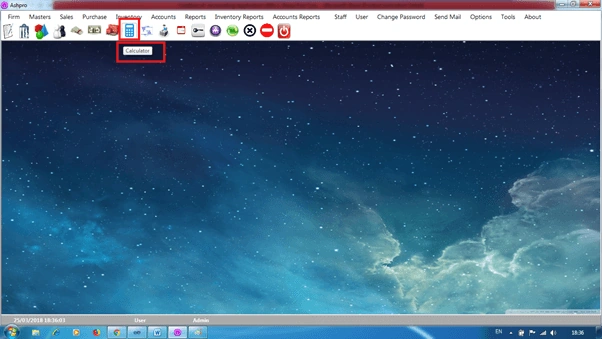
In the picture, you can see the tooltip text given to the Calculator button. Now, let us see how we can apply this.
After dragging and dropping the tooltip control from the toolbox to the form, we have to change the tooltip text.
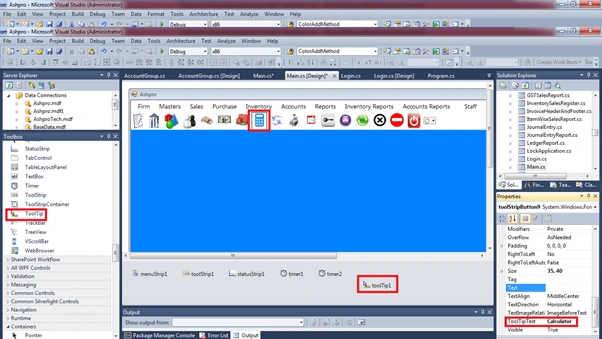
If you want to know more about this, please click the link.
StatusStrip
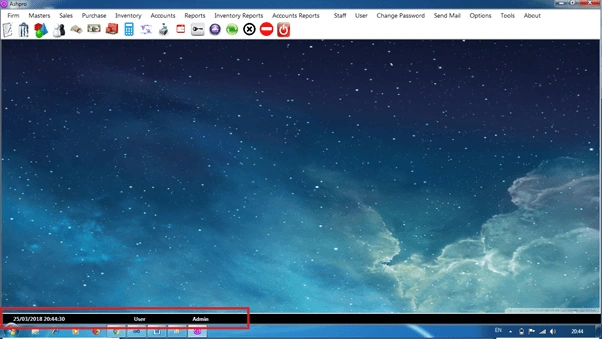
After adding MenuStrip and ToolStrip, we have to add StatusStrip to our main form to show current date and time and logged in user. We can drag and drop the control from Tool Box.
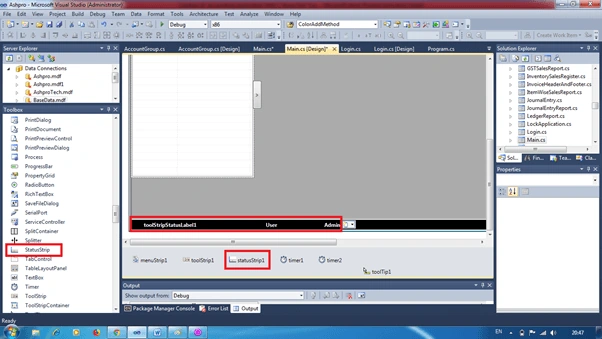
To know more about StatusStrip, you can click the link
ContextMenuStrip
And also, we want to add ContextMenuStrip by dragging and dropping from Tool Box to the form.
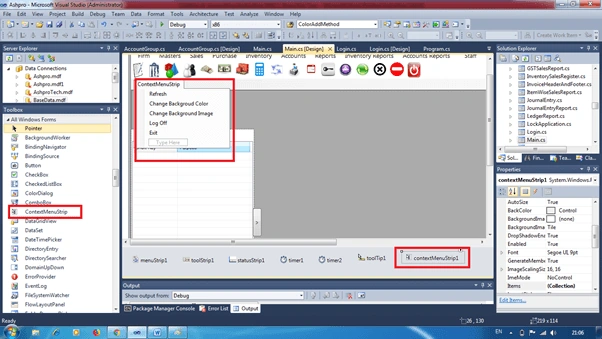
Add five items to it
- Refresh
- Change Background Color
- Change Background Image
- Log Off
- Exit
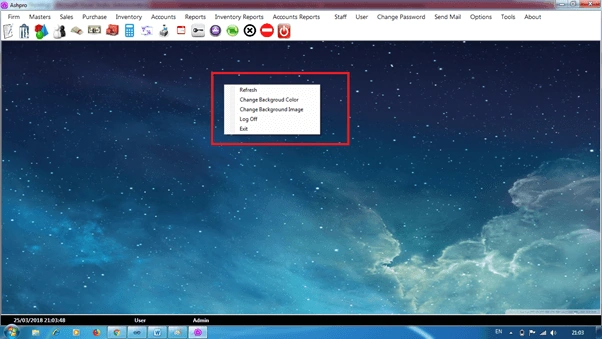
After adding the contextmenustrip to the form, please change the contextmenustrip property to the newly added one. Otherwise, this control may not work. If you want to know more about ContextMenuStrip, please click the link
Conclusion
I am not an expert in programming as well as accounting, however, I have some experience in the operation and creation of accounting software. In this series, I am trying to convey some of my knowledge to you. If you find any mistake or have any suggestions, please feel free to share the same in the comment box.
Abuzar AhmadPosted Oct 15, 2024, 1:03 PM
Sir plz upload part five link
vijay sethPosted Jan 18, 2023, 7:38 AM
Please share the source code, [email protected]
diwakar sharmaPosted Nov 4, 2022, 3:44 AM
Nice article. Can you pls share the source code. [email protected]
Channu BhusanagePosted Mar 30, 2022, 12:21 PM
Sir can you share me the source code: [email protected]
cbusca MundoPosted Mar 26, 2022, 1:02 AM
Hey sir, can u share with me the source code: [email protected]
shahid waniPosted Jun 16, 2021, 4:12 AM
Thankyou for sharing, i am also creating a project same like this, but i dont have full knowledge of accounting at this time i am missing lot of things in this. can you please share this source code and db structure of this project at [email protected]. it will help me a lot. thankyou in advance
safari mupePosted May 10, 2021, 8:49 AM
Hey sir, can u share with me the source code: [email protected]
hrizi mohamedPosted Mar 25, 2021, 12:50 PM
Thank you very much. Can you please send source code to [email protected]
Abderrahim hamzaouiPosted Feb 5, 2021, 1:31 AM
Can you please send source code to [email protected]
Anas MuhammadPosted Feb 1, 2021, 12:17 PM
Please send source code to [email protected]
Jim NemtsPosted Jan 21, 2021, 11:44 AM
I would really appreciate if you could share a source code with me at [email protected]. It will be good starting point for my thesis.
Arun RajPosted Jan 11, 2021, 7:16 AM
Can you please send source code to [email protected]
Arun RajPosted Jan 11, 2021, 7:15 AM
Can you please send me the source code?
Erdal CoraPosted Dec 24, 2020, 1:36 PM
Could you please soruce code to [email protected]
Wayne HollierPosted Dec 14, 2020, 2:23 AM
Could you please send a demo to [email protected]
Irfan ShaikhPosted Dec 11, 2020, 2:59 AM
Please send code on [email protected]
shiv sadakwalaPosted Nov 18, 2020, 10:57 PM
Please demo send
shiv sadakwalaPosted Nov 18, 2020, 10:33 PM
Please Send Code [email protected]
Qazi MubinPosted Nov 1, 2020, 1:57 PM
Kindly send the code on [email protected]
Qazi MubinPosted Nov 1, 2020, 1:56 PM
Kindly send the on
Saddam AliPosted Sep 21, 2020, 6:39 PM
Can you send me the code on [email protected]
vijay sethPosted Apr 7, 2020, 2:02 AM
Thank you for the nice article, can you send me the code at [email protected]
ahmed mustafaPosted Mar 24, 2020, 6:04 PM
Thank you for the topic , can you send me the code at [email protected]
Dhanashri BhamarePosted Dec 8, 2019, 3:27 AM
Thank you for the topic , can you send me the code at [email protected]
Faizal HussainPosted Nov 26, 2019, 8:19 AM
Hi bro, can you send me the code on [email protected]
jignesh patelPosted Nov 11, 2019, 10:29 PM
Can you send me the code on [email protected]
SabiyaCo EnterprisePosted Sep 21, 2019, 10:59 AM
Thank you for the topic , can you send me the code at [email protected]
VIJEESH SPosted Sep 20, 2019, 2:49 AM
Thank you for the article Ashraf
Rajeev AgarwalPosted Jul 30, 2019, 7:05 AM
Thank you for the topic , can you send me the code at [email protected]
Nekrumah camposPosted Jul 4, 2019, 7:44 PM
Ol? Ashraf, voc? poderia me enviar o seu c?digo no [email protected]
mazur mazurPosted Mar 18, 2019, 1:44 PM
Hi! Thanks for your job. Could you send me your code to [email protected]
Ankit GuptaPosted Jan 28, 2019, 10:45 PM
Can you send me the code on [email protected]
Thomas MahPosted Jan 17, 2019, 7:55 PM
Thank you for your sharing. could you send me your code to : [email protected]
Mohammad JarrarPosted Oct 7, 2018, 7:28 AM
Thank you for the topic , can you send me the code at : [email protected]
ibrahim sherwaniPosted Sep 3, 2018, 5:30 AM
Send me source code plz [email protected]
Surendra KumarPosted Sep 3, 2018, 3:29 AM
Could you send me a source code to email: [email protected]
Kresimir BegcevicPosted Sep 2, 2018, 4:28 AM
Could you send me a source code to email: [email protected]
Muhammad AkhtarPosted Aug 8, 2018, 4:04 PM
Nice work Keep it up
SOFARI HASSANEPosted Jul 24, 2018, 5:53 AM
Could you send me the source code to this email: [email protected]
Job kochuPosted Jun 4, 2018, 2:24 AM
Sir, Very good .kindly send me the full materials with source code.
Deepak TanejaPosted Apr 6, 2018, 2:19 AM
Good sir Where to lunch the part 3 for that it is very interesting for me.really good idea for expose the knowledge
Tridip BhattacharjeePosted Apr 3, 2018, 8:25 AM
Good but where is source code.
Bhavesh JadavPosted Mar 27, 2018, 9:34 PM
Good................