

Introduction
Here I will explain creation of dropdown menus using a Twitter bootstrap file. The Twitter bootstrap file is fully supported for creating dropdown menus, pills and tabs. A Twitter bootstrap file already includes many js and css files. You need the jquery.js and bootstrap_drodown.js files. You can download this from the link http://twitter.github.com/. Using this article you can simply create dropdown menus, pills and tabs buttons in your website.
Example
<html>
<head>
<meta charset="utf-8" />
<title>Twitter Bootstrap dropdown</title>
<link href="twitter-bootstrap/twitter-bootstrap-v2/docs/assets/css/bootstrap.css" rel="stylesheet" type="text/css" />
</head>
<body>
<div class="navbar">
<div class="navbar-inner">
<div class="container">
<ul class="nav">
<a class="brand" href="#">c-sharp</a>
<li class="active"><a href="#">Home</a></li>
<li><a href="#">About</a></li>
<li><a href="http://www.c-sharpcorner.com">Article</a></li>
<li><a href="#">Contact</a></li>
<li class="dropdown" id="accountmenu">
<a class="dropdown-toggle" data-toggle="dropdown" href="#">Learn<b class="caret"></b></a>
<ul class="dropdown-menu">
<li><a href="http://www.c-sharpcorner.com/1/279/php.aspx">PHP</a></li>
<li><a href="http://www.c-sharpcorner.com/1/279/php.aspx">MySQL</a></li>
<li class="divider"></li>
<li><a href="http://www.c-sharpcorner.com/1/233/javascript-css.aspx">JavaScript</a></li>
<li><a href="http://www.c-sharpcorner.com/1/244/html-5.aspx">HTML5</a></li>
</ul>
</li>
</ul>
</div>
</div>
</div>
<div class="container-fluid">
<h1>Dropdown Example</h1>
</div>
<script type="text/javascript" src="twitter-bootstrap-v2/docs/assets/js/jquery.js"></script>
<script type="text/javascript" src="twitter-bootstrap-v2/docs/assets/js/bootstrap-dropdown.js"></script>
<script type="text/javascript">
$(document).ready(function () {
$('.dropdown-toggle').dropdown();
});
</script>
</body>
</html>
Output
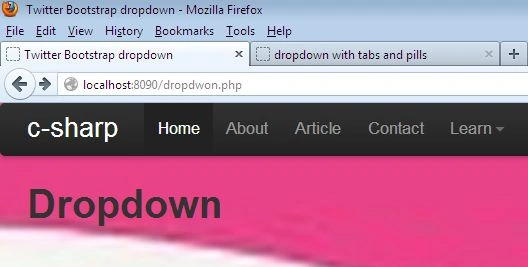
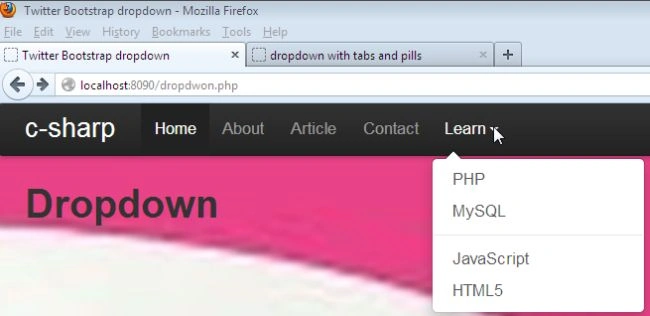
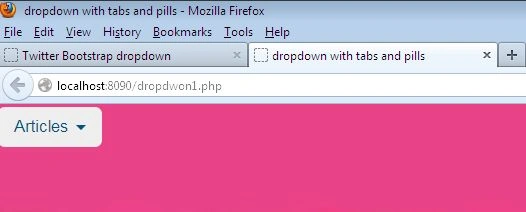
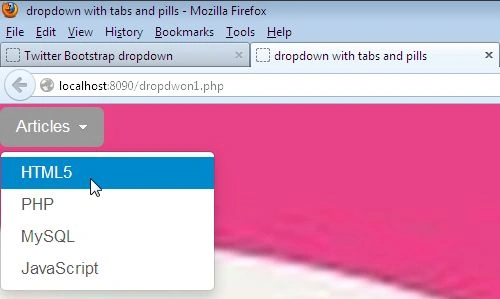
You can apply a dropdown JavaScript plug-in also for creating pills and tabs, as in the following:
Example
<html>
<head>
<meta charset="utf-8" />
<title>dropdown with tabs and pills</title>
<link href="twitter-bootstrap/twitter-bootstrap-v2/docs/assets/css/bootstrap.css" rel="stylesheet" type="text/css" />
</head>
<body>
<ul class="nav nav-pills">
<li class="dropdown all-camera-dropdown">
<a class="dropdown-toggle" data-toggle="dropdown" href="#">
Articles
<b class="caret"></b>
</a>
<ul class="dropdown-menu">
<li data-filter-camera-type="all"><a data-toggle="tab" href="http://www.c-sharpcorner.com/1/244/html-5.aspx">HTML5</a></li>
<li data-filter-camera-type="Alpha"><a data-toggle="tab" href="http://www.c-sharpcorner.com/1/279/php.aspx">PHP</a></li>
<li data-filter-camera-type="Zed"><a data-toggle="tab" href="http://www.c-sharpcorner.com/1/279/php.aspx">MySQL</a></li>
<li data-filter-camera-type="Bravo"><a data-toggle="tab" href="http://www.c-sharpcorner.com/1/233/javascript-css.aspx">JavaScript</a></li>
</ul>
</li></ul>
<script type="text/javascript" src="twitter-bootstrap-v2/docs/assets/js/jquery.js"></script>
<script type="text/javascript" src="twitter-bootstrap-v2/docs/assets/js/bootstrap-dropdown.js"></script>
</body>
</html>
Output
Join the conversation! Your thoughts help the community grow.