

Introduction
In this article, we are going to describe the implementation of a custom collection in Java. I begin by describing what a custom collection implementation is; then after all, why we need it. So I give you an appropriate reason.
Custom Collection Implementation
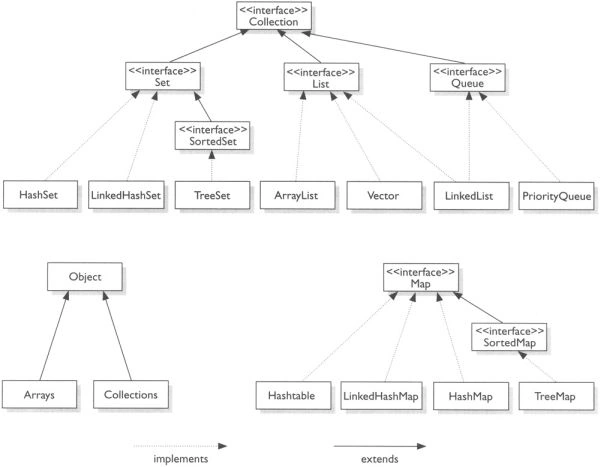
Most of the time many programmers will never need to implement their own Collections classes. The Java platform allows you to write your own implementation of a core collection interface. It is easy to write your own implementation with the help of abstract implementations. However, someday you might want to write your own implementation. It is fairly easy to do this with the aid of the abstract implementations provided by the Java platform. Before we discuss how to write an implementation, let's discuss why you might want to write one. You can go pretty far using the implementations described in the preceding sections of this article.
Why we use custom Collection implementation
There are the following reasons for sort of custom collection you might want to implement. These are taken from Reference
- Persistent: All of the built-in Collection implementations reside in main memory and vanish when the program exits. If you want a collection that will still be present the next time the program starts, you can implement it by building a veneer over an external database. Such a collection might be concurrently accessible by multiple programs.
- Application-specific: Application specific is a very broad category. One example is an unmodifiable Map containing real-time telemetry data. The keys could represent locations, and the values could be read from sensors at these locations in response to the get operation.
. - High-performance, special-purpose: Many data structures take advantage of restricted usage to offer better performance than is possible with general-purpose implementations. For instance, consider a List containing long runs of identical element values. Such lists, which occur frequently in text processing, can be run-length encoded — runs can be represented as a single object containing the repeated element and the number of consecutive repetitions. This example is interesting because it trades off two aspects of performance: It requires less space but more time than an ArrayList.
- High-performance, general-purpose: The Java Collections Framework's designers tried to provide the best general-purpose implementations for each interface, but many, many data structures could have been used, and new ones are invented every day. Maybe you can come up with something faster!
- Enhanced functionality: Suppose you need an efficient bag implementation (also known as a multiset): a Collection that offers constant-time containment checks while allowing duplicate elements. It's reasonably straight forward to implement such a collection atop a HashMap.
- Convenience: You may want additional implementations that offer conveniences beyond those offered by the Java platform. For instance, you may frequently need List instances representing a contiguous range of Integers.
- Adapter: Suppose you are using a legacy API that has its own ad hoc collections API. You can write an adapter implementation that permits these collections to operate in the Java Collections Framework. An adapter implementation is a thin veneer that wraps objects of one type and makes them behave like objects of another type by translating operations on the latter type into operations on the former.
Custom Collection in Java Example
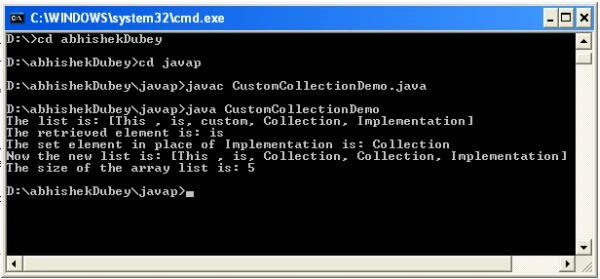
To write your own custom implementation is not difficult. Java supports the abstract implementations to implement your own collection. Let's see how to write the custom collection implementation.
Code
- import java.util.*;
- class MyClass {
- public static List myList(Object[] a) {
- return new ArrayList(a);
- }
- }
- class ArrayList extends AbstractList implements java.io.Serializable {
- private Object[] x;
- ArrayList(Object[] array) {
- x = array;
- }
- public Object get(int index) {
- return x[index];
- }
- public Object set(int index, Object element) {
- Object oldVal = x[index];
- x[index] = element;
- return oldVal;
- }
- public int size() {
- return x.length;
- }
- }
- public class CustomCollectionDemo {
- public static void main(String[] args) {
- try {
- String s[] = {
- "This ",
- "is",
- "custom",
- "Collection",
- "Implementation"
- };
- Object o;
- int i = 0;
- MyClass a = new MyClass();
- List lst = a.myList(s);
- System.out.println("The list is: " + lst);
- ArrayList al = new ArrayList(s);
- o = al.get(1);
- System.out.println("The retrieved element is: " + o);
- String s1 = "Collection";
- o = al.set(2, s1);
- System.out
- .println("The set element in place of Implementation is: "
- +
- s1);
- System.out.println("Now the new list is: " + lst);
- i = al.size();
- System.out.println("The size of the array list is: " + i);
- } catch (Exception e) {
- }
- }
- }
Join the conversation! Your thoughts help the community grow.