
Introduction
In this article, we'll see the implementation of custom paging on GridView
control. The Gridview offers two paging models 1) Default paging and 2) Custom
paging.
It's easy to configure default paging by only just enabling allowpaing property
to true but less efficient in performance. The simple paging model fetches all
records for each pageindexchanging event and displays the appropirate subset of
all returned records.
For example, you have 5000 records in your database's table. You want to display
100 records per page. Now, when page first loaded it will fetch 5000, but the GridView will display the first set of 100 records. Next, when user navigates to
the second page again 5000 records will be fetched and display the second set
of 100 records.
In custom paging, we have to do some more work, rather just enabling allowpaging
property to true. We have to develop custom logic to fetch selected records for
the specific page index instead fetching all records and display subset of them.
There are so many websites that explains the advantages and performance
comparison over default paging. There are so many websites too, that provide
example of custom paging but mostly I found those examples developed using
datasource controls.
Setting up database and tables in SQL Server 2005
- Create new database EmployeeDB SQL Sever 2005.
- Create new table Employee in EmployeeDB.
- Create table fields same as below.
- Insert 20 to 30 records.
- Create new stored procedure that reterives the subset of records according to
current page index.
CREATE PROCEDURE dbo.USP_GET_EMPLOYEES
(
@P_CurrentPageIndex INT,
@P_PageSize INT,
@P_TotalRecords INT OUTPUT
)
AS
BEGIN
SET NOCOUNT ON
DECLARE @StartRowIndex INT
DECLARE @MaxRowIndex INT
SET @MaxRowIndex = @P_PageSize * @P_CurrentPageIndex
SET @StartRowIndex = (@MaxRowIndex - @P_PageSize) + 1
SELECT * FROM
(
SELECT ROW_NUMBER() OVER(ORDER BY Id) AS RowNum,
Id, FName, MName, LName, BirthDate, MaritalStatus,
Gender, Designation, Mobile FROM Employee.
) AS DerivedTable
WHERE RowNum BETWEEN @StartRowIndex AND @MaxRowIndex
--Return total no of records available as an output parameter
SELECT @P_TotalRecords = COUNT(*) FROM EMPLOYEEEND
| Id | Int |
| FName | nvarchar(50) |
| MName | nvarchar(50) |
| LName | nvarchar(50) |
| BirthDate | datetime |
| MaritalStatus | char(1) |
| Gender | char(1) |
| Designation | nvarchar(50) |
| Mobile | nvarchar(15) |
1. Set appropriate conncetion string in web.config file.
Eg.
<connectionStrings>
<add name="EmpDB"
connectionString="Data Source=.;
Initial Catalog=EmployeeDB;
Integrated Security=True"
providerName="System.Data.SqlClient"/>
</connectionStrings>The aspx page
<%@ Page Language="C#" AutoEventWireup="true" CodeFile="Default.aspx.cs" Inherits="_Default" %>
<!DOCTYPE
html PUBLIC
"-//W3C//DTD XHTML 1.0 Transitional//EN"
"http://www.w3.org/TR/xhtml1/DTD/xhtml1-transitional.dtd">
<html
xmlns="http://www.w3.org/1999/xhtml">
<head
runat="server">
<title>Employee
details (Custom paging)</title>
</head>
<body>
<form
id="form1"
runat="server">
<table
width="100%"
style="font-family:
Verdana; font-size:
12px">
<tr
align="center">
<td>
<asp:GridView
ID="grdEmployee"
runat="server"
AutoGenerateColumns="False"
BackColor="White"
BorderColor="#CCCCCC"
BorderStyle="None"
BorderWidth="1px"
CellPadding="4"
Font-Names="verdana"
Font-Size="12px"
ForeColor="Black"
GridLines="Both"
Width="80%">
<FooterStyle
BackColor="#CCCC99"
ForeColor="Black"
/>
<PagerStyle
BackColor="White"
ForeColor="Black"
HorizontalAlign="Right"
/>
<SelectedRowStyle
BackColor="#CC3333"
Font-Bold="True"
ForeColor="White"
/>
<HeaderStyle
BackColor="#333333"
Font-Bold="True"
ForeColor="White"
/>
<Columns>
<asp:BoundField
DataField="RowNum"
HeaderText="Serial No"
/>
<asp:TemplateField
HeaderText="Full name">
<ItemTemplate>
<asp:Label
ID="lblFname"
runat="Server"
Text='<%#
Eval("FName") %>'></asp:Label>
<asp:Label
ID="lblMname"
runat="server"
Text='<%#
Eval("MName") %>'></asp:Label>
<asp:Label
ID="lblLname"
runat="server"
Text='<%#
Eval("LName") %>'></asp:Label>
</ItemTemplate>
<ItemStyle
HorizontalAlign="Left"
Wrap="False"
/>
</asp:TemplateField>
<asp:BoundField
DataField="BirthDate"
HeaderText="Birthday"
DataFormatString="{0:MM/dd/yyyy}"
HtmlEncode="False"
/>
<asp:TemplateField
HeaderText="Marital">
<ItemStyle
HorizontalAlign="Left"
/>
<ItemTemplate>
<asp:Label
ID="lblMarital"
runat="Server"
Text='<%#
Eval("MaritalStatus") %>'></asp:Label>
</ItemTemplate>
</asp:TemplateField>
<asp:TemplateField
HeaderText="Gender">
<ItemStyle
HorizontalAlign="Left"
/>
<ItemTemplate>
<asp:Label
ID="lblGender"
runat="Server"
Text='<%#
Eval("Gender") %>'></asp:Label>
</ItemTemplate>
</asp:TemplateField>
<asp:BoundField
DataField="Designation"
HeaderText="Designation">
<ItemStyle
HorizontalAlign="Left"
/>
</asp:BoundField>
<asp:BoundField
DataField="Mobile"
HeaderText="Contact">
<ItemStyle
HorizontalAlign="Left"
/>
</asp:BoundField>
</Columns>
</asp:GridView>
</td>
</tr>
<tr>
<td
align="center">
<asp:LinkButton
ID="lnkFirstPage"
runat="server"
Text="First"></asp:LinkButton>
||
<asp:LinkButton
ID="lnkPrevious"
runat="server"
Text="Previous"></asp:LinkButton>
||
<asp:LinkButton
ID="lnkNext"
runat="server"
Text="Next"></asp:LinkButton>
||
<asp:LinkButton
ID="lnkLastPage"
runat="server"
Text="Last"></asp:LinkButton>
</td>
</tr>
</table>
</form>
</body>
</html>
The code behind (aspx.cs)
using System;
using System.Configuration;
using System.Data;
using System.Data.SqlClient;
using System.Web.UI;
using System.Web.UI.WebControls;
public
partial class
_Default : System.Web.UI.Page
{
#region
[INITIALIZATION]
SqlConnection con;
SqlCommand cmd;
SqlDataAdapter da;
DataTable dt;
string conStr =
ConfigurationManager.ConnectionStrings["EmpDB"].ConnectionString;
int totalRecords;
#endregion
#region [PAGE EVENTS]
protected void
Page_Init(object sender,
EventArgs e)
{
EventHandler clickHandler =
new EventHandler(PagingButtonClick);
lnkFirstPage.Click += clickHandler;
lnkLastPage.Click += clickHandler;
lnkNext.Click += clickHandler;
lnkPrevious.Click += clickHandler;
}
protected void
Page_Load(object sender,
EventArgs e)
{
if (!Page.IsPostBack)
{
lnkFirstPage.Enabled = false;
// Disable First and last button
lnkPrevious.Enabled = false;
// on first time page load
ViewState["pageindex"] = 1; // Manages current page index.
LoadGrid(Convert.ToInt16(ViewState["pageindex"])); //
SetViewState();
}
}
#endregion
#region [USER FUNCTIONS]
///
<summary>
/// Makes
connection to the database
/// and
bind the gridview
///
</summary>
///
<param name="currentPageIndex"></param>
private void
LoadGrid(int currentPageIndex)
{
con = new
SqlConnection(conStr);
cmd = new
SqlCommand("USP_GET_EMPLOYEES", con);
cmd.Parameters.Add("@P_CurrentPageIndex",
SqlDbType.Int).Value = currentPageIndex;
cmd.Parameters.Add("@P_PageSize",
SqlDbType.Int).Value = grdEmployee.PageSize;
cmd.Parameters.Add("@P_TotalRecords",
SqlDbType.Int).Direction =
ParameterDirection.Output;
cmd.CommandType = CommandType.StoredProcedure;
try
{
if (con !=
null && con.State == ConnectionState.Closed)
{
con.Open();
da = new
SqlDataAdapter();
dt = new
DataTable();
da.SelectCommand = cmd;
da.Fill(dt);
}
}
finally
{
if (con !=
null && con.State != ConnectionState.Closed)
{
con.Close();
}
}
grdEmployee.DataSource = dt;
grdEmployee.DataBind();
}
///
<summary>
/// set the
viewstate for
/// 1.
Total records
/// 2.
Total page
///
</summary>
private void
SetViewState()
{
int _totalRecords = (int)
cmd.Parameters["@P_TotalRecords"].Value;
int _pageSize = grdEmployee.PageSize;
int _totalPages = 0;
// Make sure totalrecords are morethan gridview's
paging size
if (_totalRecords > _pageSize)
{
// Get the total no of pages need to be
created
if ((_totalRecords % _pageSize)
== 0)
{
_totalPages = _totalRecords / _pageSize;
}
else
{
_totalPages = (_totalRecords / _pageSize) + 1;
}
}
ViewState["totalrecord"] = _totalRecords;
ViewState["totalpage"] = _totalPages;
}
///
<summary>
/// Single
custom button click event
/// for
paging buttons
///
</summary>
///
<param name="sender"></param>
///
<param name="e"></param>
protected
void PagingButtonClick(object sender,
EventArgs e)
{
if (sender is
LinkButton)
{
LinkButton clickedButton = (LinkButton)sender;
#region
switch case for button click
switch (clickedButton.Text)
{
case
"Next":
lnkFirstPage.Enabled = true;
lnkPrevious.Enabled = true;
ViewState["pageindex"] =
Convert.ToInt32(ViewState["pageindex"])
+ 1;
if (Convert.ToInt32(ViewState["totalpage"])
== Convert.ToInt32(ViewState["pageindex"]))
{
lnkNext.Enabled = false;
lnkLastPage.Enabled = false;
}
break;
case
"Previous":
lnkNext.Enabled = true;
lnkLastPage.Enabled = true;
ViewState["pageindex"] =
Convert.ToInt32(ViewState["pageindex"])
- 1;
if (Convert.ToInt32(ViewState["pageindex"])
== 1)
{
lnkNext.Enabled = true;
lnkLastPage.Enabled = true;
lnkPrevious.Enabled = false;
lnkFirstPage.Enabled = false;
}
break;
case
"First":
if (Convert.ToInt32(ViewState["pageindex"]
= 1) == 1)
{
lnkNext.Enabled = true;
lnkLastPage.Enabled = true;
lnkPrevious.Enabled = false;
lnkFirstPage.Enabled = false;
}
break;
case "Last":
lnkFirstPage.Enabled = true;
lnkPrevious.Enabled = true;
ViewState["pageindex"] =
Convert.ToInt32(ViewState["totalpage"]);
if (Convert.ToInt32(ViewState["totalpage"])
== Convert.ToInt32(ViewState["pageindex"]))
{
lnkNext.Enabled = false;
lnkLastPage.Enabled = false;
}
break;
}
#endregion
LoadGrid(Convert.ToInt32(ViewState["pageindex"]));
}
}
#endregion
}
Snapshot
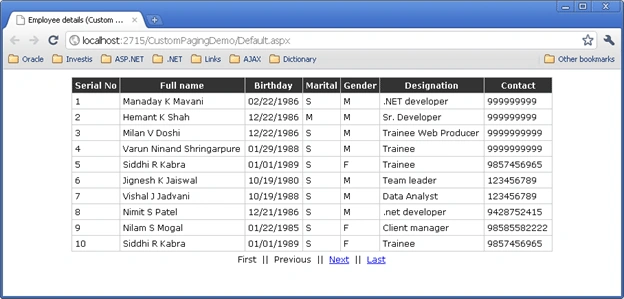
Snapshot 1 the first page
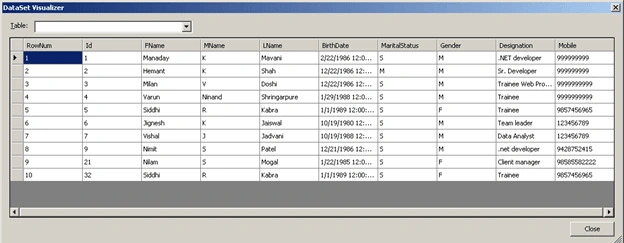
Snapshot 2 Retrieved data for first page
FAROOKH MANSURIPosted Sep 14, 2015, 3:38 AM
It's very helpful article. Thanks dear.........
jan carlo castroPosted Feb 19, 2011, 12:42 PM
hi.. can u add how to sort the data?
emre kocaPosted Nov 15, 2010, 12:31 AM
Where did you define ViewState? I am new guy to this lang!