

In this article I am going to explain how we can validate two dates using
custom-validator. This article also covers how to use a JQuery calendar in
master pages.
Java-script for validating dates is as follows:
<script
type="text/javascript">
function
monthDiff(d1, d2) {
var months;
var date1 =
new Date(d1);
var date2 =
new Date(d2);
return (date1 - date2) / (1000 * 60
* 60 * 24);
return months;
}
//function getLeapYear
function difference(d1, d2)
{
var hiredate, dob;
var diff = 18 * 12;
hiredate = document.getElementById(d1).value;
dob = document.getElementById(d2).value;
var Age = monthDiff(hiredate, dob);
var compareVal = 365 * 18;
//getCompareVal(hiredate,dob);
if (Age >= compareVal) {
return
true;
//true
} else {
return
false; //false
}
}
function
validatehiredate(value, arg) {
arg.IsValid = (difference('ctl00_ContentPlaceHolder1_txtHiredate','ctl00_ContentPlaceHolder1_txtDateofBirth'));
}
</script>
To load calendar the script is as follows
<script
type="text/javascript">
$(function () {
$('#ctl00_ContentPlaceHolder1_txtHiredate').datepick({
showOnFocus: false, showTrigger:
'#calImg' });
});
</script>
<script
type="text/javascript">
$(function () {
$('#ctl00_ContentPlaceHolder1_txtDateofBirth').datepick({
showOnFocus: false, showTrigger:
'#Img1' });
});
</script>
In master page include the following
<script type="text/javascript" src="http://ajax.googleapis.com/ajax/libs/jquery/1.4.4/jquery.min.js"></script>
<script type="text/javascript" src="http://ajax.googleapis.com/ajax/libs/jqueryui/1.8.1/jquery-ui.min.js"></script>
<script type="text/javascript" src="js/jquery.datepick.js"></script>
<style
type="text/css">
@import "css/jquery.datepick.css";
</style>
Sample Images:
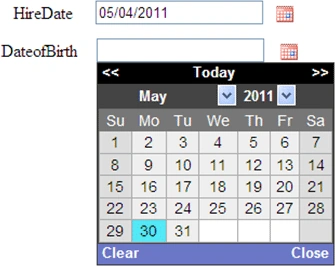
Loading Calendar:
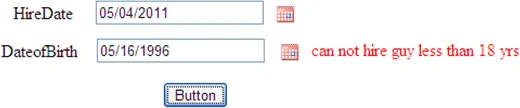
Validation
Default.aspx:
<%@
Page Language="C#"
MasterPageFile="~/MasterPage.master"
AutoEventWireup="true"
CodeFile="Default.aspx.cs"
Inherits="_Default"
Title="Untitled Page"
%>
<asp:Content ID="Content1" ContentPlaceHolderID="ContentPlaceHolder1" runat="Server">
<script type="text/javascript">
function
monthDiff(d1, d2) {
var months;
var date1 =
new Date(d1);
var date2 =
new Date(d2);
return (date1 - date2) / (1000 * 60
* 60 * 24);
return months;
}
//function getLeapYear
function difference(d1, d2)
{
var hiredate, dob;
var diff = 18 * 12;
hiredate = document.getElementById(d1).value;
dob = document.getElementById(d2).value;
var Age = monthDiff(hiredate, dob);
var compareVal = 365 * 18;
//getCompareVal(hiredate,dob);
if (Age >= compareVal) {
return
true;
//true
} else {
return
false; //false
}
}
function
validatehiredate(value, arg) {
arg.IsValid = (difference('ctl00_ContentPlaceHolder1_txtHiredate','ctl00_ContentPlaceHolder1_txtDateofBirth'));
}
</script>
<script
type="text/javascript">
$(function () {
$('#ctl00_ContentPlaceHolder1_txtHiredate').datepick({
showOnFocus: false, showTrigger:
'#calImg' });
});
</script>
<script
type="text/javascript">
$(function () {
$('#ctl00_ContentPlaceHolder1_txtDateofBirth').datepick({
showOnFocus: false, showTrigger:
'#Img1' });
});
</script>
<asp:Button
ID="Button1"
runat="server"
OnClick="Button1_Click"
Text="Button"
ValidationGroup="personal"
Style="left:
459px; position: absolute; top: 171px" />
<asp:Label
ID="lblDate"
runat="Server"
Text="HireDate"
style="left: 321px;
position: absolute; top: 98px"></asp:Label>
<asp:Label
style="LEFT: 310px;
POSITION: absolute; TOP: 133px" id="Label1"
runat="Server"
Text="DateofBirth"></asp:Label>
<asp:TextBox
ID="txtHiredate"
runat="server"
ValidationGroup="personal"
Style="left: 397px;
position: absolute; top: 96px"
/>
<div
style="display: none;">
<img
id="calImg"
src="images/calendar.gif"
alt="Popup"
class="trigger"
style="left: 564px;
position: absolute; top: 101px"
/>
</div>
<asp:TextBox
ID="txtDateofBirth"
runat="server"
ValidationGroup="personal"
Style="left: 398px;
position: absolute; top: 131px"
/>
<asp:CustomValidator
ID="CustomValidator1"
runat="server"
ClientValidationFunction="validatehiredate"
ControlToValidate="txtDateofBirth"
ValidationGroup="personal"
Display="Dynamic"
Style="left:
596px; position: absolute; top: 132px">can not hire guy less than 18 yrs</asp:CustomValidator>
<div
style="display: none;">
<img
id="Img1"
src="images/calendar.gif"
alt="Popup"
class="trigger"
style="left: 568px;
position: absolute; top: 136px"
/>
</div>
</asp:Content>
Dorababu MekaPosted Oct 13, 2018, 10:50 AM
Teja I didn't get your question, you want to validate for 21 years? If so try changing 18 to 21 and try
Tejareddy BPosted Oct 1, 2018, 12:04 AM
Validation is to be as follows minimum hiring should be done when employee age exceed 20 years
Tejareddy BPosted Oct 1, 2018, 12:02 AM
Hiredate and date of birth validation needed in oaf
Dorababu MekaPosted Oct 5, 2012, 8:56 AM
Hi priya mathiyalagan set showOnFocus:true as follows in the script <script type="text/javascript"> $(function () { $('#ctl00_ContentPlaceHolder1_txtDateofBirth').datepick({ showOnFocus: true, showTrigger: '#Img1' }); }); </script>
priya mathiyalaganeditedPosted Mar 2, 2012, 6:58 AMEdited Mar 2, 2012, 7:00 AM
Thanks nice article.i ve doubt in this, if i want to use the calender in textbox instead of the calender icon mean what should i do?Actually am trying some method but didnt work .I cal the textbox id instead of the image id , but it shows double textbox .
priya mathiyalaganPosted Mar 2, 2012, 6:58 AM
Thanks nice article.i ve doubt in this, if i want to use the calender in textbox instead of the calender icon mean what should i do?Actually am trying some method but didnt work .I cal the textbox id instead of the image id , but it shows double textbox .