

Introduction
Data structures play a crucial role in any programming language, and R is no exception. R offers a rich array of data structures that enable data scientists and analysts to work with data efficiently and effectively. In this guide, we'll explore the various data structures in the R language. Provide syntax examples and illustrate how each data structure is used in practical scenarios in detail.
Note. Before reading this article, please learn about the basics of R Programming in my previous article on C#Corner: R Programming Data tables are an extension of data frames and are optimized for working with large datasets efficiently.
What Are Data Structures?
In R programming, data structures are specialized formats for organizing, storing, and manipulating data. Each data structure has its unique characteristics and is suited for specific types of data and operations. Understanding these data structures is essential for data analysis and manipulation tasks.
Common Data Structures in R
R offers several fundamental data structures,
- Vectors: Vectors are one-dimensional arrays that can hold elements of the same data type, such as numbers, characters, or logical values. They are the building blocks of many other data structures in R.
- Lists: Lists are versatile data structures that can store elements of different data types. They are often used to group related data or objects together.
- Matrices: Matrices are two-dimensional data structures with rows and columns. They are suitable for organizing data into tabular formats.
- Data Frames: Data frames are similar to matrices but allow columns to have different data types. They are commonly used to store and manipulate datasets.
- Arrays: Arrays are multi-dimensional data structures that can store elements of the same data type. They are used for more complex data arrangements.
- Factors: Factors are used to represent categorical data. They store levels or categories and are essential for statistical analysis.
Now, let's dive deeper into each of these data structures, providing syntax examples and use cases for each.
1. Vectors in R
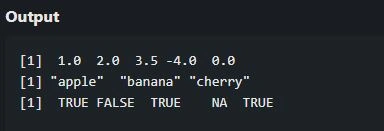
Vectors are the most basic data structure in R. They can hold elements of the same data type, making them efficient for data storage and manipulation. If you want to learn more about Vectors in R Programming, Please visit my recently published article on C# Corner: Vectors in R Programming.
vector_name <- c(value1, value2, ...)Example
# Creating a numeric vector
numeric_vector <- c(1, 2, 3.5, -4, 0)
print(numeric_vector)

# Creating a character vector
character_vector <- c("apple", "banana", "cherry")
print(character_vector)

# Creating a logical vector
logical_vector <- c(TRUE, FALSE, TRUE, NA, TRUE)
print(logical_vector)
Output
Use Cases
- Storing and manipulating single-variable data.
- Performing element-wise operations like addition, subtraction, and multiplication.
2. Lists in R
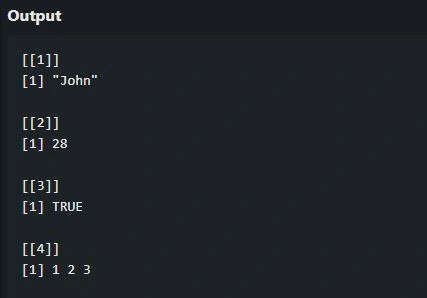
Lists are versatile data structures that can hold elements of different data types, making them suitable for organizing complex data structures.
list_name <- list(element1, element2, ...)Example
# Creating a list of various data types
my_list <- list("John", 28, TRUE, c(1, 2, 3))
print(my_list)
Output
Use Cases
- Storing mixed data types within a single structure.
- Creating nested structures for hierarchical data.
3. Matrices in R
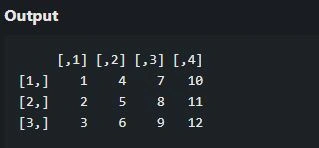
Matrices are two-dimensional data structures with rows and columns. They are ideal for organizing data into tabular formats, such as spreadsheets.
matrix_name <- matrix(data, nrow = num_rows, ncol = num_cols)Example
# Creating a matrix
data_matrix <- matrix(1:12, nrow = 3, ncol = 4)
print(data_matrix)
Output
Use Cases
- Organizing data in a tabular format.
- Performing matrix operations like matrix multiplication and determinant calculation.
4. Data Frames in R
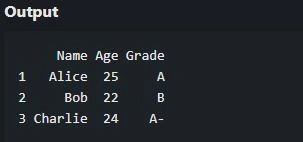
Data frames are similar to matrices but allow columns to have different data types. They are commonly used to store and manipulate datasets, where each column represents a variable.
data_frame_name <- data.frame(column1, column2, ...)Example
# Define the student_data data frame
student_data <- data.frame(
  Name = c("Alice", "Bob", "Charlie"),
  Age = c(25, 22, 24),
  Grade = c("A", "B", "A-")
)
print(student_data)
Output
Use Cases
- Handling and analyzing structured data.
- Reading and writing data from/to external files like CSV or Excel.
5. Arrays in R
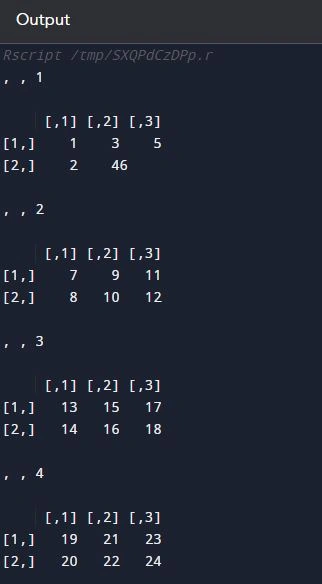
Arrays are multi-dimensional data structures that can store elements of the same data type. They are used for more complex data arrangements, such as three-dimensional data.
array_name <- array(data, dim = c(num_rows, num_cols, num_dimensions))Example
# Creating a 3D array
data_array <- array(1:24, dim = c(2, 3, 4))
print(data_array)
Output
Use Cases
- Handling multi-dimensional data, such as image data.
- Performing operations involving higher-dimensional data.
6. Factors in R
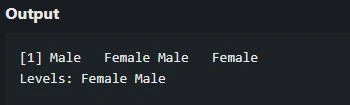
Factors are used to represent categorical data. They store levels or categories and are essential for statistical analysis, especially when conducting regression or ANOVA.
factor_name <- factor(vector_of_categories)Example
# Creating a factor
gender_factor <- factor(c("Male", "Female", "Male", "Female"))
print(gender_factor)
Output
Use Cases
- Analyzing and modeling categorical data.
- Ensuring proper handling of factor levels in statistical models.
7. Data Tables in R
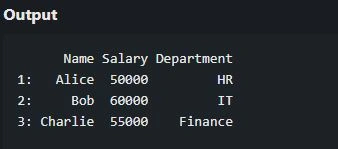
Data tables are an extension of data frames and are optimized for working with large datasets efficiently. They are part of the "data.table" package in R.
Syntax
library(data.table)
data_table_name <- data.table(column1, column2, ...)
Example
# Load the data.table library
library(data.table)

# Creating a data table
employee_data <- data.table(
  Name = c("Alice", "Bob", "Charlie"),
  Salary = c(50000, 60000, 55000),
  Department = c("HR", "IT", "Finance")
)

# Print the employee_data data table
print(employee_data)
Output
Use Cases
- Efficiently handling and manipulating large datasets.
- Performing data operations with high performance.
Conclusion
Data structures are fundamental to R programming and play a pivotal role in data analysis and manipulation. In this guide, we've explored the essential data structures in R, including vectors, lists, matrices, data frames, arrays, factors, and data tables. Each of these data structures has its unique characteristics and use cases, making them valuable tools in the toolkit of any R programmer or data analyst.
As you continue your journey with R, mastering these data structures will empower you to efficiently handle, analyze, and visualize data, whether you're working with small datasets or big data. Understanding when and how to use each data structure is a key step toward becoming a proficient R programmer.
Thanks for reading.
Join the conversation! Your thoughts help the community grow.