

Introduction
Today, in this article let's play around with one of the interesting and most useful concepts in SharePoint 2010.
Question: What is Permission level?
In simple terms "The permission levels are a set of permissions defined that grants permission to users or groups to perform specific actions. The default permission levels are as follows: Read, Contribute, Design, and Full Control".
Step 1: Open SharePoint 2010 central administration and navigate to a specific site.
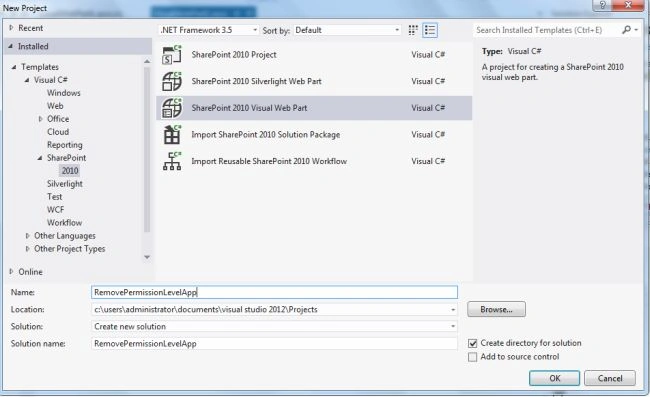
Step 2: Open up Visual Studio 2012 and try to "SharePoint Visual Web Part" project, as in:
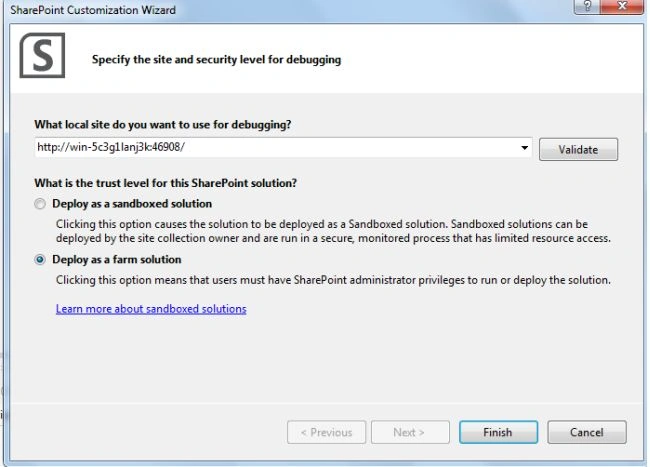
Step 3: Select "Deploy as a farm solution" as in the following and click the "Finish" button.
Step 4: The complete code of visualwebpart1usercontrol.ascx looks like this:
<%@ Assembly Name="$SharePoint.Project.AssemblyFullName$" %>
<%@ Assembly Name="Microsoft.Web.CommandUI, Version=14.0.0.0, Culture=neutral, PublicKeyToken=71e9bce111e9429c" %>
<%@ Register TagPrefix="SharePoint" Namespace="Microsoft.SharePoint.WebControls"
Assembly="Microsoft.SharePoint, Version=14.0.0.0, Culture=neutral, PublicKeyToken=71e9bce111e9429c" %>
<%@ Register TagPrefix="Utilities" Namespace="Microsoft.SharePoint.Utilities" Assembly="Microsoft.SharePoint, Version=14.0.0.0, Culture=neutral, PublicKeyToken=71e9bce111e9429c" %>
<%@ Register TagPrefix="asp" Namespace="System.Web.UI" Assembly="System.Web.Extensions, Version=3.5.0.0, Culture=neutral, PublicKeyToken=31bf3856ad364e35" %>
<%@ Import Namespace="Microsoft.SharePoint" %>
<%@ Register TagPrefix="WebPartPages" Namespace="Microsoft.SharePoint.WebPartPages"
Assembly="Microsoft.SharePoint, Version=14.0.0.0, Culture=neutral, PublicKeyToken=71e9bce111e9429c" %>
<%@ Control Language="C#" AutoEventWireup="true" CodeBehind="VisualWebPart1.ascx.cs"
Inherits="DeletePermissionLevelApp.VisualWebPart1.VisualWebPart1" %>
<div>
<table style="font-family: Verdana; text-align: center;">
<tr>
<td colspan="2">
<asp:label id="Label1" runat="server" text="Delete Permission Level - SharePoint 2010 via Visual Studio 2012"
font-bold="true" forecolor="Maroon" font-size="Large"></asp:label>
</td>
</tr>
<tr>
<td>
<asp:label id="Label2" runat="server" text="Please Enter Permission Level Name:"></asp:label>
</td>
<td>
<asp:textbox id="TextBox1" runat="server" width="117px"></asp:textbox>
</td>
</tr>
<tr>
<td colspan="2">
<asp:button id="Button1" runat="server" text="Delete Permission Level" forecolor="Orange"
font-bold="true" backcolor="Black" onclick="Button1_Click" width="228px" />
</td>
</tr>
<tr>
<td colspan="2">
<asp:label id="Label4" runat="server" font-bold="true"></asp:label>
</td>
</tr>
</table>
</div>
Step 5: The complete code of visualwebpart1usercontrol.ascx.cs looks like this:
using Microsoft.SharePoint;
using System;
using System.ComponentModel;
using System.Web.UI.WebControls.WebParts;namespace DeletePermissionLevelApp.VisualWebPart1
{
[ToolboxItemAttribute(false)]
public partial class VisualWebPart1 : WebPart
{
// Uncomment the following SecurityPermission attribute only when doing Performance Profiling using
// the Instrumentation method, and then remove the SecurityPermission attribute when the code is ready
// for production. Because the SecurityPermission attribute bypasses the security check for callers of
// your constructor, it's not recommended for production purposes.
// [System.Security.Permissions.SecurityPermission(System.Security.Permissions.SecurityAction.Assert, UnmanagedCode = true)]
public VisualWebPart1()
{
}
protected override void OnInit(EventArgs e){base.OnInit(e);
InitializeControl();
}
protected void Page_Load(object sender, EventArgs e)
{
TextBox1.Focus();
}
protected void Button1_Click(object sender, EventArgs e)
{
if (string.IsNullOrEmpty(TextBox1.Text))
{
Label4.Text = "Please Enter Some Values";
Label4.ForeColor = System.Drawing.Color.Red;
}
else
{
SPWeb web = SPContext.Current.Web;
SPRoleDefinition rDefination = new SPRoleDefinition();
web.RoleDefinitions.Delete(TextBox1.Text);
web.Update();
Label4.Text = TextBox1.Text + " - Permission Level Deleted Successfully";
Label4.ForeColor = System.Drawing.Color.Green;
TextBox1.Text = string.Empty;
}
}
}
}
Step 6: Deploy the solution file and add the new webpart to a SharePoint site.
Step 7: The output of the application looks like this:

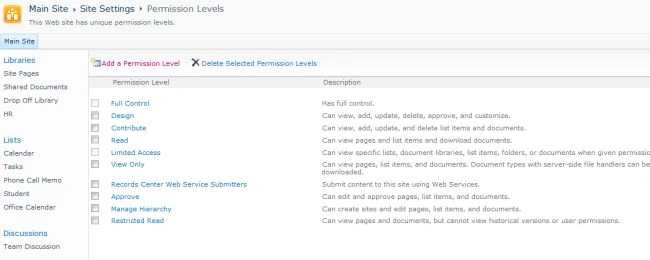
Step 8: Looking at previously created permission level output of the application looks like this:
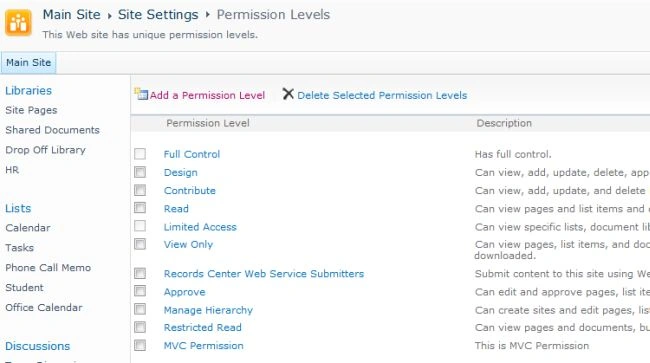
Step 9: Data entering output of the application looks like this:
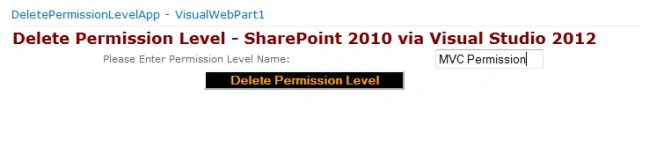
Step 10: Permission level deleted output of the application looks like this:
I hope this article is useful for you.
ManuraPosted Aug 21, 2013, 5:48 AM
I'm new to SharePoint and using SharePoint Foundation server 2010 to save files using client object model. The application will list the files in the server using MVC4 UI. To retreive the files and folders I use SharePoint 2010 client object model. I want to implement the Edit feature for the word and excel documents which is already available when we access SharePoint site directly through IE. Simply I just want to open the file and save changes to the server when we save it or close the program. Is it possible to do using client object model. I can open the file but not save the changes to the server. I google it to find a solution but yet not succeeded. If anybody knows how to do it please answer. Thanks in advance