

Introduction
Now I am telling about responsive web design tutorial using google Material design lite just like a Bootstrap... TO design your web site look and feel
for desktop, tablet and mobile
About Us:-
In this MDL file included CSS, javascript, for all grids, buttons, form,Label, table, tooltip, header, footer, menu, icons all LIbrary files included and enhanced in MDL file you Just add the class file In Your Design
Add References Page Top:
- <script src="https://storage.googleapis.com/code.getmdl.io/1.0.0/material.min.js">
- <link href="mdl/material.css" rel="stylesheet" />
- <script src="mdl/material.js"></script>
- <link href="mdl/material.min.css" rel="stylesheet" />
- <script src="mdl/material.min.js"></script>
Grid:-
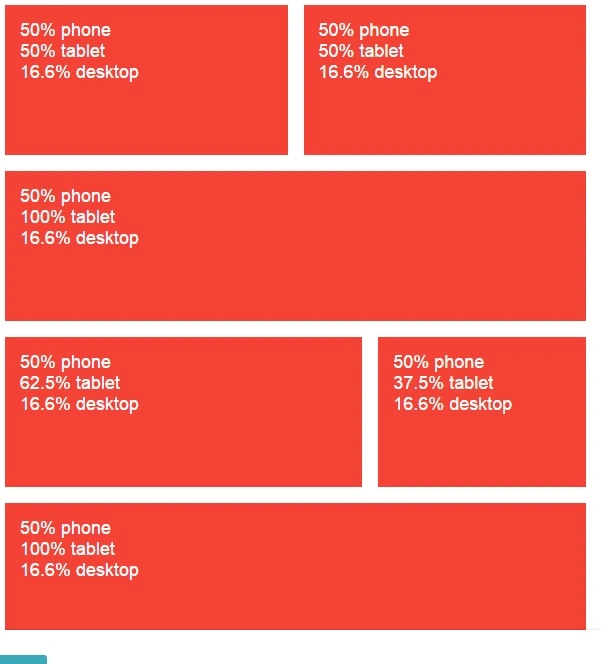
Source Code:-
- <div class="mdl-grid">
- <div class="mdl-cell mdl-cell--2-col-phone mdl-cell--4-col-tablet mdl-cell--2-col-desktop"> 50% phone </br> 50% tablet </br> 16.6% desktop </div>
- <div class="mdl-cell mdl-cell--2-col-phone mdl-cell--4-col-tablet mdl-cell--2-col-desktop"> 50% phone </br> 50% tablet </br> 16.6% desktop </div>
- <div class="mdl-cell mdl-cell--2-col-phone mdl-cell--8-col-tablet mdl-cell--2-col-desktop"> 50% phone </br> 100% tablet </br> 16.6% desktop </div>
- <div class="mdl-cell mdl-cell--2-col-phone mdl-cell--5-col-tablet mdl-cell--2-col-desktop"> 50% phone </br> 62.5% tablet </br> 16.6% desktop </div>
- <div class="mdl-cell mdl-cell--2-col-phone mdl-cell--3-col-tablet mdl-cell--2-col-desktop"> 50% phone </br> 37.5% tablet </br> 16.6% desktop </div>
- <div class="mdl-cell mdl-cell--2-col-phone mdl-cell--8-col-tablet mdl-cell--2-col-desktop"> 50% phone </br> 100% tablet </br> 16.6% desktop </div>
- </div>
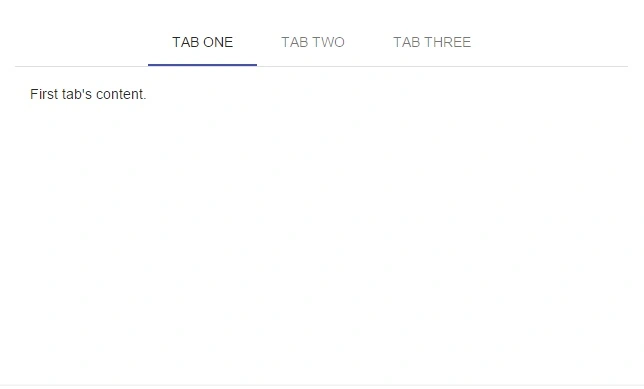
- <div class="mdl-tabs mdl-js-tabs">
- <div class="mdl-tabs__tab-bar"> <a href="#tab1" class="mdl-tabs__tab">Tab One</a> <a href="#tab2" class="mdl-tabs__tab">Tab Two</a> <a href="#tab3" class="mdl-tabs__tab">Tab Three</a> </div>
- <div class="mdl-tabs__panel is-active" id="tab1">
- <p>First tab's content.</p>
- </div>
- <div class="mdl-tabs__panel" id="tab2">
- <p>Second tab's content.</p>
- </div>
- <div class="mdl-tabs__panel" id="tab3">
- <p>Third tab's content.</p>
- </div>
Table:-
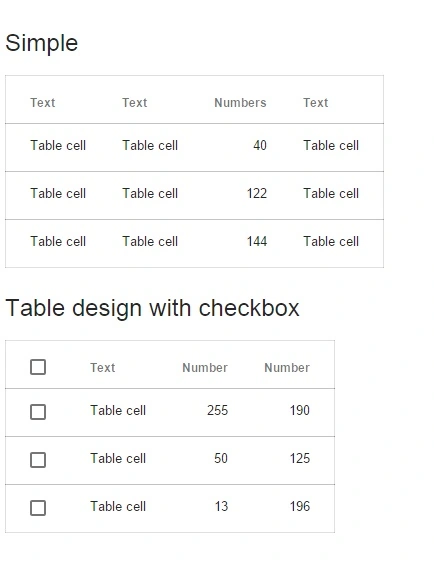
- <table class="mdl-data-table mdl-js-data-table">
- <thead>
- <tr>
- <th class="mdl-data-table__cell--non-numeric">Text</th>
- <th class="mdl-data-table__cell--non-numeric">Text</th>
- <th>Numbers</th>
- <th class="mdl-data-table__cell--non-numeric">Text</th>
- </tr>
- </thead>
- <tbody>
- <tr>
- <td class="mdl-data-table__cell--non-numeric">Table cell</td>
- <td class="mdl-data-table__cell--non-numeric">Table cell</td>
- <td>40</td>
- <td class="mdl-data-table__cell--non-numeric">Table cell</td>
- </tr>
- <tr>
- <td class="mdl-data-table__cell--non-numeric">Table cell</td>
- <td class="mdl-data-table__cell--non-numeric">Table cell</td>
- <td>122</td>
- <td class="mdl-data-table__cell--non-numeric">Table cell</td>
- </tr>
- <tr>
- <td class="mdl-data-table__cell--non-numeric">Table cell</td>
- <td class="mdl-data-table__cell--non-numeric">Table cell</td>
- <td>144</td>
- <td class="mdl-data-table__cell--non-numeric">Table cell</td>
- </tr>
- </tbody>
- </table>
- <h4>Table design with checkbox</h4>
- <table class="mdl-data-table mdl-js-data-table mdl-data-table--selectable">
- <thead>
- <tr>
- <th class="mdl-data-table__cell--non-numeric">Text</th>
- <th>Number</th>
- <th>Number</th>
- </tr>
- </thead>
- <tbody>
- <tr>
- <td class="mdl-data-table__cell--non-numeric">Table cell</td>
- <td>255</td>
- <td>190</td>
- </tr>
- <tr>
- <td class="mdl-data-table__cell--non-numeric">Table cell</td>
- <td>50</td>
- <td>125</td>
- </tr>
- <tr>
- <td class="mdl-data-table__cell--non-numeric">Table cell</td>
- <td>13</td>
- <td>196</td>
- </tr>
- </tbody>
- </table>
Form

- <form>
- <div class="mdl-textfield mdl-js-textfield mdl-textfield--floating-label "> <label for="input_text" class="mdl-textfield__label">First name</label> <input type="text" class="mdl-textfield__input" id="input_text" /> </div>
- <div class="mdl-textfield mdl-js-textfield mdl-textfield--floating-label"> <label for="input_email" class="mdl-textfield__label">Email</label> <input type="email" class="mdl-textfield__input" id="input_email" /> </div>
- <div class="mdl-textfield mdl-js-textfield mdl-textfield--floating-label"> <label for="input_password" class="mdl-textfield__label">Password with verification</label> <input type="password" pattern="[0-9]*" class="mdl-textfield__input" id="input_password" /> <span class="mdl-textfield__error">Digits only</span> </div>
- <label for="checkbox-1" class="mdl-checkbox mdl-js-checkbox mdl-js-ripple-effect" > <input type="checkbox" id="checkbox-1" class="mdl-checkbox__input" checked /> <span class="mdl-checkbox__label">Checkbox</span> </label> <label for="option-1" class="mdl-radio mdl-js-radio mdl-js-ripple-effect"> <input type="radio" class="mdl-radio__button" id="option-1" name="options" value="1" checked/> <span class="mdl-radio__label">Option 1</span> </label> <label for="option-2" class="mdl-radio mdl-js-radio mdl-js-ripple-effect"> <input type="radio" class="mdl-radio__button" id="option-2" name="options" value="2" /> <span class="mdl-radio__label">Option 2</span> </label>
- </form>
http://www.getmdl.io/index.html
https://www.google.com/design/spec/components/chips.html#chips-contact-chips
Pankaj Kumar ChoudharyPosted Jul 28, 2015, 7:41 AM
Nice Explain Sir.........
Nilesh JadavPosted Jul 28, 2015, 6:26 AM
Nice one sir
Dinesh SaraswatPosted Jul 28, 2015, 1:18 AM
Good one...
Debasis SahaPosted Jul 28, 2015, 12:45 AM
Nice One..
Santhakumar MunuswamyPosted Jul 27, 2015, 2:34 PM
Thanks for nice article:)
RakeshPosted Jul 27, 2015, 10:19 AM
Good start sir
Mahesh ChandPosted Jul 27, 2015, 9:29 AM
Thank you Naren. Nice to see you sharing content about Material design, one of the newest topics. Curious. Are you using it in your company projects or just doing for fun? I am always interested to know what company is using what technology. Cheers!
Rajeesh MenothPosted Jul 27, 2015, 8:31 AM
Good One
Sibeesh VenuPosted Jul 27, 2015, 8:25 AM
Nice
SharadPosted Jul 27, 2015, 6:19 AM
good one
Jacob RobinsonPosted Jul 27, 2015, 5:41 AM
Nice ....
Gopi ChandPosted Jul 27, 2015, 5:36 AM
Nice article :)
Gowtham RajamanickamPosted Jul 27, 2015, 5:17 AM
good
Neeraj KumarPosted Jul 27, 2015, 5:01 AM
Nice