

Digital clock using Java
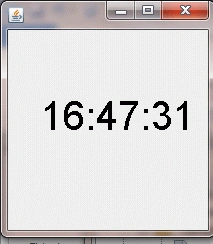
This article describes the creation of a digital clock using Java. This application shows the system's current time.
Packages Imported
- import javax.swing.JFrame
Jframe is an extended version of Frame that supports the Swing component architecture.
- import java.awt.Color
The Format RGB shows the combination of red, green and blue color, and its value ranges between 0 and 255.
- import javax.swing.WindowConstants
WindowConstants is used for operations like window closing and so on.
Syntax
- public class DimensionDemo extends Object class
- import java.awt.event.ActionEvent
It imports only the "ActionEvent" class.
- import java.awt.event.ActionListener
An action event is fired, whenever any action is done by the user.
- import java.util.Calendar
- import java.awt.Graphics
Graphics exists under the class that extends Object. Graphics is used to represent graphics on the window.
Syntax
- public class GraphicsDemo extends Object
- import java.awt.Dimension
Dimension is a class that extends the Object class.
- import javax.swing.JPanel
JPanel can be used in place of Canvas. The new feature of JPanel is Border.
- import javax.swing.Timer;
A Swing timer fires one or more action events after a specified delay.
- import java.awt.Font
Font is a class that represents fonts and it implements the serializable interface.
Syntax
public class FontDemo implements Serializable interface
Coding
- import java.awt.*;
- //In place of star we use Color,Dimension,Font,Graphics,event.ActionEvent,event.ActionListner.
- import java.util.*;
- //In place of star we use Calendar.
- import javax.swing.*;
- //In place of star we use Jframe.JPane1,WindowConstants.
- import java.awt.event.ActionListener;
- import javax.swing.Timer;
- import java.awt.event.ActionEvent;
- public class DigitalClock1 {
- public static void main(String[] args) {
- JFrame frm = new JFrame();
- frm.setDefaultCloseOperation(WindowConstants.EXIT_ON_CLOSE);
- SimpleDigitalClock clock1 = new SimpleDigitalClock();
- frm.add(clock1);
- frm.pack();
- frm.setVisible(true);
- }
- static class SimpleDigitalClock extends JPanel {
- String stringTime;
- int hour, minute, second;
- String aHour = "";
- String bMinute = "";
- String cSecond = "";
- public void setStringTime(String abc) {
- this.stringTime = abc;
- }
- public int Number(int a, int b) {
- return (a <= b) ? a : b;
- }
- SimpleDigitalClock() {
- Timer t = new Timer(1000, new ActionListener() {
- public void actionPerformed(ActionEvent e) {
- repaint();
- }
- });
- t.start();
- }
- @Override
- public void paintComponent(Graphics v) {
- super.paintComponent(v);
- Calendar rite = Calendar.getInstance();
- hour = rite.get(Calendar.HOUR_OF_DAY);
- minute = rite.get(Calendar.MINUTE);
- second = rite.get(Calendar.SECOND);
- if (hour < 10) {
- this.aHour = "0";
- }
- if (hour >= 10) {
- this.aHour = "";
- }
- if (minute < 10) {
- this.bMinute = "0";
- }
- if (minute >= 10) {
- this.bMinute = "";
- }
- if (second < 10) {
- this.cSecond = "0";
- }
- if (second >= 10) {
- this.cSecond = "";
- }
- setStringTime(aHour + hour + ":" + bMinute + minute + ":" + cSecond + second);
- v.setColor(Color.BLACK);
- int length = Number(this.getWidth(), this.getHeight());
- Font Font1 = new Font("SansSerif", Font.PLAIN, length / 5);
- v.setFont(Font1);
- v.drawString(stringTime, (int) length / 6, length / 2);
- }
- @Override
- public Dimension getPreferredSize() {
- return new Dimension(200, 200);
- }
- }
- }
Join the conversation! Your thoughts help the community grow.