

Background
Many times their is a need in a project's reporting module to show Records of Gridview into MS office word, So by considering the above requirement I decided to write this article especially focusing on beginners and those who want to learn how Export Gridview to MS office word Using Asp.net C#
Now before creating the application, let us create a table named employee in a database to from we show the records in a Gridview ,the table having the following fields (shown in the following image):
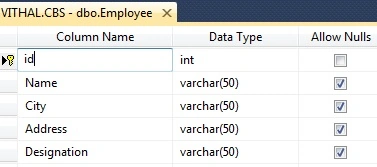
I hope you have created the same type of table.
Now create the project as:
- "Start" - "All Programs" - "Microsoft Visual Studio 2010".
- "File" - "New Project" - "C#" - "Empty Project" (to avoid adding a master page).
- Give the Project name such as ExportGridToword or another as you wish and specify the location.
- Then right-click on Solution Explorer - "Add New Item" - Default.aspx page.
- one Buttons, one label and a grid view.
Now let us create function to bind the records to Grid view from Database, If you are beginner and don’t know in details how to bind Grid view from database then refer my following article.
now, for this article create the following function into the default.aspx.cs page to bind the Grid view
- private void Bindgrid()
- {
- connection();
- query = "select *from Employee";//not recommended this i have wrtten just for example,write stored procedure for security
- com = new SqlCommand(query, con);
- SqlDataReader dr = com.ExecuteReader();
- GridView1.DataSource = dr;
- GridView1.DataBind();
- con.Close();
- }
now, call this function on page load as
- protected void Page_Load(object sender, EventArgs e)
- {
- if (!IsPostBack)
- {
- Bindgrid();
- }
- }
now run the application,then we can see the following records in Grid view as
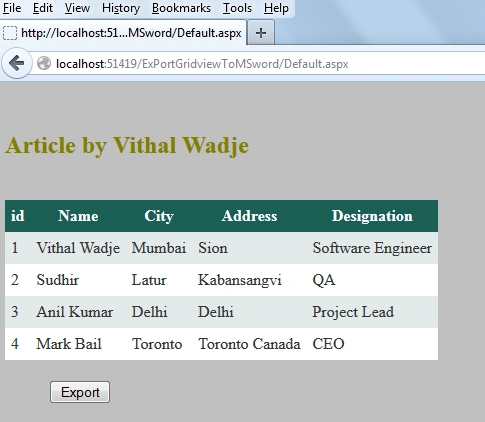
Now ,we have record to export into MS office word,let us start coding for our actual requirement..,add the VerifyRenderingInServerForm event after the page load which is required while exporting Grid view to excel,word and PDF to avoid the run time error which is occurred like as "GridView' must be placed inside a form tag with runat=server."
- public override void VerifyRenderingInServerForm(Control control)
- {
- //required to avoid the runtime error "
- //Control 'GridView1' of type 'GridView' must be placed inside a form tag with runat=server."
- }
now create the following function to Export the grid view to MS office word as
- private void ExportGridToword()
- {
- Response.Clear();
- Response.Buffer = true;
- Response.ClearContent();
- Response.ClearHeaders();
- Response.Charset = "";
- string FileName = "Vithal" + DateTime.Now +".doc";
- StringWriter strwritter = new StringWriter();
- HtmlTextWriter htmltextwrtter = new HtmlTextWriter(strwritter);
- Response.Cache.SetCacheability(HttpCacheability.NoCache);
- Response.ContentType ="application/msword";
- Response.AddHeader("Content-Disposition","attachment;filename=" + FileName);
- GridView1.GridLines = GridLines.Both;
- GridView1.HeaderStyle.Font.Bold = true;
- GridView1.RenderControl(htmltextwrtter);
- Response.Write(strwritter.ToString());
- Response.End();
- }
Now double click on Export button and call the above function on "onclick"as
- protected void Button1_Click(object sender, EventArgs e)
- {
- ExportGridToword();
- }
Now the whole code of Default.aspx.cs page will be as follows
- using System;
- using System.Web.UI;
- using System.Web.UI.WebControls;
- using System.Configuration;
- using System.Data.SqlClient;
- using System.IO;
- using System.Web;
- public partial class _Default : System.Web.UI.Page
- {
- private SqlConnection con;
- private SqlCommand com;
- private string constr,query;
- private void connection()
- {
- constr = ConfigurationManager.ConnectionStrings["getconn"].ToString();
- con = new SqlConnection(constr);
- con.Open();
- }
- protected void Page_Load(object sender, EventArgs e)
- {
- if (!IsPostBack)
- {
- Bindgrid();
- }
- }
- public override void VerifyRenderingInServerForm(Control control)
- {
- //required to avoid the runtime error "
- //Control 'GridView1' of type 'GridView' must be placed inside a form tag with runat=server."
- }
- private void Bindgrid()
- {
- connection();
- query = "select *from Employee";//not recommended this i have wrtten just for example,write stored procedure for security
- com = new SqlCommand(query, con);
- SqlDataReader dr = com.ExecuteReader();
- GridView1.DataSource = dr;
- GridView1.DataBind();
- con.Close();
- }
- protected void Button1_Click(object sender, EventArgs e)
- {
- ExportGridToword();
- }
- private void ExportGridToword()
- {
- Response.Clear();
- Response.Buffer = true;
- Response.ClearContent();
- Response.ClearHeaders();
- Response.Charset = "";
- string FileName = "Vithal" + DateTime.Now +".doc";
- StringWriter strwritter = new StringWriter();
- HtmlTextWriter htmltextwrtter = new HtmlTextWriter(strwritter);
- Response.Cache.SetCacheability(HttpCacheability.NoCache);
- Response.ContentType ="application/msword";
- Response.AddHeader("Content-Disposition","attachment;filename=" + FileName);
- GridView1.GridLines = GridLines.Both;
- GridView1.HeaderStyle.Font.Bold = true;
- GridView1.RenderControl(htmltextwrtter);
- Response.Write(strwritter.ToString());
- Response.End();
- }
- }
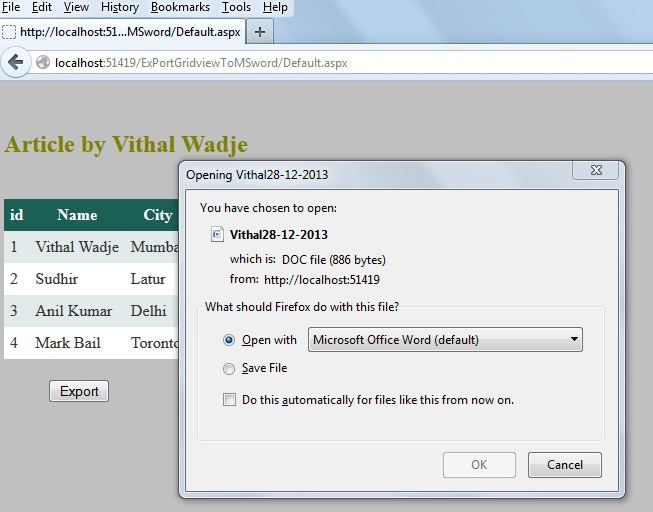
Now run the application and click on Export Button, the following popup is appeared as
Now click on open with option, then you can see that all grid view records will be exported into MS office word as
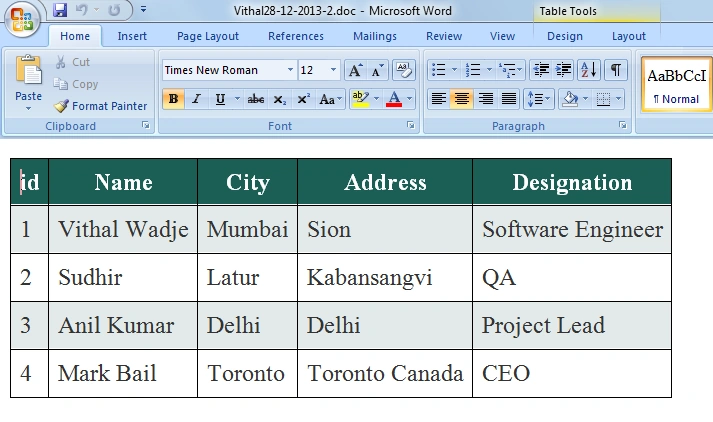
- Download the zip file from the attachment for the full source code of an application.
- change connection string from web.config file as per your server location.
Summary
I hope this article is useful for all readers, if you have any suggestion then please contact me including beginners also.
Join the conversation! Your thoughts help the community grow.