

What & Why
So the question is: What is an extension method and why do we need them?
According to MSDN: “Extension methods enable you to "add" methods to existing types without creating a new derived type, recompiling, or otherwise modifying the original type.” What this means is that using extension methods we can easily add methods to classes that we don't own or that we are not allowed to modify. An example of such a class is String that is owned by the .Net Framework or a third-party class that we don't own and we cannot modify directly.
It's important to point out here that, as the name suggests, extension methods just allow us to extend the functionality of a class and it does not allow us to access or modify the set of rules defined in a class in any manner. Also, it allows to add methods & we cannot add member variables as extensions. Extension methods are static methods and they are wrapped inside a static class, also the first parameter of the static class is the Type name prefixed with the this keyword that tells the compiler the type that this extension method supports.
Road Map
I will try to explain extension methods with three examples in this article viz.
- A simple extension method applied to a custom class.
- An extension method applied on an interface.
- An extension method for a HTML helper class that can be used in ASP.NET MVC applications.
Extension methods are most commonly used in LINQ queries. Since LINQ queries are applied on collections, all extension methods are useful because the standard extension method is developed for the "IEnumerable" interface and most of the collection classes implement this interface thus we can use all these extension methods. A complete list of extension methods with examples is available in the MSDN documentation at the following link: Enumerable Methods.
Also, please note that extension methods have a different symbol compared to the conventional methods and generally (extension) is written in front of the method description.
Example 1: Extension method for Custom Class
In the first example, I will try to explain how to implement an extension method to a custom class on which we don't have any control. Suppose we have the following two classes owned by a third-party:
- public class Product
- {
- public int ProductId { get; set; }
- public string ProductName { get; set; }
- public decimal Price { get; set; }
- public string Category { get; set; }
- }
- public class ShoppingCart
- {
- public List<Product> Products { get; set; }
- }
- ShoppingCart cart = new ShoppingCart
- {
- Products = new List<Product>
- {
- new Product { ProductId =1, ProductName = "Milk", Price = 20, Category = "Beverages", },
- new Product { ProductId =2, ProductName = "Television", Price = 2000, Category = "Electronic" },
- new Product { ProductId =3, ProductName = "Inception", Price = 200, Category = "Media" },
- new Product { ProductId =4, ProductName = "Coke", Price = 30, Category = "Beverages" },
- new Product { ProductId =5, ProductName = "Dell Inspiron", Price = 26000, Category = "Electronic" }
- }
- };
- public static decimal GetTotal(this ShoppingCart cart)
- {
- decimal totalPrice = 0;
- foreach (var item in cart.Products)
- {
- totalPrice += item.Price;
- }
- return totalPrice;
- }
Now, we can directly use this method as:
- decimal totalPrice = cart.GetTotal();
In this example, we will see how an extension method can be developed for an interface to be applied to all the classes that implements that interface. Extension methods such as Where, OrderBy, Any and so on are all developed like this. As explained earlier all these methods are defined for the interface "IEnumerable".
Suppose we have the following interface and two classes:
- public interface IMotorBike
- {
- string PrintCompanyName();
- }
- public class HeroMotoCorp : IMotorBike
- {
- public int ModelId { get; set; }
- public string ModelName { get; set; }
- public decimal Price { get; set; }
- public string PrintCompanyName()
- {
- return "Hero Moto Corp.";
- }
- }
- public class Bajaj : IMotorBike
- {
- public int ModelId { get; set; }
- public string ModelName { get; set; }
- public decimal Price { get; set; }
- public string PrintCompanyName()
- {
- return"Bajaj Motorbikes";
- }
- }
Now, suppose we want to write an extension method that returns the company name of the Type passed, we can implement it something like this:
- public static string GetBikesCompanyName(this IMotorBike moto)
- {
- if (moto is HeroMotoCorp)
- {
- return ((HeroMotoCorp)moto).PrintCompanyName();
- }
- else
- {
- return ((Bajaj)moto).PrintCompanyName();
- }
- }
- var bike1 = new HeroMotoCorp { ModelId = 3, ModelName = "Karizma", Price = 92000 };
- var bike2 = new Bajaj { ModelId = 1, ModelName = "Pulsar", Price = 82000 };
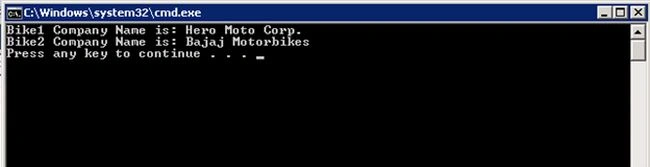
- Console.WriteLine("Bike1 Company Name is: {0}", bike1.GetBikesCompanyName());
- Console.WriteLine("Bike2 Company Name is: {0}", bike2.GetBikesCompanyName());
Example 3: Extension Methods for HTML Helper class
Last but not the least, we have a very important use of extension method in ASP.NET MVC. We don't have pre-built controls in MVC as we have in Web Forms for generating HTML controls, so we use HTML helper classes. If we notice closely, methods like TextBox, DropDownList and so on used in HTML helper classes are nothing but extension methods. We can create our own extension methods to generate HTML controls. Here I am taking an example of generating an image extension method to render a HTML image control.
Here is the extension method:
- public static MvcHtmlString Image(this HtmlHelper helper, string src, string alt)
- {
- TagBuilder tag = new TagBuilder("img");
- tag.Attributes.Add("src", src);
- tag.Attributes.Add("alt", alt);
- return new MvcHtmlString(tag.ToString(TagRenderMode.SelfClosing));
- }
Now, we can simply use this method in our View like this:
- @Html.Image(@Url.Content("~/Content/Images/Excel-icon.png"), "test")
Happy Coding.
Manish Kumar ChoudharyPosted Dec 27, 2014, 12:32 PM
Good one..