

Introduction
In this article I am going to describe various types of filters in jQuery.
Description
jQuery supports various types of filters, such as:
-
.eq()
-
.first()
-
.last()
-
.filter()
-
.has()
-
.not()
Example:
<ul>
            <li>City 1</li>
<li>City 2</li>|
<li>City 3</li>
<li>City 4</li>
<li>City 5</li>
</ul>
Suppose you want to make the background red for the third element City 3. So your function is:
<script language="javascript" type="text/javascript">
Code
$('li').eq(2).css('background-color', 'red');Code
</script>Code
Step 1 : Your .aspx page is:Code
"jQueryFilter.eq" %>
<!DOCTYPE html PUBLIC "-//W3C//DTD XHTML 1.0 Transitional//EN" "http://www.w3.org/TR/xhtml1/DTD/
xhtml1-transitional.dtd">
<html xmlns="http://www.w3.org/1999/xhtml">
Code
<head runat="server">Code
<title>eq Example</title>Code
<script src="Scripts/jquery-1.4.1-vsdoc.js" type="text/javascript"></script>Code
<script src="Scripts/jquery-1.4.1.min.js" type="text/javascript"></script>Code
</head>Code
<body>Code
<form id="form1" runat="server">Code
<div>Code
<ul>Code
<li>City 1</li>
<li>City 2</li>Code
<li>City 3</li>Code
<li>City 4</li>Code
<li>City 5</li>Code
</ul>Code
</div>Code
</form>Code
<script language="javascript" type="text/javascript">JavaScript
$('li').eq(2).css('background-color', 'red'); // endex start from 0Code
</script>Code
</body>Code
</html>Code
Your output looks like: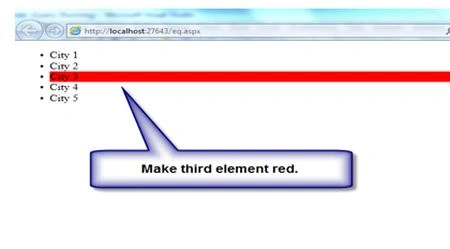
Code
Code
2) .first(): Gets the first DOM element. Change your script function to:Code
Code
<script language="javascript" type="text/javascript">Code
$('li').first().css('background-color', 'red'); // first index = 0Code
</script>Code
Your output looks like:Code
Code
Code
Code
3) .last(): Get first DOM element. Change your script function to:Code
Code
<script language="javascript" type="text/javascript">Code
$('li').last().css('background-color', 'red');Code
</script>Code
Your output looks like:Code
Code
Code
Code
4) .filter(): You can filter elements by selecter or by index. If you want to make a red background for every odd element, then your function would be:Code
<script language="javascript" type="text/javascript">SQL
$('li').filter(':odd').css('background-color', 'red'); //index start from 1.Code
</script>Code
Code
Your output looks like:Code
Code
Filter with indexCode
Code
Example : If you want to make the first and fourth elements have a red background then your script would be:Code
Code
<script language="javascript" type="text/javascript">Code
//index start from 0.Code
$('li').filter(function(index){Code
if(index == 1 || index == 4)Code
{Code
$(this).css('background-color', 'red');Code
}Code
});Code
Code
</script>Code
Code
Your output looks like:Code
Code
Code
Code
5) . has() : If you want to check for some condition then the .has() function can be used.Code
Code
Ex.Code
<ul>Code
<li>City 1</li>Code
<li><a>City 2</a></li>Code
<li>City 3</li>Code
<li>City 4</li>Code
<li><a>City 5</a></li>Code
</ul>Code
Code
If you want to make the background red for only those elements containing <a></a> tags then your script would be:Code
Code
<script language="javascript" type="text/javascript">JavaScript
$('li').has('a').css('background-color', 'red'); //Check the <a> tagCode
</script>Code
Code
Your output looks like:Code
Code
Code
6) .not(): If you want to make all the odd items red then your script would look like:Code
Code
<ul>Code
<li>City 1</li>Code
<li>City 2</li>Code
<li>City 3</li>Code
<li>City 4</li>Code
<li>City 5</li>Code
</ul>Code
<script language="javascript" type="text/javascript">SQL
$('li').not(':even').css('background-color', 'red'); //index start from 0.Code
</script>
Join the conversation! Your thoughts help the community grow.