

Introduction
As you know OWIN and KATANA was released with the Visual Studio 2013 Preview and I also described OWIN and KATANA in my previous article. The KATANA components introduce simplicity to the project. There is an aspect of the Node.js framework with which the user could author and run a Web Server. We can also say that the KATANA components imports many of the benefits of Node.js.
So, now let's have a look at the architecture of KATANA.
KATANA Architecture
The architecture of KATANA is divided into 4 major parts:
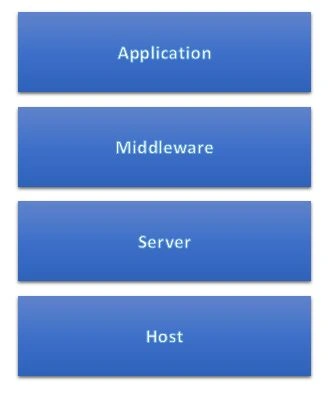
Application
As I described in my previous article, the OWIN and KATANA project is not a replacement for previous programming models but it does do the decoupled architecture between a web server and a web application. The developer can see the OWIN-related code in the startup file of the application with which the developer constructs the OWIN pipeline. You can view the same effect in OWIN related code and the registration of HTTP modules in System.Web.
Middleware
The Server has the responsibility of responding to any request from any client. When any server responds to a client request, it passes through the pipeline of OWIN components. The OWIN components are defined in the startup code of the developer's application. The pipeline components are called Middleware.
The OWIN application delegate is implemented by the OWIN middleware components so that it is callable as in the following:
Func<IDictionary<string, object>, Task>
Server
As I described earlier the Server is responsible for responding to the client request and in addition the server has the responsibility to open a network socket, listen for requests and send through the OWIN-pipeline. There are two main implementations of servers of a KATANA project as in the following:
- Microsoft.Owin.Host.SystemWeb
IIS and the ASP.NET pipeline acts as a host and a server also. When the developer chooses host, IIS handles host-level concerns like process activation and listens to the HTTP Request. The SystemWeb registers both ASP.NET HttpModule and HttpHandler to ambush requests so that then the stream is sent through the HTTP pipeline and sent through the OWIN pipeline that is specified by the user.
- Microsoft.Owin.Host.HttpListener
As the name describes, the server uses the HttpListener class of the .NET Framework to access a socket and send through the user specified OWIN pipeline. This is by default the server for KATANA self-host API and OWINHost.exe.
Host
There are the following main responsibilities of the Host:
- Underlying Process management
- Coordinating the workflow and the construction of an OWIN pipeline through which the request will be handled.
- IIS Host
IIS hosting is possible with the same process used in ASP.NET that is by using HttpModule and HttpHandler. IIS acts as a server and as a host. If you want to host by ASP.NET, then you need to write the following command in the Package Manager Console:install-package Microsoft.Owin.Host.SystemWeb
Custom Host

Now in KATANA, the developer can host applications with their own custom process. It can be your window service, console application and so on. This is as similar as self-host.
OWIN Host

The OWIN Host is the default hosting server of any web applications. The developer can use this default server rather then using the custom host. OwinHost.exe is used in a KATANA component for hosting.
In the following example I am enabling the Windows Authentication in IIS Express. For this I'll continue it with my previous application:
Step 1: Select your application and open the properties window by F4.
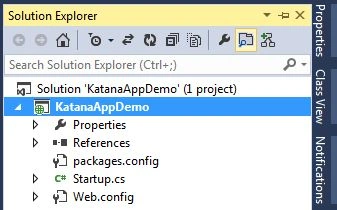
Step 2: Set Anonymous Authentication to Disable and Enable the Windows Authentication

Self Hosting of ASP.NET Web API by OWIN
In this example you will see the use of the Microsoft.Owin.Host.HttpListener package with which the HTTP Server is used to self-host the OWIN applications.
Step 1: Create a new Console Application
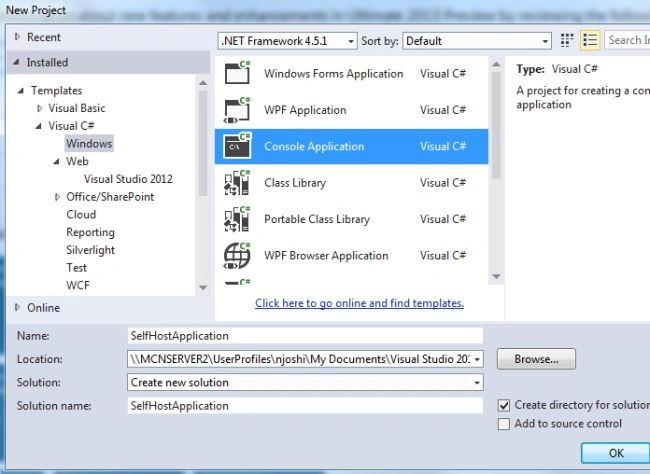
Step 2: Open Package Manager Console and enter the following command:
Install-Package Microsoft.AspNet.WebApi.OwinSelfHost -Pre

Step 3: In your Solution Explorer, select your project and add a class to configure API for self host

Enter the class name Startup and replace your code with the following code:
using Owin;
using System.Web.Http;
namespace SelfHostApplication
{
class Startup
{
public void Configuration(IAppBuilder MyApp)
{
HttpConfiguration HC = new HttpConfiguration();
HC.Routes.MapHttpRoute(name: "DefaultApi", routeTemplate: "api/{controller}/{id}",
defaults: new { id = RouteParameter.Optional }
);
MyApp.UseWebApi(HC);
}
}
}
You need to include the following assembly:
using Owin;
using System.Web.Http;
Step 4: Let's add a controller by adding a class named ValuesController
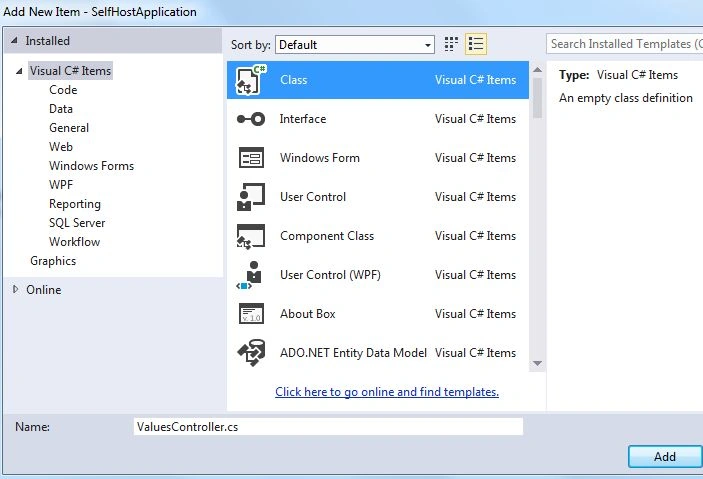
Enter the following code replacing the existing one:
using System.Collections.Generic;
using System.Web.Http;
namespace SelfHostApplication
{
public class ValuesController : ApiController
{
public IEnumerable<string> Get()
{
return new string[] {"Hello", "Katana" };
}
public string Get(int id)
{
return "Owin";
}
}
}
Step 5: Now in this step we start OWIN Host and and create a HttpClient to make a request. Go to your Program.cs file and replace the code with the following code:
using Microsoft.Owin.Hosting;
using System;
using System.Net.Http;
namespace SelfHostApplication
{
public class Program
{
static void Main(string[] args)
{
string address = "http://localhost:9000/";
//Strating OWIN Host
using (WebApp.Start<Startup>(url: address))
{
HttpClient HtClient = new HttpClient();
var Response = HtClient.GetAsync(address + "api/values").Result;
Console.WriteLine(Response);
Console.WriteLine(Response.Content.ReadAsStringAsync().Result);
}
Console.ReadLine();
}
}
}
Step 6: Debug you application by pressing F5

Summary
So far this article introduces the architecture of KATANA, OWIN, Hosting types, Servers and so on. In this article I also described the use of Windows Authentication in KATANA and Self Hosting of ASP.NET Web API by OWIN.
Thanks for reading my article.
Guest UserPosted Sep 30, 2013, 11:53 AM
So how do you do Windows Authentication when self-hosting? I've seen numerous examples such as this where the WIndows Authenticaion is essentially delegated to IIS but none where the self-hosted app performs the WIndows Authentication