

Introduction
If you are working on React web applications, sometimes you have copies of the same logic in multiple components. Instead of writing the same logic/code in multiple places, can we have logic in the single component and share it across the application? Yes, there is a solution for sharing the common logic/component across the multiple components in the application. It is called Higher-Order Components. In this article, we are going to explore Higher-Order components and their use.
Higher-Order Components
- The Higher-Order component is simply called HOC.
- A Higher-Order component is a function that takes a component and returns a new component by adding additional functionalities to the component.
- HOC is wrapped in the original component.
- Higher-Order component is an advanced technique in ReactJS for reusing component logic.
- HOCs are not part of the React API. But, It is a pattern that emerges from React’s compositional nature.
- Most of the third-party libraries are using this feature to write another library.
The examples of HOCs are Redux's connect.
import React from 'react'

export default function HOCFunction(OriginalComponent) {
  class HOCClass extends React.Component {
    constructor(props) {
      super(props);
      this.state = {
        data: "Data from HOC Component"
      };
    }

    componentDidMount() {
      this.setState({
        data: "Data from HOC"
      });
    }

    render() {
      return (
        <div style={{ backgroundColor: "#74f795", padding: "10px" }}>
          <h1 style={{ color: "red" }}>This is HOC Class</h1>
          <OriginalComponent {...this.props} data={this.state.data} />
          <br />
        </div>
      );
    }
  }
  return HOCClass
}
The above code snippet is a simple example of the HOC. In the above code,
- Created higher-order component called "HOCFunction".
- An input of "HOCFunction" is another component.
- In the "HOCFunction" function, just creating a wrapper class called "HOCClass".
- Inside the "HOCClass", just return the original component by adding additional data to it.
We can consume the "HOCFunction" as follows,
import React from 'react';
import HOCFunction from "./HOC";

class MyComponent extends React.Component {
  render() {
    return (
      <div style={{ backgroundColor: "#c9d1ce", padding: "10px" }}>
        <h1>This is Original Component</h1>
        <h3 style={{ color: "red" }}>{this.props.data}</h3>
      </div>
    )
  }
}

MyComponent = HOCFunction(MyComponent);
export default MyComponent;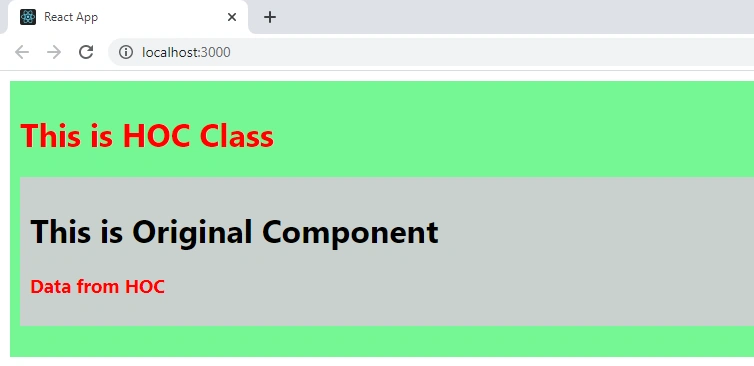
Example
Consider the scenario, there are two different components, and both having common search functionality. How to implement it using HOC?
I have created a simple application that has search functionality using HOC. In this application,
"HOC.js" have HOC called "SearchHOCFunction" and inputs of the HOC is component and data and it returns the "HOCClass" component.
render() {
  return (
	<div style={{ backgroundColor: "#74f795", padding: "10px" }}>
	  Search : <input type="text" onChange={this.changeValue}></input>
	  <br/>
	  <br/>
	  <OriginalComponent {...this.props} searchData={this.state.searchData} />
	  <br />
	</div>
  );
}
Inside the "HOCClass", implemented the search functionality.
data.forEach(item => {
	if (item.toUpperCase().includes(e.target.value.toUpperCase())) {
	  searchItem.push(item);
	}
});
Created the two components which are "Product" and "Brand". These two components are wrapped with the "SearchHOCFunction".
Product = SearchHOCFunction(Product, ProductData);
export default Product;

//Here ProductData is,
var ProductData = [
  "TV",
  "Mobile",
  "Laptop",
  "Headphone",
  "Desktop"
]Brand = SearchHOCFunction(Brand, BrandData);
export default Brand;
//Here BrandData is,
var BrandData = [
"Samsung",
"LG ",
"OnePlus",
"Apple",
"Microsoft"
]- Now both components have search functionality.
- Initially, all data will be displayed in both components.
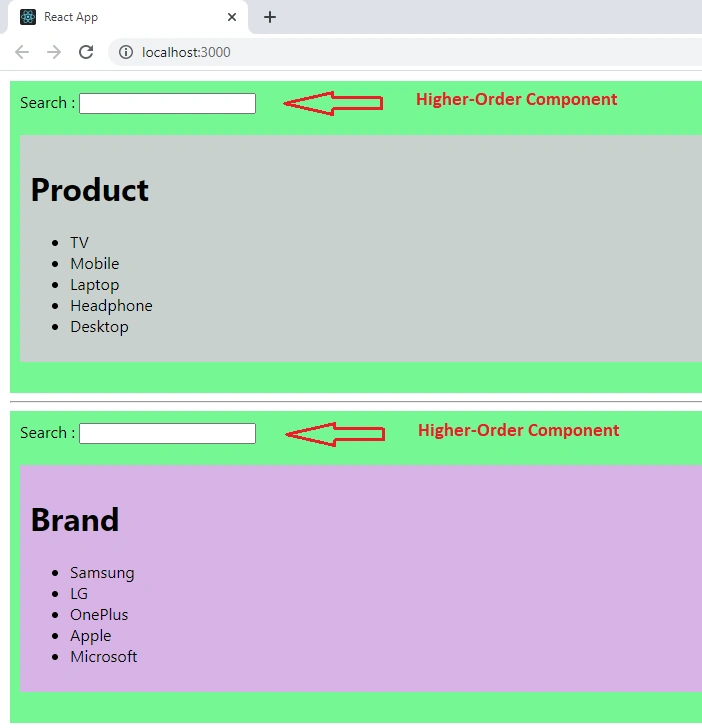
If you are typing the text in the search box (Higher-Order component), it will perform the search and return the search result data to the respective component, and then search result data will be displayed in the component.
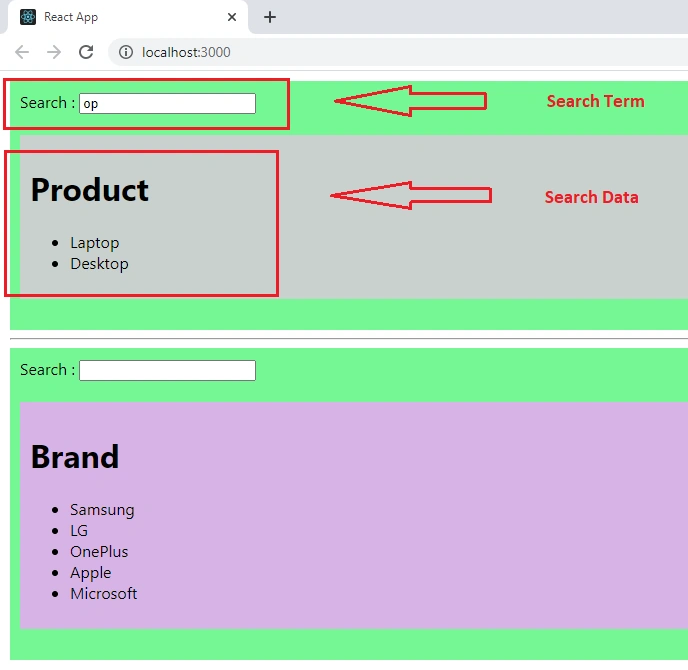
So, here instead of writing search functionality in the two components, created on HOC for search functionality and wrapped around the necessary components.
Summary
A Higher-Order component is a function that takes a component and returns a new component. The main use of HOC is to improve the reusability of particular component/logic across the application. I hope you have liked it and know about Higher-Order components and how to implement them in React applications.
Venkatasubbarao PolisettyPosted Aug 18, 2021, 2:15 AM
Useful Article!