

In this article we will see that how we can use sharepoint designer to create a new WebSite.
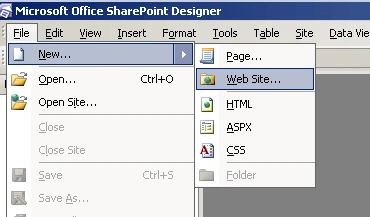
Step 1: Open Sharepoint designer and click on Web Site link under New of File menu Tab.
Step 2: Specify the location and name where you want to create a new website. Here in this case it is
http://spdevserver:1002/ -- it is Web application address where we want to create new web site. TestSite is the name of new website.
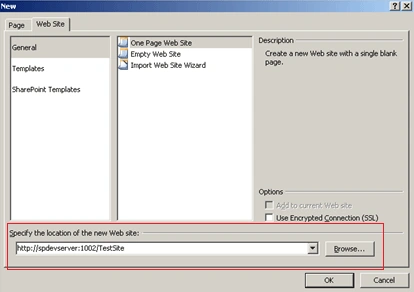
Step 3: After specifying the address click on Sharepoint Templates. You will see the list of template. Select the appropriate template and click OK.
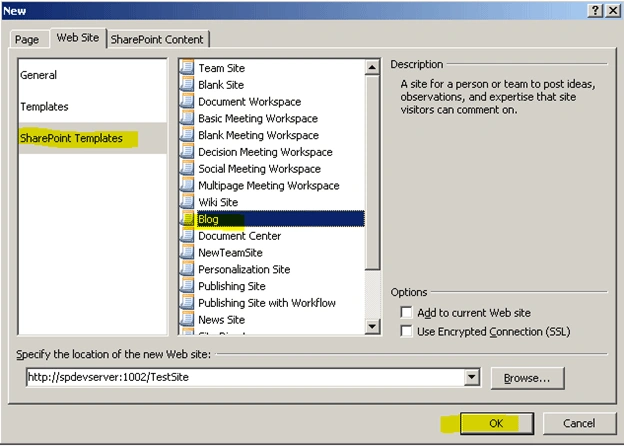
Step 4: Here in this case we have selected Blog site template. As we click on OK button our new website creation process is done.
Now you will see the below screen in Sharepoint designer.
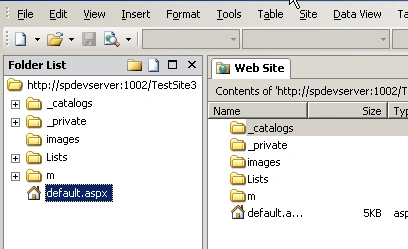
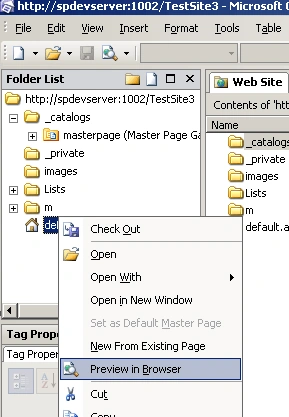
Now to see the newly created website right click on default.aspx and click on Preview in Browser.
You will see your website in new window.
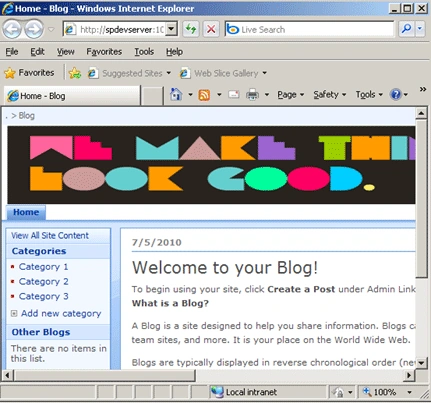
In this way we can create a new website using sharepoint designer 2007.
Yayat YatimanPosted May 19, 2021, 12:12 AM
Could you please, to share the template
Yayat YatimanPosted May 19, 2021, 12:12 AM
Hi ravish, i cannot found the web template like blog etc
Adenir BelshePosted Jul 27, 2011, 2:59 PM
When I try to create a website on the server (from my PC) using SharePoint Designer, I get the message: "Server error: The server extensions were unable to access the file "frontpg.lck". Please check the file permissions. Contact your Internet service provider or Web server administrator for more information." Our Administrator has to manually create a web on the server before I can either access it or publish to it. The server has all the extensions installed. Any ideas? Thanks
Mahesh ChandPosted Jul 6, 2010, 1:51 AM
Well done Ravish. Keep up the good work.