

Phase 01 — System Design Foundation | Topic 02
One of the most common mistakes developers make is starting to write code too early.
A requirement comes in:
“Build an Order Management System.”
And the first thought is often:
“Okay, which table should I create?”
But that is not the first question we should ask.
Before thinking about controllers, services, entities, databases, or APIs, we need to understand what problem the system is actually solving.
That is where System Design starts.
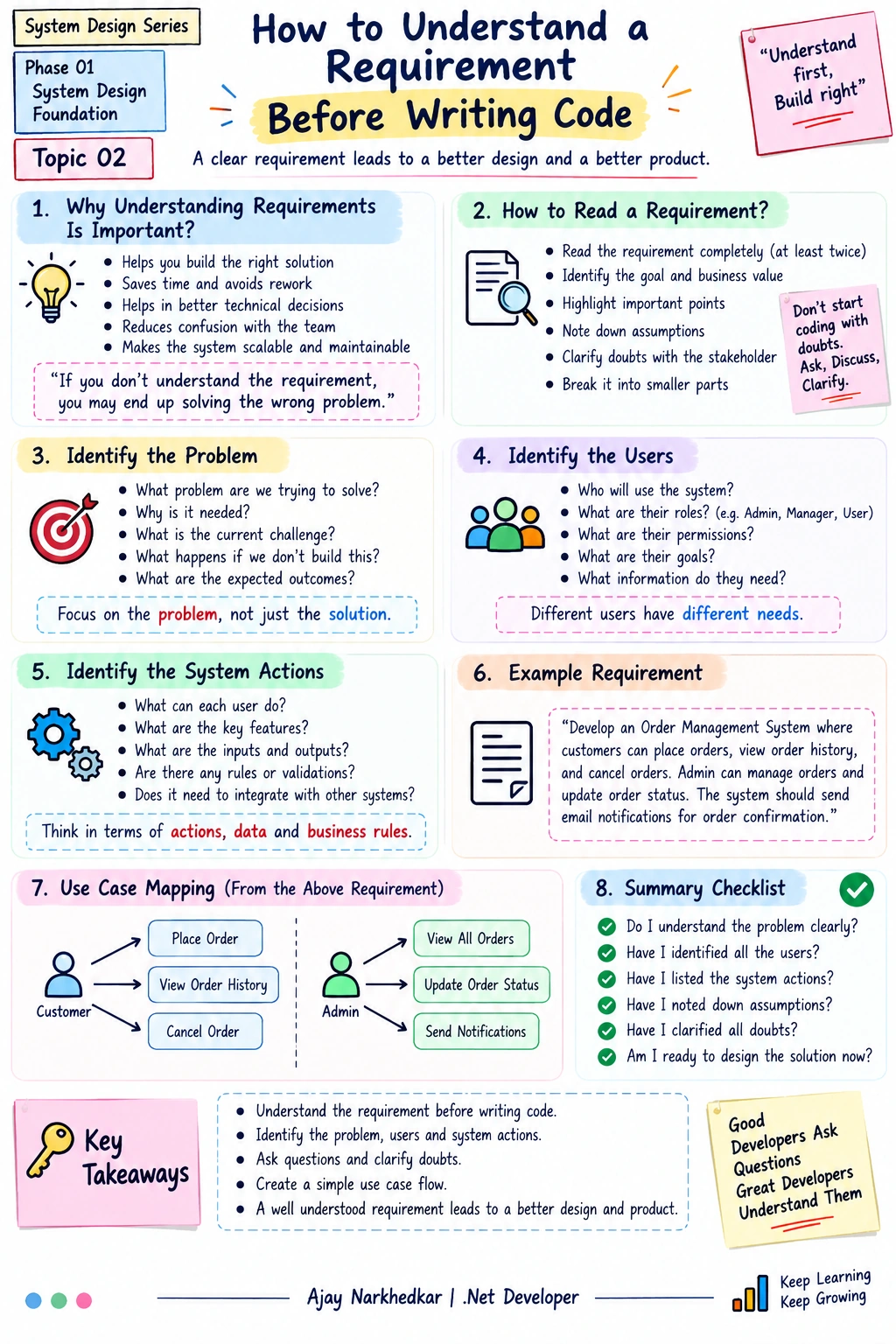
Why Is Understanding Requirements Important?
Imagine you receive this requirement:
“Develop an Order Management System where customers can place orders, view their order history, and cancel orders. Admin can manage orders and update order status. The system should send email notifications for order confirmation.”
It looks simple.
But if we start coding immediately, many questions remain unanswered:
Who are the users?
What can each user do?
What exactly happens when an order is placed?
Can an order be cancelled after shipment?
Who can update order status?
When should the email be sent?
What happens if email sending fails?
How many users will use the system?
What data needs to be stored?
These questions affect our APIs, database design, business logic, and architecture.
IMPORTANT:
A good system design starts with understanding the problem, not choosing the technology.
Step 1 — Read the Requirement Carefully
Don't read the requirement only once.
Read it and identify the important information.
For our example:
“Develop an Order Management System where customers can place orders, view order history, and cancel orders. Admin can manage orders and update order status. The system should send email notifications for order confirmation.”
We can immediately identify:
System: Order Management System
Users: Customer, Admin
Customer actions:
Place Order
View Order History
Cancel Order
Admin actions:
Manage Orders
Update Order Status
System action:
Send Order Confirmation Email
This simple breakdown already gives us a basic understanding of the system.
Step 2 — Identify the Problem
Before designing the solution, ask:
What problem are we trying to solve?
For this example:
Customers need a system to place and manage their orders, while administrators need a system to manage those orders.
That's the actual business problem.
The technology comes later.
We don't start with:
“Let's use ASP.NET Core Web API and SQL Server.”
We start with:
“What does the business need?”
Then we decide how technology can solve it.
Step 3 — Identify the Users
Next, identify who will interact with the system.
For our Order Management System:
              Order Management System
                       |
              -------------------
              |                 |
           Customer           Admin
Customer
The customer may:
Place an order
View order history
Cancel an order
Admin
The admin may:
View orders
Update order status
Manage orders
This is important because different users usually have different permissions.
For example:
Customer
   ↓
Can place an order

Admin
   ↓
Can update order status
A customer should not automatically have permission to perform administrative operations.
This later becomes part of our Authentication and Authorization design.
Step 4 — Identify the System Actions
Now ask:
What actions should the system perform?
For example:
Customer
   |
   ├── Place Order
   ├── View Order History
   └── Cancel Order

Admin
   |
   ├── View Orders
   └── Update Order Status

System
   |
   └── Send Confirmation Email
This is the beginning of our use-case mapping.
We are converting a simple business requirement into actions that the software must support.
Step 5 — Convert Requirements Into Use Cases
Let's create a simple mapping.
User | Use Case |
|---|---|
Customer | Place Order |
Customer | View Order History |
Customer | Cancel Order |
Admin | View Orders |
Admin | Update Order Status |
System | Send Confirmation Email |
Now the requirement is becoming much clearer.
Instead of having one large paragraph, we have individual responsibilities.
This makes the next design steps easier.
Step 6 — Ask What Happens Behind Each Action
This is where a developer starts thinking like a system designer.
Consider:
Place Order
What actually happens?
A simple flow could be:
Customer
   ↓
Place Order
   ↓
ASP.NET Core API
   ↓
Validate Request
   ↓
Create Order
   ↓
Save Order
   ↓
Send Confirmation
   ↓
Response
But even this raises more questions.
What if the database is unavailable?
What if email sending fails?
Should the customer wait for the email operation?
What if the customer clicks Place Order twice?
These questions eventually lead us to topics such as:
Transactions
Idempotency
Background Processing
Message Queues
Retry
Resilience
This is why System Design is not just about drawing architecture diagrams.
Step 7 — Think About the Data
Once we understand the actions, we can start thinking about the data.
For example:
Customer
Customer
---------
Id
Name
Email
Order
Order
---------
Id
CustomerId
OrderDate
Status
TotalAmount
Order Item
OrderItem
---------
Id
OrderId
ProductId
Quantity
Price
Notice something important.
We didn't start by designing these tables.
We first understood:
Problem → Users → Actions → Use Cases → Data
This is a much better approach.
Step 8 — Think About Business Rules
Requirements often contain hidden business rules.
For example:
Customer can cancel an order.
But can the customer cancel any order?
Probably not.
Maybe:
Pending       → Can Cancel
Confirmed     → Can Cancel
Shipped       → Cannot Cancel
Delivered     → Cannot Cancel
Cancelled     → Cannot Cancel
Now we have a business rule.
This rule should be implemented in the appropriate business/service layer rather than simply placing everything inside a controller.
For example:
public async Task CancelOrderAsync(int orderId)
{
    var order = await _orderRepository.GetByIdAsync(orderId);

    if (order == null)
        throw new Exception("Order not found.");

    // Business rule:
    // Only pending or confirmed orders can be cancelled.
    if (order.Status != OrderStatus.Pending &&
        order.Status != OrderStatus.Confirmed)
    {
        throw new InvalidOperationException(
            "This order cannot be cancelled.");
    }

    order.Status = OrderStatus.Cancelled;

    await _orderRepository.UpdateAsync(order);
}
The important point is not the exact code.
The important point is that requirements become business rules, and business rules become application logic.
Step 9 — Think About Non-Functional Requirements
Functional requirements tell us:
What should the system do?
But we also need to understand:
How should the system behave?
For example:
How many users will access it?
How many orders can be created per second?
How quickly should the API respond?
Should the system be available 24/7?
How secure should customer data be?
What happens if an external service fails?
These are Non-Functional Requirements.
For example:
Functional Requirement
        ↓
Customer can place an order

Non-Functional Requirement
        ↓
Order API should respond quickly
and support high traffic
We will explore Functional and Non-Functional Requirements in the upcoming topics.
A Simple Requirement-to-Design Process
As a developer, you can follow this simple process whenever you receive a new requirement:
Understand the Requirement
          ↓
Identify the Problem
          ↓
Identify the Users
          ↓
Identify User Actions
          ↓
Create Use Cases
          ↓
Identify Business Rules
          ↓
Identify Data
          ↓
Identify Functional Requirements
          ↓
Identify Non-Functional Requirements
          ↓
Start System Design
          ↓
Start Coding
This process prevents us from jumping directly into implementation.
A Real .NET Developer's Perspective
Let's say someone gives you this requirement:
“Build a Leave Management System.”
Don't immediately create:
LeaveController
LeaveService
LeaveRepository
LeaveDbContext
Instead, ask:
Who uses it?
Employee
Manager
HR
Admin
What can they do?
Employee
 ├── Apply Leave
 ├── View Leave Balance
 └── View Leave History

Manager
 ├── View Team Leave
 ├── Approve Leave
 └── Reject Leave

HR
 ├── Manage Leave Policies
 └── View Reports
Now the system is becoming clearer.
Only after understanding these requirements should we start thinking about:
APIs
Database
Authentication
Authorization
Services
Caching
Notifications
Background jobs
Architecture
This is the difference between simply writing code and designing a system.
A Small Checklist Before You Start Coding
Before creating your first controller, ask yourself:
Requirement
What problem are we solving?
What exactly does the business need?
Users
Who will use the system?
What can each user do?
Actions
What operations should the system support?
What happens during each operation?
Business Rules
What conditions must be satisfied?
What actions are allowed or not allowed?
Data
What information do we need to store?
How is the data related?
System Behaviour
How many users are expected?
How fast should the system respond?
What happens when something fails?
If you can answer these questions, you are already moving from coding thinking toward system design thinking.
IMPORTANT Takeaway
Don't start System Design with:
“Which technology should I use?”
Start with:
“What problem are we solving?”
Then move step by step:
Problem → Users → Actions → Use Cases → Business Rules → Data → Requirements → Design → Code
The better you understand the requirements, the better decisions you can make about your APIs, database, architecture, scalability, and overall system.
Keep learning. Keep designing. Keep building.
Join the conversation! Your thoughts help the community grow.