

SuiteLinksDelegate
It is a new delegate control introduced in SharePoint 2013. If you are looking to add a new link just next to “Sites, NewsFeed, SkyDrive” etc, on the top bar of your SharePoint site you can now do that with a new delegate control "SuiteLinksDelegate". The SuiteLinksDelegate control will allow us to modify the default links,
For Example: To add our own links, in the "suit links".
Header before

Step 1: Create One Empty SharePoint Project and provide the Solution Name and choose the Solution Path and click OK.
Step 2: Deploy the Solution as Farm Solution. Provide the Url in next screen and validate the connection.
Step 3: Add New UserControl to the Project from the Templates and provide a Name to it, in our case it is “MyCustomSuiteLinksDelegate”

Now our Solution Explorer looks as follows,

Step 4: Add reference to Microsoft.SharePoint.Portal dll.
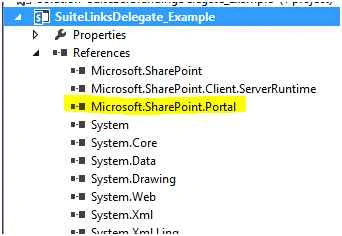
Step 5: Code snippet for the ascx.cs file.
- using System;
- using System.Web.UI;
- using System.Web.UI.WebControls;
- using System.Web.UI.WebControls.WebParts;
- using Microsoft.SharePoint;
- using Microsoft.SharePoint.Utilities;
- using Microsoft.SharePoint.WebControls;
- using System.Globalization;
- using System.IO;
- using System.Collections;
- using Microsoft.SharePoint.Portal;
- using Microsoft.SharePoint.Portal.WebControls;
- namespace SuiteBarBrandingDelegate_Example.ControlTemplates.SuiteLinksDelegate_Example
- {
- public partial class MyCustomSuiteLinksDelegate: MySuiteLinksUserControl
- {
- protected void Page_Load(object sender, EventArgs e)
- {}
- protected override void Render(HtmlTextWriter writer)
- {
- writer.RenderBeginTag(HtmlTextWriterTag.Style);
- writer.Write(".ms-core-suiteLinkList {display: inline-block;}");
- writer.RenderEndTag();
- writer.AddAttribute(HtmlTextWriterAttribute.Class, "ms-core-suiteLinkList");
- writer.RenderBeginTag(HtmlTextWriterTag.Ul);
- RenderSuiteLink(writer, "http://AboutUs/", "About Us", "lnkSearchLink", false);
- RenderSuiteLink(writer, "http://ContactUs/", "Contact Us", "lnkSearchLink", false);
- RenderSuiteLink(writer, "http://Feedback", "Requisition Manager", "lnkSearchLink", false);
- writer.RenderEndTag();
- base.Render(writer);
- }
- }
- }
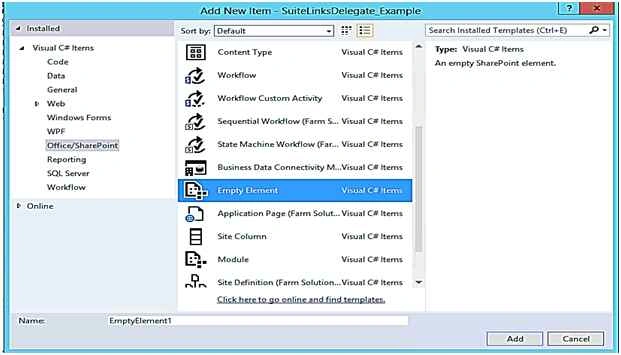
Step 7: Click on elements.xml file and paste the following code snippet inside the elements tag.
- <?xml version="1.0" encoding="utf-8"?>
- <Elements xmlns="http://schemas.microsoft.com/sharepoint/">
- <!-- Adding DelegateControl reference to our custom SuiteSuiteLinksDelegate Control -->
- <Control ControlSrc="/_controltemplates/15/SuiteLinksDelegate_Example\MyCustomSuiteSuiteLinksDelegate.ascx" Id="SuiteLinksDelegate" Sequence="90" /> </Elements>
The final outcome will look as in the following,

Mohammed IbrahimPosted Dec 3, 2015, 7:37 PM
nice
Humayun Kabir MamunPosted Dec 3, 2015, 7:37 AM
Nice...
Santhakumar MunuswamyPosted Nov 29, 2015, 11:46 PM
Good one
Raja TPosted Nov 29, 2015, 11:08 PM
Nice,Thanks for sharing
Ankur MistryPosted Nov 29, 2015, 4:05 AM
Nice article
Mukesh KumarPosted Nov 29, 2015, 3:19 AM
Nice Share