

Introduction
In this article, we will learn how to Create a custom input mask directive in Angular application, using input mask directive we can control user input and format values in a specific format.
Prerequisites
- Basic Knowledge of Angular 2 or higher
- Visual Studio Code
- Node and NPM installed
- Bootstrap (Optional)
Create an Angular Project
Create an Angular project by using the following command.
ng new angappNow install Bootstrap by using the following command,
npm install bootstrap --saveNow open the styles.css file and add Bootstrap file reference. To add a reference in the styles.css file add this line.
@import '~bootstrap/dist/css/bootstrap.min.css';Create Directive
Create a new directive using the Angular CLI command.
ng generate directive InputmaskNow open InputMask .directive.ts file and add following code.
import { Directive, ElementRef, HostListener, Input } from '@angular/core';

@Directive({
  selector: '[appInputMask]'
})
export class InputMaskDirective {
  @Input() appInputMask: string = '';

  constructor(private el: ElementRef) { }

  @HostListener('input', ['$event']) onInput(event: InputEvent) {
    const input = event.target as HTMLInputElement;
    const originalValue = input.value.replace(/\D/g, '');
    let maskedValue = '';

    let valueIndex = 0;
    for (let maskIndex = 0; maskIndex < this.appInputMask.length; maskIndex++) {
      if (/\d/.test(this.appInputMask[maskIndex])) {
        if (originalValue[valueIndex]) {
          maskedValue += originalValue[valueIndex++];
        } else {
          break;
        }
      } else {
        maskedValue += this.appInputMask[maskIndex];
      }
    }

    input.value = maskedValue;
  }
}
Now open app.component.html file and add the following code.
<div class="container" style="margin-top:10px;margin-bottom: 24px;">
  <div class="col-sm-12 btn btn-info">
    Input Mask Directive in Angular Application
  </div>
</div>
<div class="container">
  <input type="text" class="form-control" [appInputMask]="'(99) 999-999-9999'">
</div>
Now open app.module.ts and following code.
import { NgModule } from '@angular/core';
import { BrowserModule } from '@angular/platform-browser';
import { FormsModule } from '@angular/forms';
import { HttpClientModule } from '@angular/common/http';
import { AppRoutingModule } from './app-routing.module';
import { AppComponent } from './app.component';
import { InputMaskDirective } from './InputMask.directive';


@NgModule({
  declarations: [
    AppComponent, InputMaskDirective
  ],
  imports: [
    BrowserModule,
    AppRoutingModule,
    FormsModule,
    HttpClientModule
  ],
  providers: [],
  bootstrap: [AppComponent],

})
export class AppModule { }
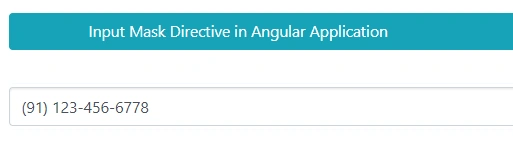
Now run the application using npm start and check the result.
Summary
In this article, we learned how to Create a custom input mask directive in Angular application.
Join the conversation! Your thoughts help the community grow.