

- try/catch block
- onError event
try {
//Executable script
}
catch (errorObject) {
//Error handler
}
finally {
//Code to execute all the time,irrespective of error occurrence.
}
Whenever an error occurs while processing code present in try block, it will hand it over to catch block for executing the code present in it. A try/catch block cannot handle syntax errors like semicolon missing. So, it cannot handle errors generated by javascript engine. Now, we will see its functionality by an example. Create a sample web application in VS 2008 named as JSErrorHandling with a label added to it and add below js code to the script tag:
<script language="javascript" type="text/javascript">
function GetTextValue() {
try {
//Undefined control.
var data = document.getElementById("txtData").value;
}
catch (errorObject) {
document.getElementById("lblJSError").innerText = errorObject;
}
//Another try block[User Defined exception]
try {
var number = "q1";
if (isNaN(number)) {
throw "number is not correct";
}
}
catch (errorObject) {
document.getElementById("lblJSError").innerText += "\r\n" + errorObject;
}
//Another try block[User Defined exception with parameters and finally block]
try {
var number = "q1";
if (isNaN(number)) {
var error = new Array("number is not correct", number);
throw error;
}
}
catch (errorObject) {
document.getElementById("lblJSError").innerText += "\r\n" + errorObject[0] + " in " + errorObject[1];
}
finally {
document.getElementById("lblJSError").innerText += "\r\nComplete processing";
}
}
</script>
When we execute this script, the output will be as shown below:
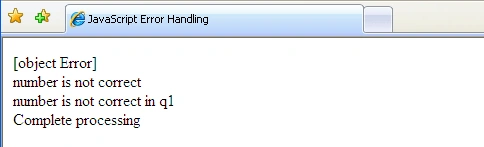
So, by using try/catch block we can handle the exceptions and display it in a proper way on page. We can have mulitple catch blocks for a try block, which is not supported by IE. The syntax will be as shown below:
Another try block[Multiple catch blocks]
try {
var number = 10;
if (number < 20) {
throw "InvalidRange";
}
number = "q2";
if (isNaN(number)) {
throw "IncorrectNumber";
}
}
catch (errorObject if errorObject == "InvalidRange") {
document.getElementById("lblJSError").innerText += "\r\n" +"Not a Valid Range";
}
catch (errorObject if errorObject == "IncorrectNumber") {
document.getElementById("lblJSError").innerText += "\r\n" +"Not a correct Number";
}
The next approach is using onError event of the window object by using below script:
function GetTextValue() {
//Undefined control.
var data = document.getElementById("txtData").value;
}
function globalError() {
document.getElementById("lblJSError").innerText += "\r\n" + arguments[0] + " in " + arguments[1] + " at line " + arguments[2];
return true;
}
window.onerror = globalError;
Whenever a error occurs, it will pass the control to globalError function with parameter 1 as error description and parameter 2 as URL and parameter 3 as line number. When we return true from error handler, it will assume error is handled by error handler.
I am ending up the things here. I hope this article will be helpful for all.
Join the conversation! Your thoughts help the community grow.