

Introduction
Definition
- AsynchronousIt implies that the different parts of a program run simultaneously.
- Event-BasedThe program executes the code based on the events generated while the program is running. For example, a button click triggers an event and then the program’s event handler receives this event and does some work accordingly.
- Observable sequencesObservable and Flowable take some items and pass onto their subscribers. So, these items are called as Observable sequences or Data Stream.
- RxJava frees us from the callback hell by providing the composing style of programming. We can plug in various transformations that resemble the Functional programming.
RxJava uses Observer and observable pattern where the subject all the time maintains its Observers and if any change occurs, then it notifies them by calling one of their methods.
3 O's of RxJava
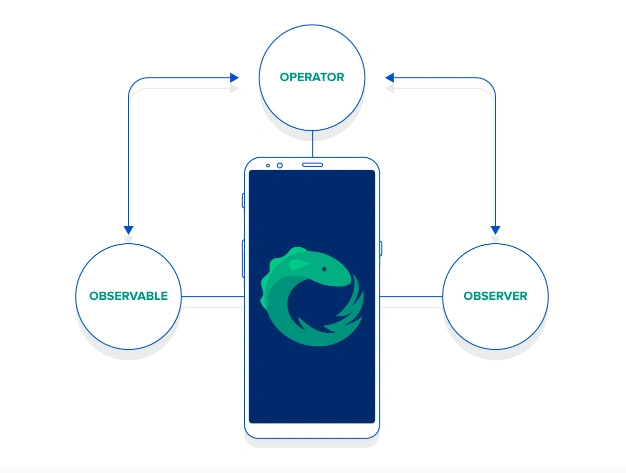
The stream abstraction is implemented through three main constituents - Observables, Observers, and Operators. Observables emit data and observers consume that emitted data. Emissions from Observable objects can further be modified, transformed, and manipulated by chaining Operator calls.
Before implementing some code, we must add a gradle in our build.gradle.
- // reactive
- implementation 'io.reactivex.rxjava2:rxandroid:2.0.2'
- // Because RxAndroid releases are few and far between, it is recommended you also
- // explicitly depend on RxJava's latest version for bug fixes and new features.
- implementation 'io.reactivex.rxjava2:rxjava:2.1.7'
Observable
- Observable<Integer> observable = Observable.create(new Observable.OnSubscribe<Integer>() {
- @Override public void call(Subscriber<? super Integer> subscriber) {
- subscriber.onNext(1);
- subscriber.onNext(2);
- subscriber.onNext(3);
- subscriber.onCompleted();
- }
- });
- Observable.just(1, 2, 3); // 1, 2, 3 will be emitted, respectively
Observer
Observer is another component of RxJava. Observers are subscribed to the Observables whenever there is a change or an event of interest occurs it immediately notifies by the following events.
- Observer#onNext(T) - invoked when an item is emitted from the stream
- Observable#onError(Throwable) - invoked when an error has occurred within the stream
- Observable#onCompleted() - invoked when the stream is finished emitting items.
- Observable<Integer> observable = Observable.just(1, 2, 3);
- observable.subscribe(new Observer<Integer>() {
- @Override public void onCompleted() {
- Log.d("Test", "In onCompleted()");
- }
- @Override public void onError(Throwable e) {
- Log.d("Test", "In onError()");
- }
- @Override public void onNext(Integer integer) {
- Log.d("Test", "In onNext():" + integer);
- }
- });
In onNext(): 1
In onNext(): 2
In onNext(): 3
In onNext(): 4
In onCompleted()
The items emitted by Observables are manipulated before notifying the subscribed Observer object(s). There are many operators available in RxJava including map, filter, reduce, flatmap etc. Let's look at the map example since we are modifying the above example.
Output produced is every number multiplied by 3 i.e, 3,6,9,12,15.
How it simplifying things.
Let's see the difference between these two approaches. Firstly, we have a very popular and old way to make a network call. AsyncTask has been the traditional way to make calls until fast networking libraries came into the picture.
Create an inner class and extend to AsyncTask, make network operation, and in postExecute(), update the UI. This is the approach this network call uses. Everything seamlessly looks good until the phone rotates. Once the phone is rotated, the code gets blown up and the app gets crashes because the activity recreates itself.
Memory leaks occur in this approach because this inner class has a reference of the outer class. If we want to chain another long operation, then we have to nest the other tasks which will become a non-readable code.
However, in RxJava, this call looks different as shown below.
In this approach, when an activity is destroyed, we can unsubscribe to the activity. A call does not execute when an activity is destroyed so a potential crash may occur or memory/context leaks are avoided.
Operators
- Observable.just(1, 2, 3, 4, 5).map(new Func1<Integer, Integer>() {
- @Override public Integer call(Integer integer) {
- return integer * 3;
- }
- }).subscribe(new Observer<Integer>() {
- @Override public void onCompleted() {
- // ...
- }
- @Override public void onError(Throwable e) {
- // ...
- }
- @Override public void onNext(Integer integer) {
- // get output here
- }
- });
Network Call - AsyncTask vs RxJava
- public class NetworkRequestCall extends AsyncTask<Void, Void, User> {
- private final int userId;
- public NetworkRequestCall(int userId) {
- this.userId = userId;
- }
- @Override protected User doInBackground(Void... params) {
- return networkService.getUserDetails(userId);
- }
- @Override protected void onPostExecute(User user) {
- nameTextView.setText(user.getName());
- // ...set other views
- }
- }
- private void onButtonClicked(Button button) {
- new NetworkRequestCall(123).execute()
- }
- private Subscription subscription;
- private void onButtonClicked(Button button) {
- subscription = networkService.getObservableUser(123)
- .subscribeOn(Schedulers.io())
- .observeOn(AndroidSchedulers.mainThread())
- .subscribe(new Action1<User>() {
- @Override public void call(User user) {
- nameTextView.setText(user.getName());
- // ... set other views
- }
- });
- }
- @Override protected void onDestroy() {
- if (subscription != null && !subscription.isUnsubscribed()) {
- subscription.unsubscribe();
- }
- super.onDestroy();
- }
Join the conversation! Your thoughts help the community grow.