

Many developers know how to do this but this will be helpful for beginners.
Source
<form id="form1" runat="server">
<div>
<div>
<asp:Panel ID="pnlText" runat="server" GroupingText="TextBoxDemo" style="left: 21px; position: absolute; top: 80px"
Height="87px">
<table align="center">
<tr>
<td>
<asp:TextBox ID="TextBox1" runat="server" onkeyup="sync()" Style="left: 259px; position: absolute; top: 14px"></asp:TextBox>
</td>
<td style="width: 142px">
<asp:TextBox ID="TextBox2" runat="server" Enabled="false" Style="left: 263px; position: absolute; top: 52px"></asp:TextBox>
</td>
</tr>
</table>
</asp:Panel>
</div>
<div>
<asp:Panel ID="pnlCheck" runat="server" GroupingText="CheckBoxDemo" Style="left: 23px;position: absolute; top: 271px">
<table align="center">
<tr>
<td>
<asp:CheckBox ID="Chk1" runat="server" onclick="document.getElementById('CheckBox1').checked = this.checked;"
Style="left: 232px; position: absolute; top: 23px" />
</td>
<td>
<asp:CheckBox ID="CheckBox1" Enabled="false" runat="server" Style="left: 365px; position: absolute; top: 25px" />
</td>
</tr>
</table>
</asp:Panel>
</div>
<div>
<asp:Panel ID="pnlDDL" runat="server" GroupingText="DropDownDemo" style="left: 22px; position: absolute; top: 181px">
<table align="center">
<tr>
<td>
<asp:DropDownList ID="ddl1" runat="server" onchange="javascript:update();" OnSelectedIndexChanged="ddl1_SelectedIndexChanged"
Style="left: 263px; position: absolute; top: 47px">
<asp:ListItem Value="1"></asp:ListItem>
<asp:ListItem Value="2"></asp:ListItem>
<asp:ListItem>3</asp:ListItem>
<asp:ListItem Value="4"></asp:ListItem>
</asp:DropDownList>
</td>
<td>
<asp:DropDownList ID="DropDownList1" Enabled="false" runat="server" Style="left: 361px; position: absolute;top: 47px">
<asp:ListItem>1</asp:ListItem>
<asp:ListItem>2</asp:ListItem>
<asp:ListItem>3</asp:ListItem>
<asp:ListItem>4</asp:ListItem>
<asp:ListItem></asp:ListItem>
</asp:DropDownList>
</td>
</tr>
</table>
</asp:Panel>
</div>
//Script For Textboxes
<script type="text/javascript">
function sync()
{
var n1 = document.getElementById('TextBox1');
var n2 = document.getElementById('TextBox2');
n2.value = n1.value;
}
</script>
//Script For Dropdown
<script language="javascript" type="text/javascript">
function update() {
document.getElementById('<%= DropDownList1.ClientID %>').value = document.getElementById('<%= ddl1.ClientID %>'
.value;
}
</script>
</div>
</form>
Another script which you can also use for dropdownlist is as follows
<script type="text/javascript">
function MyApp(sender){
var Match = false;
var DDL2 = document.getElementById('DropDownList1');
for(var i=0; i< DDL2.length-1; i++){
Match = sender.value==loDDL2.options[i].value;
if(Match)
DDL2.selectedIndex = sender.selectedIndex;
}
}
</script>
If you use the above script change onchange which was written as earlier as onchange="javascript: MyApp (this);"
Or you can also add the following in the page_Load Event for the required dropdown you needed:
ddl1.Attributes.Add("OnChange", "MyApp(this)");
Sample Images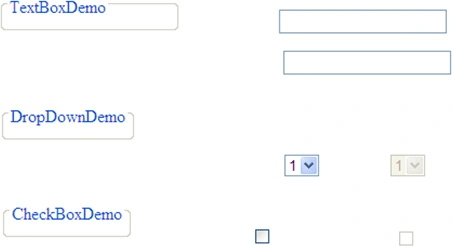
Output Image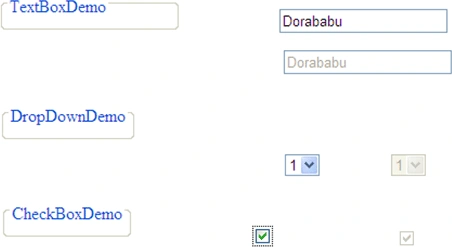
The sample code is attached; if you have any issues then let me know.
Join the conversation! Your thoughts help the community grow.