

Introduction
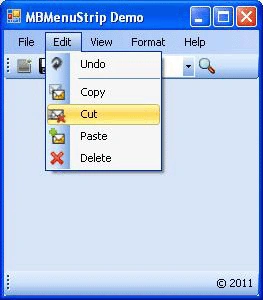
Why another MenuStrip? The standard MenuStrip is too limited in functionality and I couldn't find a custom control written that did all that I wanted. This is a User Control with Microsoft Office 2007 Visual Style. It is simple to use, just drop it onto the form and use it like the normal MenuStrip.
Background
MBMenuStrip is a MenuStrip that inherits all the properties of the simple MenuStrip control. I added Microsoft Office 2007 like visuals to MBMenuStrip. The language used is VB.NET. There are so many classes that provide the same functionality, but for that we need to write a minimum of two lines of code to renderer the class in our application. MBMenuStrip is the MenuStrip that already contains a MBRenderer class. You just add a reference for the MBMenuStrip.dll and used it by dragging and dropping.
Code
The concept for this MenuStrip came from the Microsoft Office 2007 context menu. I organized methods of MBMenuStrip into layers like this.
The following methods are responsible for rendering a simple MenuStrip like Microsoft Office.
The following method renders the background of a MBMenuStrip item:
- Protected Overrides Sub OnRenderMenuItemBackground_
- (ByVal e As System.Windows.Forms.ToolStripItemRenderEventArgs)
- If e.Item.Selected Then
- Dim g As Graphics = e.Graphics
- g.SmoothingMode = SmoothingMode.HighQuality
- Dim pa As GraphicsPath = New GraphicsPath()
- Dim rect As Rectangle = New Rectangle(2, 1, e.Item.Size.Width - 2, _
- e.Item.Size.Height - 1)
- DrawArc(rect, pa)
- Dim lgbrush As LinearGradientBrush = New LinearGradientBrush_
- (rect, Color.White, Color.White, LinearGradientMode.Vertical)
- Dim pos As Single() = New Single(3) {0.0F, 0.4F, 0.45F, 1.0F}
- Dim colors As Color() = New Color(3) {GetColor(0, 50, 100), _
- GetColor(0, 0, 30), Color.FromArgb(R0, G0, B0), GetColor(0, 50, 100)}
- Dim mix As ColorBlend = New ColorBlend()
- mix.Colors = colors
- mix.Positions = pos
- lgbrush.InterpolationColors = mix
- g.FillPath(lgbrush, pa)
- g.DrawPath(New Pen(StrokeColor), pa)
- lgbrush.Dispose()
- Else
- MyBase.OnRenderMenuItemBackground(e)
- End If
- End Sub
The following method renders the an image of a
MBMenuStrip item:
- Protected Overrides Sub OnRenderItemImage_
- (ByVal e As System.Windows.Forms.ToolStripItemImageRenderEventArgs)
- e.Graphics.SmoothingMode = SmoothingMode.HighQuality
- If Not (e.Image Is Nothing) Then
- imageheight = e.Item.Height - offsety * 2
- imagewidth = ((Convert.ToDouble(imageheight) / _
- e.Image.Height) * e.Image.Width)
- End If
- e.Graphics.DrawImage(e.Image, New Rectangle_
- (offsetx, offsety, imagewidth, imageheight))
- End Sub
The following method handles the painting of the
MBMenuStrip:
- Public Sub DrawArc(ByVal re As Rectangle, ByVal pa As GraphicsPath)
- Dim _radiusX0Y0 As Int32 = _radius, _radiusXFY0 As Int32 = _radius, _
- _radiusX0YF As Int32 = _radius, _radiusXFYF As Int32 = _radius
- pa.AddArc(re.X, re.Y, _radiusX0Y0, _radiusX0Y0, 180, 90)
- pa.AddArc(re.Width - _radiusXFY0, re.Y, _radiusXFY0, _radiusXFY0, 270, 90)
- pa.AddArc(re.Width - _radiusXFYF, _
- re.Height - _radiusXFYF, _radiusXFYF, _radiusXFYF, 0, 90)
- pa.AddArc(re.X, re.Height - _radiusX0YF, _radiusX0YF, _radiusX0YF, 90, 90)
- pa.CloseFigure()
- End Sub
Using the Code

It is very easy to use the
MBMenuStrip in your application. Simply add the reference of the DLL to your application and just drag and drop. History
MBMenuStripVersion 1.0
Karthik Muthu KaruppanPosted Apr 14, 2015, 4:33 PM
Good start