

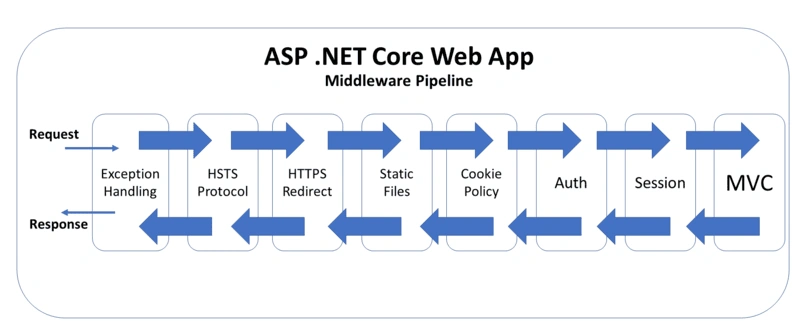
The Middleware Pipeline is one of the most important concepts in ASP.NET Core. It defines how HTTP requests and responses are handled inside an application. Every request flows through a sequence of components called middleware, and each middleware can inspect, modify, or terminate the request before passing it to the next component in the pipeline.
Understanding middleware is essential for building secure, scalable, and high-performance web applications. Features such as authentication, logging, error handling, routing, and compression are all implemented using middleware.
What is Middleware?
Middleware is a software component that:
Receives an HTTP request
Can modify the request or response
Can pass control to the next middleware
Can stop the pipeline completely
Each middleware:
Executes code before calling the next middleware.
Calls the
nextdelegate (optional).Executes code after the next middleware finishes.
How the Middleware Pipeline Works
When a request arrives:
It enters the first middleware.
The middleware decides to:
Process the request and pass it further, OR
Short-circuit the request and return a response directly.
The response travels backward through the middleware chain.
This forms a pipeline or chain of execution.
Basic Pipeline Example
In Program.cs:
var builder = WebApplication.CreateBuilder(args);
var app = builder.Build();

app.Use(async (context, next) =>
{
    Console.WriteLine("Middleware 1: Before");
    await next();
    Console.WriteLine("Middleware 1: After");
});

app.Use(async (context, next) =>
{
    Console.WriteLine("Middleware 2: Before");
    await next();
    Console.WriteLine("Middleware 2: After");
});

app.Run(async context =>
{
    await context.Response.WriteAsync("Hello from endpoint");
});

app.Run();
Output Order
Middleware 1: Before
Middleware 2: Before
Hello from endpoint
Middleware 2: After
Middleware 1: After
This shows request going forward and response coming backward.
Types of Middleware
There are three main types:
1. Built-in Middleware
ASP.NET Core includes many built-in middlewares:
UseAuthentication()UseAuthorization()UseRouting()UseHttpsRedirection()UseStaticFiles()UseCors()UseResponseCompression()
Example
app.UseHttpsRedirection();
app.UseAuthentication();
app.UseAuthorization();
app.UseRouting();
2. Inline (Anonymous) Middleware
Used directly with app.Use():
app.Use(async (context, next) =>
{
    await context.Response.WriteAsync("Before Next\n");
    await next();
    await context.Response.WriteAsync("After Next\n");
});
Useful for logging, validation, and debugging.
3. Custom Middleware Class
Create a middleware class:
public class RequestLoggingMiddleware
{
    private readonly RequestDelegate _next;

    public RequestLoggingMiddleware(RequestDelegate next)
    {
        _next = next;
    }

    public async Task Invoke(HttpContext context)
    {
        Console.WriteLine($"Request: {context.Request.Path}");
        await _next(context);
    }
}
Register it:
app.UseMiddleware<RequestLoggingMiddleware>();Use, Run, and Map
ASP.NET Core provides three ways to add middleware.
Use()
Calls the next middleware:
app.Use(async (context, next) =>
{
    Console.WriteLine("Before");
    await next();
    Console.WriteLine("After");
});
Run()
Terminates pipeline and does not call next:
app.Run(async context =>
{
    await context.Response.WriteAsync("Request handled.");
});
Map()
Branches pipeline based on path:
app.Map("/admin", adminApp =>
{
    adminApp.Run(async context =>
    {
        await context.Response.WriteAsync("Admin Panel");
    });
});
Ordering Matters
Middleware order significantly affects how the application behaves:
Incorrect Order:
app.UseAuthorization();
app.UseAuthentication(); // WRONG
Correct Order:
app.UseAuthentication();
app.UseAuthorization();
Authentication must come before Authorization.
Another example:
app.UseStaticFiles();
app.UseRouting();
If static files were after routing, they may never execute correctly.
Short-Circuiting the Pipeline
A middleware can stop further execution:
app.Use(async (context, next) =>
{
    if (context.Request.Path == "/blocked")
    {
        context.Response.StatusCode = 403;
        return;
    }

    await next();
});
Error Handling Middleware
Global exception handling:
app.UseExceptionHandler("/error");Custom global error middleware:
app.Use(async (context, next) =>
{
    try
    {
        await next();
    }
    catch(Exception ex)
    {
        context.Response.StatusCode = 500;
        await context.Response.WriteAsync("Internal Server Error");
    }
});
Adding Middleware via Extensions
Better reusable pattern:
public static class MiddlewareExtensions
{
    public static IApplicationBuilder UseRequestLogger(this IApplicationBuilder app)
    {
        return app.UseMiddleware<RequestLoggingMiddleware>();
    }
}
Use:
app.UseRequestLogger();Dependency Injection in Middleware
Middleware fully supports DI:
public class AuditMiddleware
{
    private readonly RequestDelegate _next;
    private readonly ILogger<AuditMiddleware> _logger;

    public AuditMiddleware(RequestDelegate next, ILogger<AuditMiddleware> logger)
    {
        _next = next;
        _logger = logger;
    }

    public async Task Invoke(HttpContext context)
    {
        _logger.LogInformation("Request incoming...");
        await _next(context);
    }
}
Middleware vs Filters
| Middleware | Filters |
|---|---|
| Applies to all requests | MVC-only |
| Cross-cutting concerns | Controller logic |
| Runs outside MVC | Runs inside MVC |
| Used for security/logging | Used for API behavior |
Common Use-Cases
Middleware is used for:
Authentication & Authorization
Logging and Monitoring
Error Handling
Caching
Compression
Rate Limiting
CORS
Security Headers
Request Validation
Best Practices
✅ Keep middleware simple
✅ Order pipeline carefully
✅ Avoid heavy logic in middleware
✅ Handle exceptions globally
✅ Use custom middleware for cross-cutting concerns
✅ Use Map() for path branching
✅ Prefer extension methods for reusability
When to Use Middleware
Use middleware when the logic:
✔ Applies globally
✔ Is request/response based
✔ Is infrastructure-related
✔ Should run before controllers
✔ Is reusable across APIs or services
Conclusion
The middleware pipeline is the backbone of ASP.NET Core request processing. Every feature you rely on beneath the surface—security, logging, routing, error handling—depends on middleware working together efficiently.
By mastering middleware, you take control over how requests enter, travel through, and exit your application. Whether you are building APIs, microservices, SaaS platforms, or enterprise solutions, middleware design directly impacts performance, maintainability, and security.
A well-ordered middleware pipeline leads to predictable behavior, cleaner code, and better system reliability.
Join the conversation! Your thoughts help the community grow.