

using System;
using System.Collections.Generic;
using System.ComponentModel;
using System.Data;
using System.Drawing;
using System.Text;
using System.Windows.Forms;
namespace notpad
{
public partial class Form1 : Form
{
public SaveFileDialog sfd;//instance of savefiledialog to save files
public OpenFileDialog ofd;//instance of openfiledialog to open files
public int index;
#region "Constructor"
public Form1()//initialization in Constructor
{
InitializeComponent();
sfd = new SaveFileDialog();
ofd = new OpenFileDialog();
this.Text = "Untitled-Digital Diary";
richTextBox1.TabIndex = 5;
undoToolStripMenuItem.Enabled = false;
richTextBox1.Focus();
}
#endregion
#region "Menu Item"
private void newToolStripMenuItem_Click(object sender, EventArgs e)
{
sfd.Title = "Save";
DialogResult dr = MessageBox.Show("Do you want to save the file", "save", MessageBoxButtons.YesNo, MessageBoxIcon.Question);
if (dr.Equals(DialogResult.Yes))//statement that execute when user click on yes button
{
SaveFile();//calling user defined function SaveFile function
//richTextBox1.Clear();
//this.Text = "Untitled-Digital Diary";
}
else if (dr.Equals(DialogResult.No))//statament that execute when user click on no button of dialog
{
richTextBox1.Clear();
this.Text = "Untitled-Digital Diary";
}
}
private void saveToolStripMenuItem_Click(object sender, EventArgs e)
{
SaveFile();//calling SaveFile user defined fucntion
}
private void openToolStripMenuItem_Click(object sender, EventArgs e)
{
if (richTextBox1.Modified == true)//checking either richtext box have entered value or not
{
DialogResult dr = MessageBox.Show("Do you want to save changes to the opened file", "unsaved document", MessageBoxButtons.YesNo, MessageBoxIcon.Question);
if (dr == DialogResult.No)
{
richTextBox1.Modified = false;
OpenFile();//calling OpenFile user defined function
}
else
{
if (this.Text == "Untitled-Digital Diary")//checking form Title to Untitled-Digital Diary
{
///Calling SaveFile and OpenFile user defined functions
SaveFile();
OpenFile();
}
else
{
DialogResult dr1 = MessageBox.Show("the text in the file has been changed.Do you want to save the changes", "Open", MessageBoxButtons.YesNo, MessageBoxIcon.Question);
if (dr1 == DialogResult.Yes)
{
richTextBox1.SaveFile(this.Text);
OpenFile();
}
else
{
OpenFile();
}
}
}
}
else
{
OpenFile();
}
}
private void exitToolStripMenuItem_Click(object sender, EventArgs e)
{
//statement that execute on click of exit button
//and chekcing whether textbox modified or not if modified
//then prompt user to save or not
if (richTextBox1.Modified == true)
{
DialogResult dr = MessageBox.Show("Do you want to save the file before exiting", "unsaved file", MessageBoxButtons.YesNo, MessageBoxIcon.Question);
if (dr == DialogResult.Yes)
{
SaveFile();
richTextBox1.Modified = false;
Application.Exit();
}
else
{
richTextBox1.Modified = false;
Application.Exit();
}
}
}
private void toolStripButton1_Click(object sender, EventArgs e)
{
//calling SaveFile function
SaveFile();
}
private void saveAsToolStripMenuItem_Click(object sender, EventArgs e)
{
sfd.Title = "Save As";
sfd.Filter = "Text Document|*.txt";
sfd.DefaultExt = "txt";
sfd.ShowDialog();
richTextBox1.SaveFile(sfd.FileName, RichTextBoxStreamType.PlainText);
this.Text = sfd.FileName;
}
private void cutToolStripMenuItem_Click(object sender, EventArgs e)
{
//performs Cut operation in richTextBox
richTextBox1.Cut();
}
private void pasteToolStripMenuItem_Click(object sender, EventArgs e)
{
//perform paste operation in richtextbox
richTextBox1.Paste();
}
private void copyToolStripMenuItem_Click(object sender, EventArgs e)
{
//perform copy operation
richTextBox1.Copy();
}
private void selectAllToolStripMenuItem_Click(object sender, EventArgs e)
{
//selecting all content or text in richtextbox
richTextBox1.SelectAll();
}
private void undoToolStripMenuItem_Click(object sender, EventArgs e)
{ //performs undo operation and checking user can undo or not
if (richTextBox1.CanUndo)
{
richTextBox1.Undo();
}
}
private void redoToolStripMenuItem_Click(object sender, EventArgs e)
{
//Redo
statusStrip1.Text = "used to redo last changed text";
if (richTextBox1.CanRedo)
{
richTextBox1.Redo();
}
}
private void timeDateToolStripMenuItem_Click(object sender, EventArgs e)
{
//putting or inserting current date time in richtextbox
richTextBox1.Text += Convert.ToString(DateTime.Now);
}
private void findToolStripMenuItem_Click(object sender, EventArgs e)
{
//calling and creating instance of findform and to search values
findform findob = new findform(this);
findob.Show();
}
private void fontToolStripMenuItem_Click(object sender, EventArgs e)
{
//setting richtextbox text font and color
FontDialog fd = new FontDialog();
fd.Font = richTextBox1.SelectionFont;
fd.Color = richTextBox1.SelectionColor;
if (fd.ShowDialog() == DialogResult.OK)
{
richTextBox1.SelectionFont = fd.Font;
richTextBox1.SelectionColor = fd.Color;
}
}
private void wordWrapToolStripMenuItem_Click(object sender, EventArgs e)
{
//performing wordwrap operation
if (wordWrapToolStripMenuItem.Checked == false)
{
wordWrapToolStripMenuItem.Checked = true;
richTextBox1.WordWrap = true;
}
else
{
wordWrapToolStripMenuItem.Checked = false;
richTextBox1.WordWrap = false;
}
}
private void toolStripTextBox1_Click(object sender, EventArgs e)
{
Gotoform gob = new Gotoform(this);
gob.Show();
}
private void statusBarToolStripMenuItem_Click(object sender, EventArgs e)
{ //statuslabel1.Text = "Cols " + richTextBox1.Text.Length;
}
private void findNextToolStripMenuItem_Click(object sender, EventArgs e)
{
findform f = new findform(this);
f.Show();
}
private void replaceToolStripMenuItem_Click(object sender, EventArgs e)
{
replaceform ob = new replaceform(this);
ob.Show();
}
private void addBulletToolStripMenuItem_Click(object sender, EventArgs e)
{
//putting bullets into richtextbox
try
{
richTextBox1.BulletIndent = 10;
richTextBox1.SelectionBullet = true;
}
catch (Exception ex)
{
MessageBox.Show(ex.Message.ToString(), "Error");
}
}
private void removeBulletToolStripMenuItem_Click(object sender, EventArgs e)
{
//removing bullets
try
{
richTextBox1.SelectionBullet = false;
}
catch (Exception ex)
{
MessageBox.Show(ex.Message.ToString(), "Error");
}
}
private void leftIndentationToolStripMenuItem_Click(object sender, EventArgs e)
{
//setting alignment of text into richtextbox
try
{
richTextBox1.SelectionAlignment = HorizontalAlignment.Left;
}
catch (Exception ex1)
{
MessageBox.Show(ex1.Message.ToString());
}
}
private void centerIntendationToolStripMenuItem_Click(object sender, EventArgs e)
{
try
{
richTextBox1.SelectionAlignment = HorizontalAlignment.Center;
}
catch (Exception ex1)
{
MessageBox.Show(ex1.Message.ToString());
}
}
private void rightIntendationToolStripMenuItem_Click(object sender, EventArgs e)
{
try
{
richTextBox1.SelectionAlignment = HorizontalAlignment.Right;
}
catch (Exception ex1)
{
MessageBox.Show(ex1.Message.ToString());
}
}
private void backGroundColorToolStripMenuItem_Click(object sender, EventArgs e)
{
//setting background color of richtextbox
ColorDialog cr = new ColorDialog();
if (cr.ShowDialog() == DialogResult.OK)
{
richTextBox1.BackColor = cr.Color;
}
}
private void toolStripTextBox2_Click(object sender, EventArgs e)
{
richTextBox1.SelectedText = "";
}
private void aboutToolStripMenuItem_Click(object sender, EventArgs e)
{
AboutBox1 ab = new AboutBox1();
ab.ShowDialog();
}
#endregion
#region "Function To Save File"
private void SaveFile()
{
//setting title of savefiledialog to Save As
sfd.Title = "Save As";
sfd.Filter = "Text Document|*.txt";//applied filter
sfd.DefaultExt = "txt";//applied default extension
if (sfd.ShowDialog() == DialogResult.OK)
{
// if (this.Text!= "Untitled-Digital Diary")
{
// richTextBox1.SaveFile(this.Text, RichTextBoxStreamType.PlainText);
//
}
// else if(this.Text=="Untitled-Digital Diary")
//
{
richTextBox1.SaveFile(sfd.FileName, RichTextBoxStreamType.PlainText);
this.Text = sfd.FileName;
// }
}
}
#endregion
#region "User Defined Function to Open File"
private void OpenFile()
{
//putting title of openfiledialog to Open Document
ofd.Title = "Open Document";
//ofd.DefaultExt = "txt";
ofd.Filter = "Text Files|*.txt";//appliing filter
ofd.FileName = string.Empty;//setting filename box to blank
if (ofd.ShowDialog() == DialogResult.OK)
{
if (ofd.FileName == String.Empty)
{
return;
}
else
{
//reading or loading selected file into richtextbox
string str = ofd.FileName;
richTextBox1.LoadFile(str,RichTextBoxStreamType.PlainText);
this.Text =ofd.FileName;
}
}
}
#endregion
//reading line and col number in richtextbox to statusstrip
private void richTextBox1_TextChanged(object sender, EventArgs e)
{
undoToolStripMenuItem.Enabled = true;
statuslabel1.Text = "Line: " + (richTextBox1.GetLineFromCharIndex(Int32.MaxValue)+1) + " Cols: " + richTextBox1.Text.Length;
}
#region "Printing"
private void printPreviewToolStripMenuItem_Click(object sender, EventArgs e)
{
printPreviewDialog1.Document = printDocument1;
printPreviewDialog1.ShowDialog();
}
private void toolStripMenuItem1_Click(object sender, EventArgs e)
{
printDialog1.Document = printDocument1;
if (printDialog1.ShowDialog() == DialogResult.OK)
{
printDocument1.Print();
}
}
private void pageSetUPToolStripMenuItem_Click(object sender, EventArgs e)
{
pageSetupDialog1.Document = printDocument1;
pageSetupDialog1.ShowDialog();
}
private void printDocument1_PrintPage(object sender, System.Drawing.Printing.PrintPageEventArgs e)
{
e.Graphics.DrawString(richTextBox1.Text, richTextBox1.Font, Brushes.Black, 100, 100);
}
#endregion
#region "Function For GoTo"
public void Goto(int line)//Goto line function to navigate user to line number
{
index = richTextBox1.GetFirstCharIndexFromLine(line - 1);
richTextBox1.Select(index, 0);
richTextBox1.Focus();
}
#endregion
#region "Function For FindNext"
public void FindNext(string str)//user defind function for Findig value into ichtextbox
//and perform search operaiton
{
try
{
// int result = richTextBox1.Find(str, index, str.Length, RichTextBoxFinds.WholeWord);
if (index== -1)
{
MessageBox.Show("Word Search Complete");
}
else
{
int starting = richTextBox1.Text.IndexOf(str, index);
richTextBox1.Select(starting, str.Length);
richTextBox1.Focus();
index = starting+ str.Length;
}
}
catch (SystemException s)
{
MessageBox.Show(s.Message.ToString(),"Error message");
}
}
#endregion
#region "Standard ToolBar Event"
private void toolStripButton6_Click(object sender, EventArgs e)
{
newToolStripMenuItem_Click(this, e);
}
private void toolStripButton5_Click(object sender, EventArgs e)
{
openToolStripMenuItem_Click(this, e);
}
private void printPreviewToolStripMenuItem1_Click(object sender, EventArgs e)
{
printPreviewToolStripMenuItem_Click(this, e);
}
private void pageSetUPToolStripMenuItem1_Click(object sender, EventArgs e)
{ pageSetUPToolStripMenuItem_Click(this, e);
}
private void toolStripButton4_Click(object sender, EventArgs e)
{ exitToolStripMenuItem_Click(this, e);
}
private void toolStripButton2_Click(object sender, EventArgs e)
{
backGroundColorToolStripMenuItem_Click(this, e);
}
private void toolStripButton3_Click(object sender, EventArgs e)
{
fontToolStripMenuItem_Click(this, e);
}
private void toolStripButton7_Click(object sender, EventArgs e)
{
addBulletToolStripMenuItem_Click(this, e);
}
private void toolStripButton8_Click(object sender, EventArgs e)
{
cutToolStripMenuItem_Click(this, e);
}
private void toolStripButton9_Click(object sender, EventArgs e)
{
copyToolStripMenuItem_Click(this, e);
}
private void toolStripButton10_Click(object sender, EventArgs e)
{
pasteToolStripMenuItem_Click(this, e);
}
#endregion
private void Form1_Load(object sender, EventArgs e)
{
}
}
}
Snapshot: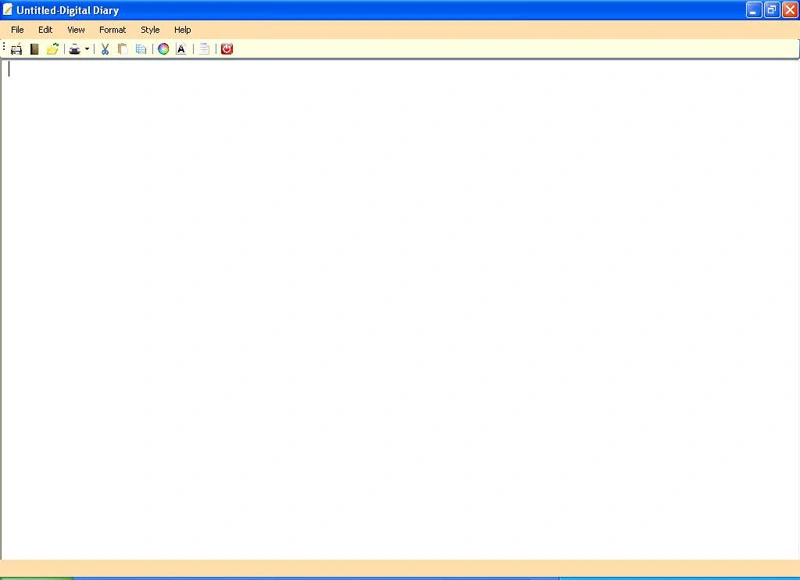
Reynard ChowPosted Jan 23, 2016, 3:21 AM
My email [email protected]
Reynard ChowPosted Jan 23, 2016, 3:21 AM
please help
Reynard ChowPosted Jan 23, 2016, 3:20 AM
Error 1 The name 'SaveFile' does not exist in the current context
Reynard ChowPosted Jan 23, 2016, 3:19 AM
when i put savefile it said
akshay balharaPosted Sep 21, 2013, 11:56 PM
Awesome Article.............but i have changed it and add another functionality of multiple tabs
Luis PerezPosted Aug 1, 2012, 11:38 PM
This is great. But if you are looking for an exact clone of Notepad in every way, from shortcut to menus, to behavior, to use as a starting point for your own application may I suggest taking at look at: http://www.simplygoodcode.com/2012/04/notepad-clone-in-net-winforms.html
Denis AdanicPosted Apr 19, 2012, 12:27 PM
Hi, its PRO++ tutorial, but i cant understand some code. Where can I get the that SNAPSHOT you made, just, that I could change that FORM and see name of some functions and etc... ????
Vuong NguyenPosted Mar 17, 2012, 8:53 AM
Really good work men. Can you send me a zip file to my email. Thanks for your help!
Pardeep MalikPosted Dec 29, 2011, 2:05 AM
Nice post for notepad coading its really very help full. Can we download full notepad project. How can i do.
bila bojaPosted Aug 29, 2011, 6:39 PM
".. so plz upload zip file. ty :)
prabhatPosted Aug 17, 2011, 5:40 AM
hi good work dear keep it up .. for example of polymorphism you can visit on this web site http://makeadvice.com/blog/?p=64
Jayaraman VickyPosted Aug 1, 2011, 6:46 AM
A clear code for a simple notepad...
Jayaraman VickyPosted Aug 1, 2011, 6:46 AM
Aclear code for a simple notepad...
Ravi SargamPosted May 26, 2011, 12:58 AM
please tell me how to download a zip file of this notepad application
pankaj singhPosted Apr 1, 2011, 3:53 PM
this article helps me alot again thanks alot rajshree
hoangolay nguyen tanPosted Mar 28, 2011, 12:58 AM
give me Source code and demo , please i don't undertand clearly thank you very much
Anil Godawat GodawatPosted Feb 26, 2011, 2:08 AM
thank for this code but sir can to send me the zip file of this artical.
Anil Godawat GodawatPosted Feb 26, 2011, 2:08 AM
thank for this code but sir can to send me the zip file of this artical.
Anil Godawat GodawatPosted Feb 26, 2011, 2:08 AM
thank for this code but sir can to send me the zip file of this artical.
Prabhat kumarPosted Sep 11, 2010, 10:58 PM
good job....
megha dhawanPosted Aug 27, 2010, 2:40 PM
hey rajshree.. this indeed is a great work.. btw wanted some help.. i am not able to understand this findform and gotoform part.. can u please elaborate its coding part.. i need it urgently..
srinath vuyyurueditedPosted Jun 15, 2010, 7:15 AMEdited Jun 15, 2010, 7:16 AM
hi Rajshree First of all Thanks for posting the code. This is the code I am looking for from past few days.It is really very helpful.Can you please Provide downloadable Solution file.It will be easy for me to implement in one of my project Thanks & regards Srinath Vuyyuru
Dorababu MekaPosted Oct 21, 2009, 8:00 AM
Really Good work Rajshree.
Mike GoldPosted Aug 20, 2009, 11:30 AM
Nice work, but it would be really great, and much more readable ifyou put some text explaining what you did. Code comments are nice, but some detailed text will help people understand what you actually did.
SenthilkumarPosted Aug 19, 2009, 10:56 AM
Really good work rajshree. You can develop some small games application. with regards, Erode senthilkumar
Kapil SoniPosted Aug 19, 2009, 9:19 AM
Hi gud work bhi keep it up in future also k bye and tc