

Introduction
In modern enterprise applications, generating documents like PDFs dynamically and storing them securely is a common requirement. Power Apps, combined with Azure API Management and SharePoint Online, offers a powerful way to achieve this. In this article, I will walk through how to generate a PDF from Power Apps using a custom API, route the request through an API Management Gateway to an on-premise API, and finally upload the generated PDF to SharePoint Online using certificate-based authentication.
Overview
This solution involves the following components:
Power Apps: The front-end app that triggers the PDF generation.
Custom Connector: Acts as a bridge between Power Apps and the API Management Gateway.
Azure API Management (APIM): Securely exposes the on-premise API to Power Apps.
On-Premise API: Responsible for generating the PDF.
SharePoint Online: The destination where the PDF is uploaded.
Certificate Authentication: Used to securely authenticate the upload to SharePoint without user credentials.
Architecture
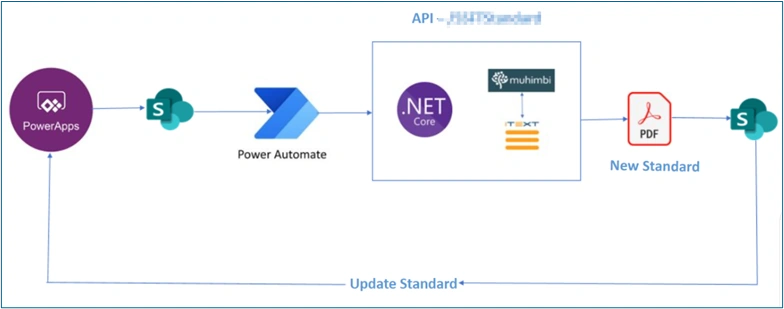
In this architecture, Power Apps will trigger an API via Power Automate (custom connector), and the Inputs for this API will be generated by Power Apps. The JSON input will be generated from Power Apps based on the input selection from UI, and the Json file will be saved in SharePoint Online. The “Input” is the ItemId with which the Json file is saved in the SharePoint Online. The .NET API accepts the input, i.e., ItemId of the JSON file, and downloads the JSON file from the SharePoint Online.
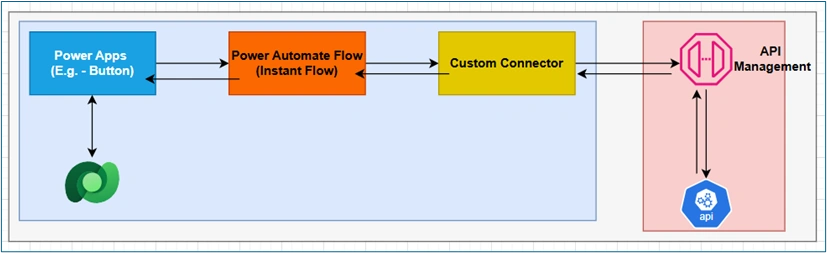
Detailed Walkthrough
1.Designing the Power App
User Interface: Create a form or screen where users enter the data required for the PDF (e.g., invoice details, report parameters).
Trigger Button: Add a button labeled “Generate PDF” or similar.
Logic: Use Power Fx to collect form data and call the custom connector when the button is clicked.
Feedback: Display loading indicators and success/error messages to guide the user.
2.Creating the Custom Connector in Power Automate
OpenAPI Definition: Define the API schema (request/response) using Swagger or directly in the Power Automate custom connector UI.
Authentication: Set to “No authentication” if APIM handles security or configure as needed. I used API key authentication.
Actions: Add actions for:
Generating the PDF (POST request with user data).
(Optional) Uploading the PDF to SharePoint if handled by the API.Testing: Use the built-in test feature to validate connectivity and responses.
3.Setting Up Azure API Management (APIM) Gateway
Import API: Import your on-premise API into APIM using OpenAPI, WSDL, or manual configuration.
Policies:
Inbound: Add policies for authentication, IP filtering, rate limiting, and logging.
Backend: Configure route requests to the on-premise API via a self-hosted or Azure-hosted gateway.
Outbound: Transform responses if needed (e.g., base64 to binary).Security: Use OAuth 2.0, client certificates, or other mechanisms as required.
Testing: Use APIM’s test console to ensure requests are routed and responses are correct.
4.Implementing the On-Premise API
Technology: Use .NET, Node.js, Java, or any stack that supports PDF generation.
Endpoints:
POST /generate-pdf: Accepts data, generates PDF, returns as byte array or base64.
POST /upload-sharepoint (optional): Accepts PDF and uploads to SharePoint.PDF Generation: Use libraries like iTextSharp (C#), PDFKit (Node.js), or similar. In my case, I used Muhimbi to generate the PDF and iText for formatting the PDF.
Security: Restrict access to APIM IPs, validate incoming requests.
Error Handling: Return meaningful error messages for troubleshooting.
5.Uploading to SharePoint Online Using Certificate Authentication
Azure AD App Registration
Register an app in Azure AD.
Upload a certificate (public key) for authentication.
Grant required API permissions (e.g., Sites.ReadWrite.All for Microsoft Graph).Token Acquisition
Use the certificate to acquire an app-only access token via OAuth 2.0.
Use libraries like MSAL or ADAL for token management.Uploading the PDF
Use Microsoft Graph API (/sites/{site-id}/drives/{drive-id}/items/{parent-id}:/{filename}:/content) or SharePoint REST API.
Set appropriate metadata (e.g., file name, content type).Error Handling: Handle token expiration, permission errors, and upload failures gracefully.
6.Calling the API from Power Apps
Invoke Custom Connector: Use PowerFx to call the connector’s action, passing user data.
Handle Response
If the API returns a SharePoint file URL, display it or provide a download link.
If the API returns the PDF, use Power Automate to upload it to SharePoint.User Feedback: Notify users of success or failure, and provide next steps (e.g., view/download PDF).
7.(Optional) Logging and Monitoring
APIM Analytics: Monitor API usage, errors, and performance in the Azure Portal.
SharePoint Audit Logs: Track file uploads and user access.
Custom Logging: Implement logging in your API for troubleshooting and auditing.
Common Error Responses and Solutions
While working with a custom API, below is the reference of common error responses and their solutions.
1. 400 Bad Request
Cause: Incorrect request format or missing parameters.
Solution: Check the API documentation for required parameters and ensure your request body/parameters are correctly formatted.
2. 401 Unauthorized
Cause: Missing or invalid authentication credentials.
Solution: Verify that you are including the correct ClientID / AppId or Site URL. Check if the Certificate Validity has expired.
3. 403 Forbidden
Cause: Insufficient permissions to access the resource.
Solution: Ensure the Functional User account has the necessary permissions to SharePoint Sites and that you are not trying to access restricted resources.
4. 404 Not Found
Cause: Incorrect endpoint or resource does not exist.
Solution: Double-check the endpoint URL and resource identifiers.
5. 500 Internal Server Error
Cause: An error occurred on the server side.
Solution: Try the request again later. If the issue persists, check the logs and contact the API provider's support team.
6. 503 Service Unavailable
Cause: The server is temporarily unable to handle the request.
Solution: Retry the request after some time. Check the API provider’s status page for maintenance updates.
Tips & Best Practices
Security: Never expose sensitive endpoints directly to Power Apps; always use APIM or similar gateways.
Scalability: Use asynchronous processing for large PDFs or high-volume scenarios.
Error Handling: Provide clear error messages to users and log detailed errors for admins.
Documentation: Document your API endpoints, connector actions, and authentication flows for future maintenance.
Conclusion
This architecture provides a secure, scalable, and maintainable way to generate and store PDFs from Power Apps. By leveraging Azure API Management and certificate-based authentication, you ensure enterprise-grade security and flexibility. Whether you are automating invoice generation, report creation, or any other document workflow, this approach can be adapted to fit a wide range of business needs.
Join the conversation! Your thoughts help the community grow.