

In this article we will be seeing how to get all holds lists from the SharePoint
site using object model.
I have created a SharePoint site and I have activated the site feature (Go to
Site Actions => Site Settings => Site Actions => Manage Site Features) "Hold
and eDiscovery".

Once you have created the feature you could be able to see the following options
(Site Actions => Site Settings => Hold and eDiscovery).

We will be seeing how to get all holds lists for the SharePoint site. We will be
using Hold.GetAllHoldsLists Method to get all holds list.
Hold.GetAllHoldsLists Method
Gets all holds lists in a specified site.
- Namespace: Microsoft.Office.RecordsManagement.Holds
- Assembly: Microsoft.Office.Policy (in Microsoft.Office.Policy.dll)
Steps Involved:
- Open Visual Studio 2010.
- Create a new console application.
- Add the following references.
- Microsoft.Office.Policy.dll
- Microsoft.SharePoint.dll
- Add the following namespaces.
- using Microsoft.Sharepont;
- using Microsoft.Office.RecordsManagement.Holds;
- Replace the code with the following.
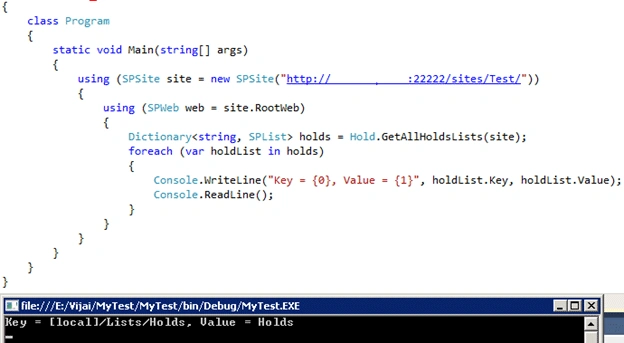
- Build the solution.
- Hit F5, you will be getting all holds lists for the SharePoint site.
Join the conversation! Your thoughts help the community grow.