

I previously wrote this article in my blog, Think Big!.
Overview
This lesson focuses on how to programmatically turn on the screen saver.
Background
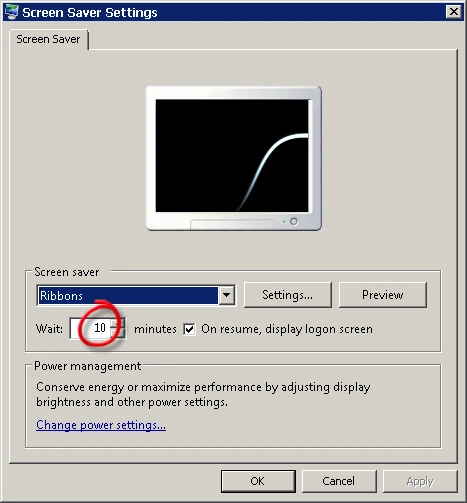
In Windows, you can turn it on automatically by leaving the machine inactive for a specific period. You can control this period from the Screen Saver options from the desktop properties dialog. The following figure shows the Screen Saver Settings dialog.
Programmatically turning on the screen saver
In this section we will learn how to turn on the screen saver in .NET and C#. Of course you can write the code in any language you prefer, but here we will write it in C#.
You can turn on the screen saver by sending the WM_SYSCOMMAND message with the parameter SC_SCREENSAVE.
Sending a message can be done using the SendMessage() function that resides in the User32.dll library.
The definition of this function is as follows:
Code |
This function takes four arguments:
- hWnd:
Handle to the window to send the message to. You can set this argument to a window handle, the desktop handle (HWND_DESKTOP), or the handle for all top-level windows (HWND_BROADCAST). - Msg:
The message to send. - wParam:
Additional message-specific options. - lParam:
Additional message-specific options.
This function returns a value specific to the message sent. Usually, it returns non-zero if it succeed or zero otherwise.
Here is the full code:
C# |
Code explanation:
First, we created our PInvoke method. This method is decorated by the DllImportAttribute attribute specifying the library which the method resides in. Also PInvoke methods must be declared as static and extern.
Because LRESULT defined as a signed 32-bit integer, it is marshaled as System.Int32 in .NET. Also, because of System.IntPtr is the best type for marshaling any Win32 raw handle, we have used it for the first argument. UINT, WPARAM, and LPARAM are all defined as an unsigned 32-bit integer, so we have marshaled them as System.UInt32. HWND_BROADCAST represents the handle for all top-level windows, so we have sent them the order to turn on the screen saver.
PInvoke stands for Platform Invocation, it is the process of creating a wrapper for the .NET to interact with unmanaged functions.
Marshaling is the process of creating a bridge between .NET types and unmanaged types.
You can use PostMessage() in place of SendMessage() if you want to send the message asynchronously and don't want to wait for a response.
learner learnerPosted Oct 11, 2010, 9:13 AM
i need another method like TurnOnScreenSaver() that stops the screen saver. That is i wanna turn on the screen saver first (already done) then on a specific condition i wanna turn off the screen saver and continue the process(on and off) .
ziar khanPosted Apr 30, 2010, 1:28 AM
Thanks my dear Sir, as a muslim I am very happy that our brother (u) do the job of programming. Sir, i belong to pakistan and MCS Degree in Computer Science Plz tell me how to learn programming like u