

In this article I am going to discuss how to resize a control using jquery.
<%@ Page Language="C#" AutoEventWireup="true" CodeFile="Resizable.aspx.cs" Inherits="Resizable" %>
<!DOCTYPE html PUBLIC "-//W3C//DTD XHTML 1.0 Transitional//EN" "http://www.w3.org/TR/xhtml1/DTD/xhtml1-transitional.dtd">
<html xmlns="http://www.w3.org/1999/xhtml">
<head runat="server">
<%--Jquery--%>
<script src="http://ajax.googleapis.com/ajax/libs/jquery/1.5/jquery.min.js"></script>
<script src="http://ajax.googleapis.com/ajax/libs/jqueryui/1.8/jquery-ui.min.js"></script>
<%--Style sheet for resize control--%>
<link rel="stylesheet" type="text/css" href="http://ajax.googleapis.com/ajax/libs/jqueryui/1.8/themes/base/jquery-ui.css" />
<style type="text/css">
.resizable
{ width: 250px;
height: 100px;
background: #FFFFFF;
border: solid 1px red;
}
.NormalTextBox
{
width: 250px;
background: Yellow;
border: solid 1px red;
}
</style>
<script>
$(document).ready(function() {
$(".resizable").resizable();
});
</script>
</head>
<body>
<form id="form1" runat="server">
<table width="60%" align=left>
<tr>
<td width="100px">
Name:
</td>
<td align=left>
<asp:TextBox ID="TextBox1" runat="server" CssClass="NormalTextBox"></asp:TextBox>
</td>
</tr>
<tr>
<td width="100px">
Contact No:
</td>
<td align=left>
<asp:TextBox ID="TextBox2" runat="server" CssClass="NormalTextBox"></asp:TextBox>
</td>
</tr>
<tr valign="top">
<td width="100px">
Address:
</td>
<td align=left>
<asp:TextBox ID="TextBox3" CssClass="resizable" runat="server" TextMode="MultiLine"
Rows="4" ></asp:TextBox>
</td>
</tr>
<tr>
<td width="100px">
</td>
<td align=left>
<asp:Button ID="Button1" runat="server" Text="Submit"></asp:Button>
</td>
</tr>
</table>
</form>
</body>
</html>
Output: By debugging this application you will get the following output:
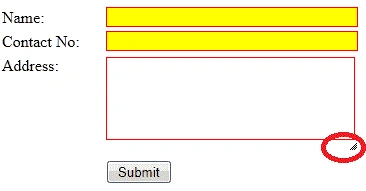
Figure 1:
You can resize the textbox by dragging the arrow (marked by red indicator sign) and drop anywhere on the screen.
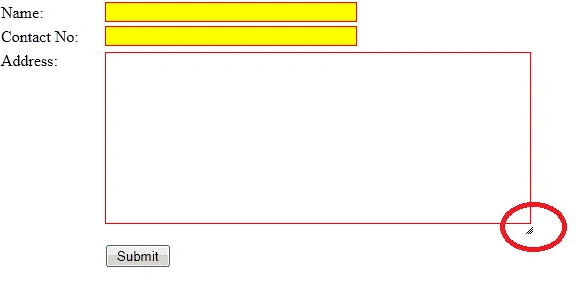
Figure 2: You can increase and decrease the size of the control as you need.
Join the conversation! Your thoughts help the community grow.