

This article has been excerpted from book "The Complete Visual C# Programmer's Guide from the Authors of C# Corner".
Reflection is the sole mechanism of discovering class information at runtime. You can create instances of classes on the fly at runtime using Reflection namespace members, which is similar to the optional Runtime Type Information mechanism in C++.
The ability to list a type's members is a great way to quickly discover which elements are available. It is an important tool for reporting on your system as well as assisting in the development of user documentation. Using the Reflection namespace, you can control what kind of members you want to show to your users, as well as other information (such as the visibility of a particular method). You can also get information on all of the members in a class or specify only certain subsets (such as methods or fields). Also you can use this neat feature when documenting class hierarchy.
Listing 5.76: Reflection.cs, Reflection Example
// example object creation factory
using System;
using System.Reflection;
// simple class
class MyClass
{
public static int x = 0;
public void prompt(string param1)
{
Console.WriteLine("MyClass… " + param1);
}
public static void prompt2()
{
Console.WriteLine("Here is a message from prompt2.");
}
}
class TheApp
{
public static void Main()
{
// create the Type object
Type type1 = typeof(MyClass);
//or
// Type type1 = Type.GetType("MyClass");
// create an instance of that type
Object o = Activator.CreateInstance(type1);
((MyClass)o).prompt("hello1");
// declare and populate the arrays to hold the information...
FieldInfo[] fi = type1.GetFields(BindingFlags.Default |
BindingFlags.Static |
BindingFlags.NonPublic | BindingFlags.Public); // fields
MethodInfo[] mi = type1.GetMethods(BindingFlags.Default |
BindingFlags.Static |
BindingFlags.NonPublic | BindingFlags.Public); // methods
// iterate through all the method members
foreach (MethodInfo m in mi)
{
Console.WriteLine(m);
}
// iterate through all the field members
foreach (FieldInfo f in fi)
{
Console.WriteLine(f);
}
object[] argValues = new object[] { "Hello2" };
String[] argNames = new String[] { "param1" };
// call the requested method with filled parameters
type1.InvokeMember("prompt", BindingFlags.Default |
BindingFlags.InvokeMethod,
null, o, argValues, null, null, argNames);
Console.ReadLine();
}
}
Figure 5.31 contains the resulting output. 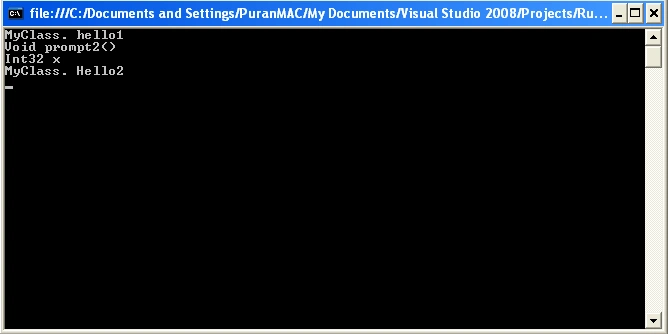
Figure 5.31: Screen Output Generated from Listing 5.76
The reflection mechanism is also useful when developing applications that use third-party COM+ components at your site or in the market because you can use Reflection to accomplish late binding to COM objects via the IDispatch interface.
Conclusion
Hope this article would have helped you in understanding Runtime Type Information (Reflection) in C#. See other articles on the website on .NET and C#.
 |
The Complete Visual C# Programmer's Guide covers most of the major components that make up C# and the .net environment. The book is geared toward the intermediate programmer, but contains enough material to satisfy the advanced developer. |
eliza sahooPosted Mar 29, 2010, 7:10 AM
A simple way to get the class structure information of the Class we are using in our application. Step1: Create the Class object of the class we want to explore at run time or the class which is getting added at runtime. Step2: As we are looking for the structure of the class, get all Constructors, Fields and methods by invoking respective functions of the Class. Step3: print them in java console or use them as required. Hope it answer the question.Any suggestions are welcomed.