

Calculator App will look like the following:
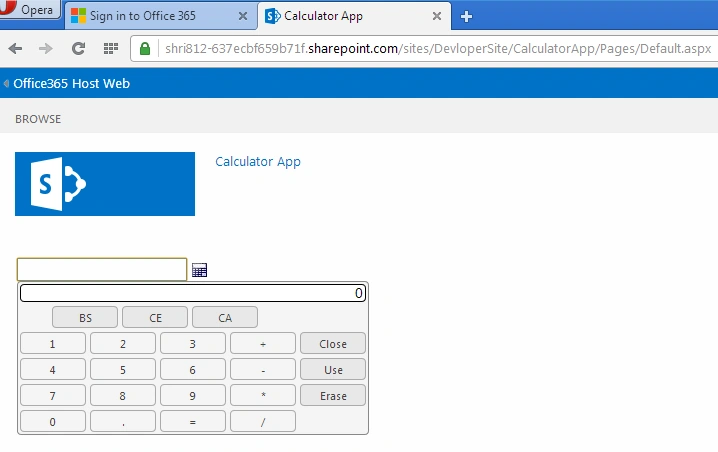
Step 1: Create A new SHA project using Office 365 account credentials.
Step 2: SHA project structure as in the following,
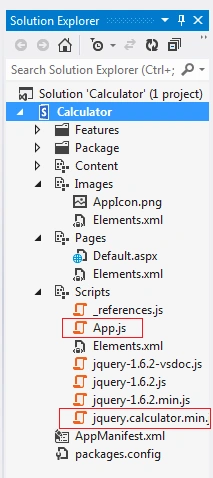
Step 3: In this project we are going to import JQuery Plugins and CSS file for calculator.
- <script type="text/javascript" src="../Scripts/jquery.calculator.min.js"></script>
- <style type="text/css">
- @import "../content/jquery.calculator.css";
- </style>
Step 4: Default.aspx page contain code for calculator creation as follows.
- <%@ Page Inherits="Microsoft.SharePoint.WebPartPages.WebPartPage, Microsoft.SharePoint, Version=15.0.0.0, Culture=neutral, PublicKeyToken=71e9bce111e9429c" MasterPageFile="~masterurl/default.master" language="C#" %>
- <%@ Register Tagprefix="SharePoint" Namespace="Microsoft.SharePoint.WebControls" Assembly="Microsoft.SharePoint, Version=15.0.0.0, Culture=neutral, PublicKeyToken=71e9bce111e9429c" %>
- <%@ Register Tagprefix="Utilities" Namespace="Microsoft.SharePoint.Utilities" Assembly="Microsoft.SharePoint, Version=15.0.0.0, Culture=neutral, PublicKeyToken=71e9bce111e9429c" %>
- <%@ Register Tagprefix="WebPartPages" Namespace="Microsoft.SharePoint.WebPartPages" Assembly="Microsoft.SharePoint, Version=15.0.0.0, Culture=neutral, PublicKeyToken=71e9bce111e9429c" %>
- <asp:Content ContentPlaceHolderId="PlaceHolderAdditionalPageHead" runat="server">
- <script type="text/javascript" src="../Scripts/jquery-1.6.2.min.js"></script>
- <script type="text/javascript" src="../Scripts/jquery.calculator.min.js"></script>
- <style type="text/css">
- @import "../content/jquery.calculator.css";
- </style>
- <script type="text/javascript" src="../Scripts/App.js"></script>
- <script type="text/javascript">
- $(function()
- {
- $('#basicCalculator').calculator({
- showOn: 'both',
- buttonImageOnly: true,
- buttonImage: '../content/calculator.png'
- });
- });
- </script>
- </asp:Content>
- <asp:Content ContentPlaceHolderId="PlaceHolderMain" runat="server">
- <p>
- <input type="text" id="basicCalculator" />
- </p>
- </asp:Content>
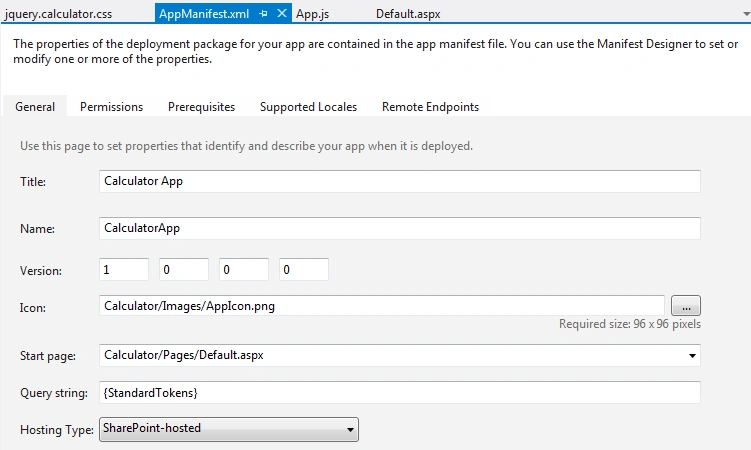
Step 5: Manifest.xml file,
No need to set any permission for this app, as we are going to use JQuery plugins only.
Step6: App.JS file,
- "use strict";
- var context;
- var web;
- var user;
- function sharePointReady()
- {
- context = new SP.ClientContext.get_current();
- web = context.get_web();
- getUserName();
- }
- function getUserName()
- {
- user = web.get_currentUser();
- context.load(user);
- context.executeQueryAsync(onGetUserNameSuccess, onGetUserNameFail);
- }
- function onGetUserNameSuccess()
- {
- $('#message').text('Hello ' + user.get_title());
- }
- function onGetUserNameFail(sender, args)
- {
- alert('Failed to get user name. Error:' + args.get_message());
- }
Step 7: Jquery.calculator.css file contains code for calculator look and feel.
- /* Main style sheet for jQuery Calculator v1.3.2 */
- div.hasCalculator, span.hasCalculator
- {
- position: relative;
- }
- button.calculator - trigger
- {
- width: 25 px;
- padding: 0 px;
- }
- img.calculator - trigger
- {
- margin: 2 px;
- vertical - align: middle;
- }
- .calculator - popup
- {
- display: none;
- z - index: 10;
- margin: 0;
- padding: 0;
- border: 1 px solid #888;
- border-radius: 4px;
- -moz-border-radius: 4px;
- -webkit-border-radius: 4px;
- color: # 000;
- background - color: #f4f4f4;
- font - family: Arial,
- Helvetica,
- sans - serif;
- }
- .calculator - keyentry
- {
- position: absolute;
- top: 3 px;
- right: 3 px;
- width: 0 px;
- }
- .calculator - inline
- {
- position: relative;
- border: 1 px solid #888;
- border-radius: 4px;
- -moz-border-radius: 4px;
- -webkit-border-radius: 4px;
- background-color: # f4f4f4;
- }
- .calculator - inline.calculator - close
- {
- display: none;
- }
- .calculator - disabled
- {
- position: absolute;
- z - index: 100;
- background - color: white;
- opacity: 0.5;
- filter: alpha(opacity = 50);
- }
- .calculator - rtl
- {
- direction: rtl;
- }
- .calculator - prompt
- {
- clear: both;
- text - align: center;
- }
- .calculator - prompt.ui - widget - header
- {
- margin: 2 px;
- }
- .calculator - result
- {
- clear: both;
- margin: 2 px;
- padding: 0 px 2 px;
- text - align: right;
- background - color: #fff;
- border: 1 px inset #000;
- border-radius: 4px;
- -moz-border-radius: 4px;
- -webkit-border-radius: 4px;
- font-size: 110%;
- }
- .calculator-focussed
- {
- background-color: # ffc;
- }
- .calculator - row
- {
- clear: both;
- width: 100 % ;
- }
- .calculator - space
- {
- float: left;
- margin: 2 px;
- width: 28 px;
- }
- .calculator - half - space
- {
- float: left;
- margin: 1 px;
- width: 14 px;
- }
- .calculator - row button
- {
- position: relative;
- float: left;
- margin: 2 px;
- padding: 0 px;
- height: 22 px;
- background - color: #f4f4f4;
- border - radius: 4 px; - moz - border - radius: 4 px; - webkit - border - radius: 4 px;
- text - align: center;
- cursor: pointer;
- }
- .calculator - row.calculator - ctrl
- {
- width: 60 px;
- background - color: #e8e8e8;
- }
- .calculator - row.calculator - undo, .calculator - row.calculator - clear - error, .calculator - row.calculator - clear {
- width: 28 px;
- }
- .calculator - row.calculator - base, .calculator - row.calculator - angle {
- width: 28 px;
- font - size: 70 % ;
- }
- .calculator - row.calculator - base - active, .calculator - row.calculator - angle - active {
- border: 2 px inset# fff;
- }
- .calculator - digit, .calculator - oper
- {
- width: 28 px;
- }
- .calculator - mem - empty
- {
- color: #888;
- }
- .calculator-row .calculator-trig
- {
- font-size: 70%;
- }
- @-moz-document url-prefix() { // Firefox
- .calculator-trig, .calculator-base
- {
- text-indent: -3px;
- }
- }
- .calculator-key-down {
- -moz-border-radius: 4px;
- -webkit-border-radius: 4px;
- }
- .calculator-keystroke
- {
- display: none;
- width: 16px;
- height: 14px;
- position: absolute;
- left: -8px;
- top: -8px;
- color: # 000;
- background - color: #fff;
- border: 1 px solid #888;
- font-size: 80%;
- }
- .calculator-angle .calculator-keystroke, .calculator-base .calculator-keystroke, .calculator-trig .calculator-keystroke {
- top: -10px;
- font-size: 95%;
- }
- .calculator-keyname
- {
- width: 22px;
- font-size: 70%;
- }
- .calculator-cover
- {
- display: none;
- display/**/: block;
- position: absolute;
- z-index: -1;
- filter: mask();
- top: -4px;
- left: -4px;
- width: 125px;
- height: 200px;
- }
Gowtham RajamanickamPosted Dec 28, 2015, 5:15 AM
Good One
Santhakumar MunuswamyPosted Dec 27, 2015, 8:50 AM
Thanks for nice article