

In this article I am describing how to show and hide the content of div or table using JavaScript function.
<%@ Page Language="C#" AutoEventWireup="true" CodeFile="Default.aspx.cs" Inherits="_Default" %>
<!DOCTYPE html PUBLIC "-//W3C//DTD XHTML 1.0 Transitional//EN" "http://www.w3.org/TR/xhtml1/DTD/xhtml1-transitional.dtd">
<html xmlns="http://www.w3.org/1999/xhtml">
<head runat="server">
<title>Example: Show hide div using JavaScript</title>
<!DOCTYPE html PUBLIC "-//W3C//DTD XHTML 1.0 Transitional//EN" "http://www.w3.org/TR/xhtml1/DTD/xhtml1-transitional.dtd">
<html xmlns="http://www.w3.org/1999/xhtml">
<head runat="server">
<title>Example: Show hide div using JavaScript</title>
<%--Javascript function--%>
<script type="text/javascript">
function DivExpandFun(divid, FixedImg, upImg, downImg)
<script type="text/javascript">
function DivExpandFun(divid, FixedImg, upImg, downImg)
{
if (typeof ccollect != "undefined")
if (typeof ccollect != "undefined")
{
if (document.getElementById(divid).style.display != "none")
if (document.getElementById(divid).style.display != "none")
{
document.getElementById(divid).style.display = "none"
document.getElementById(FixedImg).src = downImg;
document.getElementById(FixedImg).title = "Open div"
}
else
document.getElementById(divid).style.display = "none"
document.getElementById(FixedImg).src = downImg;
document.getElementById(FixedImg).title = "Open div"
}
else
{
document.getElementById(divid).style.display = "block"
document.getElementById(FixedImg).src = upImg;
document.getElementById(FixedImg).title = "Close div"
}
}
}
document.getElementById(divid).style.display = "block"
document.getElementById(FixedImg).src = upImg;
document.getElementById(FixedImg).title = "Close div"
}
}
}
function GetStyle(classname)
{
ccollect = new Array()
}
ccollect = new Array()
}
function do_onload()
{
GetStyle("hideContent")//give the name of style class
}
if (document.getElementById)
window.onload = do_onload
</script>
GetStyle("hideContent")//give the name of style class
}
if (document.getElementById)
window.onload = do_onload
</script>
<style type="text/css">
.hideContent
{
display: block;
}
</style>
</head>
<body>
<form id="form1" runat="server">
<div>
<table style="width: 250px; border: solid 1px gray; background-color: Silver;">
<tr>
<td>
<span>My Details</span>
</td>
<td align="right">
<a onclick="DivExpandFun('Mydiv','Image1','<%=ResolveUrl("~/Images/UpArrow.gif")%>','<%=ResolveUrl("~/Images/DownArrow.gif")%>');">
<img id="Image1" src='<%=ResolveUrl("~/Images/UpArrow.gif")%>' title="Close div" /></a>
</td>
</tr>
</table>
<div id="Mydiv" class="hideContent">
<table style="padding: 5px; width: 250px; border: solid 1px gray">
<tr>
<td>
<b>Name:</b> Purushottam Rathore<br />
<b>Address:</b><br />
<b>City:</b> Noida<br />
<b>Pin Code:</b> 201301<br />
<b>Country:</b> India
</td>
</tr>
</table>
</div>
</div>
</form>
</body>
</html>
Ourput: Now Press F5 you will get the output as follows:
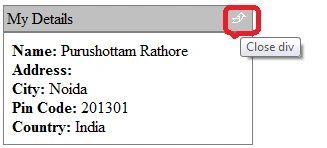
Figure 1: Show div by default.
Figure 1: Show div by default.
Now click on the image, div will be close like as follows:
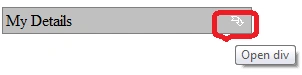
Figure 2: Hide the div
Figure 2: Hide the div
viet vo quocPosted Oct 14, 2011, 11:33 AM
Very good!!Thanks so much.