

In this article I am giving you a small introduction on SharePoint 2010 Social networking capabilities. Social networking capabilities have been improved a lot in SharePoint 2010. Let us see some of the best improvements.
Profile Page
Profile page in SharePoint 2010 has been improved a lot. Now it is giving somewhat similar to the functionalities that we seen in Facebook or Twitter
- Overview - It displays basic profile of the user. User picture and presence information linked to the Office Communicator. It also includes ccolleague web part and a web part showing our commonalities with other users
- Organization - It contains an org chart. It shows our peers to the right and superiors above. It is very nice web part essential in organization.
- Content - It displays all our recent activity like recently used documents or new blog posts etc.
- Tags and Notes - It will display all your tags and notes.
- Colleagues - This is the list of people in our organization. We can add other from the organization as our colleagues.
- Memberships - This shows all our the distribution lists and sites that that we belongs.
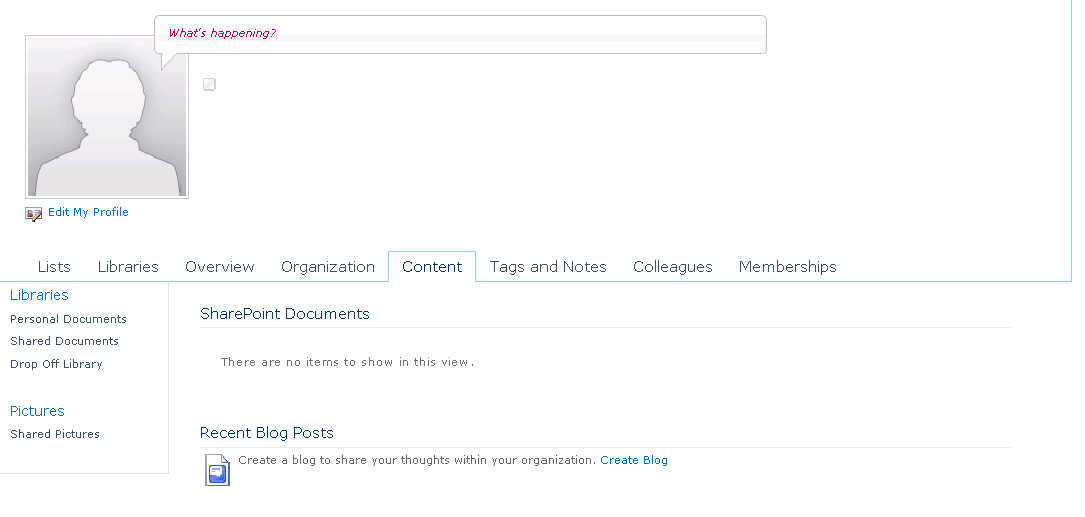
(Click on image to view bigger image)
Picture Library
SharePoint 2010 has added a better way to manage your users' profile pictures. It utilizes a central repository that can then be pushed to AD and we can use the same in any other application.
I Like, Tags & Notes
This is a very good addition to SharePoint 2010 feature list. When a user clicks on I like it, it is saved as bookmark and when he click on Tags and Notes, small snippets and description can be added to the page .User have the flexibility to set it as private or public. The tags set as public can be used to suggest tags to other users and can be used in search. Tags can be added to a page or a document.
karthikeyan JayaramanPosted Feb 11, 2011, 4:52 PM
Hello Mr.Joy, It was very nice reading your article. I have recently started learning sharepoint 2010. I have very little experience in c# programming(2-3 months). I'm trying to build an intranet portal for employee performance management(Login time, performance reports, communications, notifications, alerts etc). I would greatly appreciate your guidance. Kindly let me know if it would be fine for me to email you for the same. Regards, Karthikeyan Email: [email protected]
Romeo SinPosted Jan 16, 2011, 7:59 AM
Hi Destin, after having a first glance on your website i have became a very big fan of your but friend how to download it ???
Mahesh ChandPosted Oct 27, 2010, 5:25 PM
It is very nice built-in feature. I was amazed to see how much you could do with SP 2010.