

Yet another social sharing buttons script
created by using jQuery and XML for your website. The script is very
straight forward and self explanatory. The buttons container and
buttons setting are stored in the XML file.
Figure 1

Figure 2

How to use it?
-
Download the SocialButton.xml and jquery.social-buttons.js file. This script requires the latest jQuery library, get it at http://jquery.com/.
-
Open the SocialButton.xml and customize the necessary settings. You can customize the div container border style, width, color, position, and margin and background color. The DivMargin allow us to adjust the div container to the left and right.
Listing 1: -
Open the jquery.social-buttons.js file and provide the location of the XML file on your server. Use absolute paths if you are not sure of the relative path and make sure the script and XML file are in the same domain. For example:
Figure 3
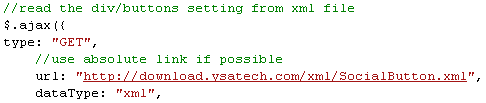
- Place the scripts before the body tag in the master page,
template or web page that you want the social buttons to appear. For
instance:
Figure 4

<!--solid, dotted, dashed, none --><DivBorderStyle>dashed</DivBorderStyle> <!--Border width (int) --><DivBorderWidth>1</DivBorderWidth> <!--Border color--> <DivBorderColor>#0000A0</DivBorderColor> <!--left, right, top, bottom --> <DivPosition>left</DivPosition> <!--left or right (px) --> <DivMargin>50px</DivMargin> <!--Div background color --> <DivBgColor>#F9F9F9</DivBgColor>You have the option to show or hide a particular social button.
Listing 2:<!--none, block --><DisplayGooglePlusOne>block</DisplayGooglePlusOne><DisplayFacebookLike>block</DisplayFacebookLike> <DisplayFacebookShare>none</DisplayFacebookShare> <DisplayTwitter>block</DisplayTwitter> <DisplayDigg>block</DisplayDigg> <DisplayStumbleUppon>block</DisplayStumbleUppon> <DisplayAddThis>block</DisplayAddThis>Frequent Questions and Answers
-
Does your script work on different platforms?
Yes, it should be cross-browser compatible. -
How come I don't see the social sharing button that I like?
Currently, the script only provide the option to show or hide Google Plus One, Facebook like/Sharing, Twitter, Digg, StumbleUpon, and AddThis buttons. You can modify the script to fit your requirements. -
Is this script free?
Yes. Use at your own risk. -
Why there are white space in between the button?
Some buttons do not display the counter if the count is zero.
Conclusion
I hope someone will find this information useful and make your programming job easier. If you find any bugs or disagree with the contents or want to help improve this article, please drop me a line and I'll work with you to correct it. I would suggest downloading the demo and explore it in order to grasp the full concept of it because I might miss some important information in this article. Please send me an email if you want to help improve this article.
Davin MartynPosted Sep 14, 2011, 8:31 AM
This is nice article please define what is the jquery in asp.net and define its uses?
Lucy JanePosted Sep 14, 2011, 12:08 AM
Hello bryjan, will u tell me how can i get the value of attributes of sociaL sharing button thanks in advance
Mahesh ChandPosted Sep 13, 2011, 10:25 PM
I was looking for the same. Thank you for sharing Bryian. We plan to use in next version of C# Corner.