

Developers usually waste 90% of their time thinking how to generate Office format documents. Perhaps that is what is being used by most companies and developers right now. Microsoft Word, PDF, Rich Text Format and other similar formats are in high demand these days.
Creating a custom interoperability service is a very time-consuming and a less efficient function when the solution type for your application is enterprise. Third-party applications provide a very good solution to such tasks that can enable us to kick-start our applications in a matter of a few minutes.
Spire.Doc (by E-Iceblue) is one of them. I have personally tried the software library for the .NET Framework and it is kind of a helpful tool for .NET developers (no matter whether you are a Windows Forms, Windows Presentation Foundation or ASP.NET developer) for generating cross-file format files.
Note: By cross-file format I mean you can generate the output in a number of formats, file based (under files, this library supports PDF, Microsoft Word, HTML web pages, Rich Text Format and more), it also supports generating images for your documents and to get the streams for your document resources.
Spire.Doc API: I have used Spire.Doc (and other connected APIs and namespaces) to provide it a quick look and start. If someone has a great understanding of how these documents are, what a paragraph is and what can be added to various components.
The very basic document in Microsoft Word would require only:
- Single document object.
- Single section to contain the data. This is also the page of your applications document.
- A number of paragraphs, depending on whether and what you want to add to the document. The paragraph would allow you to add images or other stuff, such as text and characters; symbols in Unicode format you just need to the integer value for the Unicode character.
- Tables are also added to the section object, if required.
The Spire.Doc namespace also allows you to save the document, in any number of formats, ranging from PDFs to a wide variety of Microsoft Word formats.
Note for E-Iceblue developers
I have had a few intuition problems using the product, for a .NET developer, adding a new element to the current child hierarchy is something like the following.
- var element = new Element();
- // Any properties or similar editions
- parentElement.Children.Add(element);
- var element = parentElement.AddChild();
- // Child type is determined by the function called, AddParagraph, AddTable etc.
- // Then element is edited out.
A few code samples for readers
Since review-only posts are not my style, I would provide a few code samples to the readers also, as if to show how easy it is to use the Spire.Doc library for their personal use. As already said, this is a library for the .NET Framework, the library is consumable by every framework (although, E-Iceblue also ships the library in various versions, one for every framework on .NET).
The same code sample would work on Windows Forms, Windows Presentation Foundation, SilverLight, ASP.NET and (as I have tested it enormous times on) Console applications.
Documentation of the Spire.Doc is available along with the package when you download it (and it is a very great and intuitive documentation, with a style pretty much as that of the MSDN). You can always use the documentation application, to read the API and continue where you get stuck when developing the application.
Loading a new document
Loading the new document is similar, whether you are trying to create a new document, or load it from an existing file. Spire.Doc provides you with constructors that can be used to initialize the Document object.
- // First method, new document
- var document = new Document(); // works
- // Second method, existing document
- var document = new Document("path", FileFormat.Docx);
Once loaded, you can then work with a document to add a new section, paragraph or other similar object or to edit the existing objects in the document.
Editing the document
Editing the document is another key feature of this library, because it not only lets you create new documents but also allows you to edit already existing documents and files, no matter what data type they hold. The key points are that you can edit the document (of any type) and save it (in any format).
You can add new paragraphs or sections to your document that in turn allow you to add images and text to the document. (As already said above) I do have a little problem with this process in the Spire.Doc namespace, but still it is a great way of handle-oriented programmers that have a great intuition for creating the object then saving the handle for further processes.
- // Creating a document, adding a section and a new Paragraph.
- var document = new Document();
- var section = document.AddSection();
- // update the section, if required
- var paragraph = section.AddParagraph();
- // Update the paragraph, for example.
- paragraph.AppendText("Love for all, hatred for none!");
- paragraph.AppendPicture(imageObject); // accepts System.Drawing.Image object.
Saving the document
The final stage is saving the document on the file system, or processing it for further processes. Usually, web developers would want to send dynamically generated Word or PDF files to their clients at runtime. Spire.Doc is a great way to complete this task.
Spire.Doc exposes functions to store the generated document in a couple of formats, you can use just one function, the type and you're done! See the following (continuing the previous example of document):
- // Continuing from the previous example
- document.SaveToFile("MyNewFile.pdf", FileFormat.PDF); // extension required
Plus: The library also allows you to get results in stream and image formats. You should try them also!
Tested sample: The following code is a sample example of what I explained previously (using the library for applications to generate PDFs and to send them to the clients at runtime using an SMTP server for emails.
- using System;
- using System.Collections.Generic;
- using System.Linq;
- using System.Text;
- using System.Threading.Tasks;
- using Spire.Doc;
- using Spire.Doc.Documents;
- using Spire.CompoundFile;
- using System.Net;
- using System.Net.Mail;
- namespace SpireConsoleApplication
- {
- class Program {
- static void Main(string[] args)
- {
- // Create the document
- var document = new Document();
- // Add a section to document
- var section = document.AddSection();
- // Add paragraph to the section
- var paragraph = section.AddParagraph();
- paragraph.AppendText("Love for all, hatred for none!");
- paragraph.AppendPicture(
- System.Drawing.Image.FromFile("<location>.jpg"));
- document.SaveToFile("<location>.pdf", FileFormat.PDF);
- new Program().SendEmail("<location>.pdf");
- }
- private void SendEmail(string fileName)
- {
- using(SmtpClient sc = new SmtpClient("smtp.gmail.com", 25))
- {
- sc.Credentials = new NetworkCredential("<username>", "<word>");
- sc.EnableSsl = true;
- var message = new MailMessage(
- "<from>", "<recipient>",
- "Spire.Doc PDF file", "Email contains the attachment.");
- message.Attachments.Add(new Attachment(fileName));
- sc.Send(message);
- }
- }
- }
- }
The following is the email received:
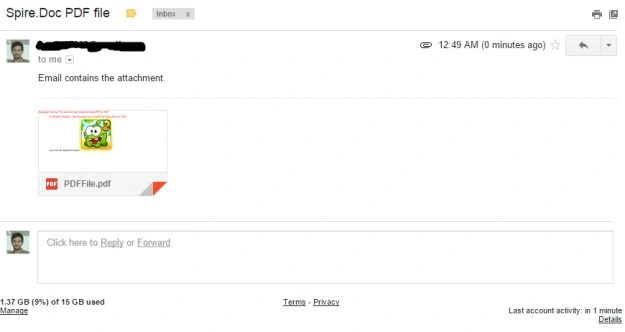
Figure 1: Receiving the mail
The email with the attachment generated at runtime in PDF format using the Spire.Doc library.
Perhaps this now shows how simple it can be use the library to generate runtime PDF documents and send them to client. Yes, I love the Cut the Rope game and the Om Nom character so I used its picture to be sent. The library can be used in WPF, Windows Forms, ASP.NET or other .NET Framework applications, to generate the files at runtime, then they can be sent to the clients, opened as files on the desktop or shown to the users. I have personally enjoyed using it, ignore the intuition problems that I said.
Pro tip: You can convert a Microsoft Word document to HTML format to show it in your web application also. So it also solves the “How to show Microsoft Word document in website” problem.
Note: I did not use the license, you should use the license to remove the Red watermark on the documents.
Review Excerpt
I would quote what I was saying to myself (when I was using the library to test the quality.
Spire.Doc is a very fast and efficient solution to enterprise applications for generating office documents in desktop and web applications on .NET Framework. It removes the pain of interoperability from minds of .NET developers and provides a very agile solution to developers. It is a very easy, recommended and efficient solution for cross-file format document generation.
References
The library is available on E-Iceblue's website, you can also install the packages by executing the NuGet command in the NuGet package manager console.
PM> Install-Package Spire.DocThe packages (and others by E-Iceblue for PDF and Excel based solutions) are available on the E-Iceblue's account on NuGet.
You can also download the product from their website to use them in your own applications. I would leave the rest of the application and resources up to you. Happy coding.
Vijaya ChikkamathPosted Jun 14, 2017, 2:06 AM
Does it help convert only word to other formats and vice versa? We have a requirement where we should be able to convert any file type to html.. Example: doc, docx, xls, xlsx, txt, ppt, pptx, to html
NitinPosted Jun 15, 2015, 9:32 AM
good one
Atul GuptaPosted Jun 15, 2015, 3:14 AM
Good Article ,thank you for sharing knowledge!
Rahul Kumar SaxenaPosted Jun 15, 2015, 2:30 AM
Good Show..
Van LaiPosted Jun 14, 2015, 9:31 PM
Thanks a lot for sharing
Santhakumar MunuswamyPosted Jun 12, 2015, 2:27 PM
Thanks for sharing