

In this article we will see how to transfer data on PC, Pocket-PC and Mobiles etc... via Bluetooth. You can find out so many sources on 32feet.net. Actually I got this source also from that website only but it was raising some security issues. In this article I have modified some code.
Background:
Transferring files over LAN from one PC to another PC we can use Remoting of .Net but transferring files on Bluetooth enabled devices is not like .Net Remoting. Here we will see how to send files over various Bluetooth enabled devices.
Pre-Requisites:
For doing our task first we have to download the DLL files from 32feet.net. Download the DLLs and add references to those DLLs to your project.
These DLLs will provide all functionality which we need to do the transfers such as searching for Bluetooth devices, view their MAC address, send the data etc...
Follow the steps given below to complete our task.
Step 1:
Download InTheHand.dll from above link.
Step 2:
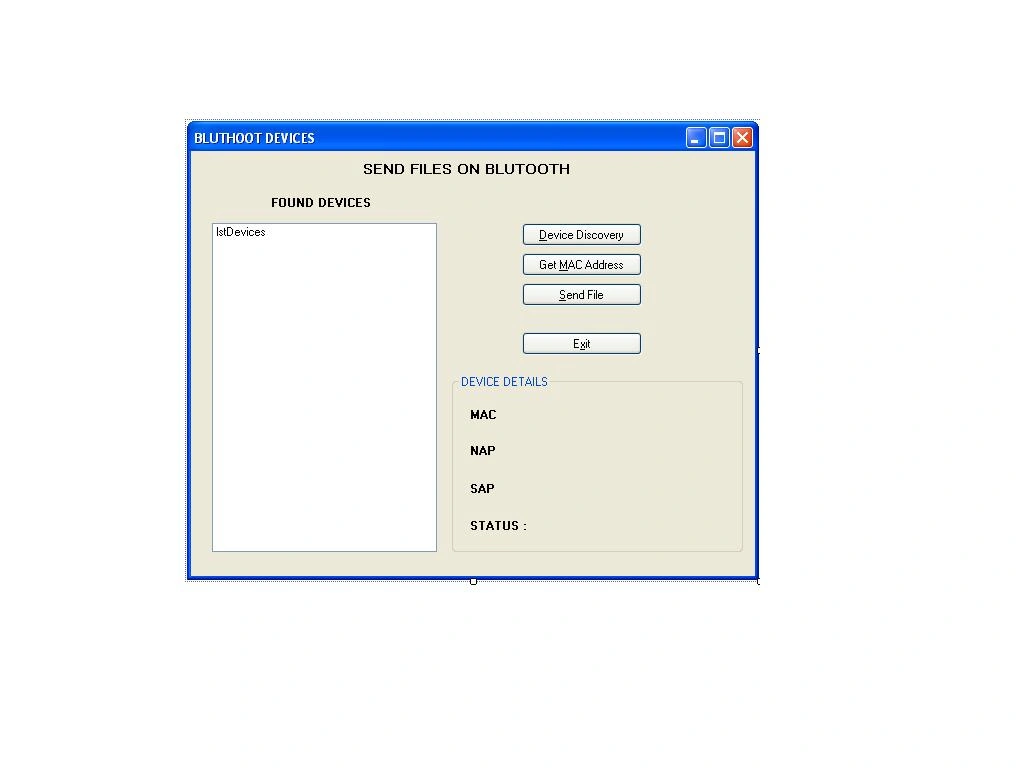
Start a new Windows application and add a reference to this DLL file. Design your UI like shown below.
Step 3:
First import the namespace from the referenced DLLs like below.
using InTheHand.Net;
using InTheHand.IO.Ports;
using InTheHand.Net.Bluetooth;
using InTheHand.Net.Forms;
Step 4:
In the declaration section create an instance of the BluetoothAddress class which is present in InTheHand namespace of the referenced dll.
InTheHand.Net.BluetoothAddress[] address_array = new BluetoothAddress[1000];
private Thread thrSend;
Step 5:
In the btnDescover click event write the following code to discover the Bluetooth devices around us. Here we are creating an instance of Bluetoothclient Class present in InTheHand namespace of the referenced DLL.
InTheHand.Net.Sockets.BluetoothClient bc = new InTheHand.Net.Sockets.BluetoothClient();
InTheHand.Net.Sockets.BluetoothDeviceInfo[] array = bc.DiscoverDevices();
for (int i = 0; i < array.Length; i++)
{
this.address_array[i] = array[i].DeviceAddress;
this.lstDevices.Items.Add(array[i].DeviceName);
}
Step 6:
For viewing the MAC, NAP and SAP address of selected bluetooth devices write the folowing code in the GetMAC_Click event for getting various addresses of Bluetooth devices.
if (this.lstDevices.SelectedIndex == -1)
{
MessageBox.Show("Please select a device.");
return;
}
int index = this.lstDevices.SelectedIndex;
string mac = this.address_array[index].ToString();
string nap = this.address_array[index].Nap.ToString();
string sap = this.address_array[index].Sap.ToString();
lblmac.Text = "MAC : " + mac.ToString();
lblnap.Text = "NAP :" + nap.ToString();
lblsap.Text = "SAP :" + sap.ToString();
Step 7:
For sending a file to a Bluetooth device write the following code in the Send file_Click event to send the file.
this.thrSend = new Thread(new ThreadStart(sendfile));
this.thrSend.Start();
Step 8:
The above code will start only the thread for sending a file but you have to write the method which will do the actual work of sending the file. Write the method sendfile as below.
private void sendfile()
{
SelectBluetoothDeviceDialog dialog = new SelectBluetoothDeviceDialog();
dialog.ShowAuthenticated = true;
dialog.ShowRemembered = true;
dialog.ShowUnknown = true;
OpenFileDialog ofd = new OpenFileDialog();
ofd.Title = "Select File";
ofd.Filter = "All Files (*.*)|.*";
if (dialog.ShowDialog() == System.Windows.Forms.DialogResult.OK)
{
if (ofd.ShowDialog() == DialogResult.OK)
{
Cursor.Current = Cursors.WaitCursor;
System.Uri uri = new Uri("obex://" + dialog.SelectedDevice.ToString() + "/" + ofd.FileName);
ObexWebRequest request = new ObexWebRequest(uri);
request.ReadFile(ofd.FileName);
ObexWebResponse response = (ObexWebResponse)request.GetResponse();
MessageBox.Show(response.StatusCode.ToString());
response.Close();
Cursor.Current = Cursors.Default;
}
else
{
MessageBox.Show("File Not Selected");
}
}
else
{
MessageBox.Show("Device Not Selected");
}
}
In the above method you can find ObexRequest and Response object to transfer the object from our application to a Bluetooth device.
Conclusion:
In such an easy manner we can send files over various Bluetooth enabled devices.
tabrez shaikhPosted May 22, 2018, 1:07 PM
Any help on receive file ?
manoj t sPosted Aug 27, 2015, 6:21 AM
m getting devices list in list box but when i press SEND file there m not getting any devices.
vishrut shahPosted May 8, 2015, 3:50 AM
how to handel the .dll file
Rahul VijayanPosted Feb 26, 2014, 12:22 PM
Why does it worked correctly..
morteza allamiPosted Jan 18, 2014, 12:39 PM
Hi this application does not find devices
CesarPosted Oct 22, 2013, 3:40 PM
@Dhruv, @Krishna. I had the same problem here. The bluetooth is connected in both, pc and mobile and the software doesnt show the device on the device list. Did you solve the problem @Dhruv?
Krishna GaradPosted Jul 22, 2013, 1:03 AM
@Dhruv make sure bluetooth switch is on for your system as well as for mobile.
Dhruv ShahPosted Jul 18, 2013, 5:20 AM
I am not getting any device after searching for device. plz do reply wht to do??
imam bukhshPosted Mar 11, 2013, 7:12 AM
is there any waty to send only data like text by using the same libraries
tanuja jamiPosted Feb 25, 2013, 5:17 AM
do you have any link regarding the new version of dll. If so can you please share it.
Krishna GaradPosted Feb 25, 2013, 3:52 AM
Tanuja I din't tested it on windows 8. I think it will not work for windows 8. Check for new version of InTheHand.net dll they may have new release for windows 8.
tanuja jamiPosted Feb 25, 2013, 1:34 AM
can this API be used for win 8 desktop app also? I'm trying to create a win 8 desktop app for bluetooth transfer using vs 2012 express.can this API be used for it.I'm facing problem with inTheHand.Net.Forms
mohammad abumahfouzPosted Oct 2, 2012, 1:12 PM
thank so much
sripriyaeditedPosted Apr 4, 2012, 12:27 PMEdited Apr 4, 2012, 11:46 PM
Hi I am trying to develop a serial port profile application for file transfer between a PC and a laptop using Bluetooth Dongles. The dongle supports Bluesoleil which supports microsoft stack I am using Visual Studio 2008 Is console application advisable for my project? Will the 32feet.net source help my project? Thanks in advance..
ajith jPosted Feb 17, 2012, 1:02 AM
May be due to unavailability of Bluetooth stack in your host machine. Try to fix it
Arvind PandePosted Feb 16, 2012, 11:48 PM
Error: Bluetooth.Net Not Supported for this platform (win-xp) , how to solve this error ?
Arvind PandePosted Feb 16, 2012, 11:48 PM
Error: Bluetooth.Net Not Supported for this platform (win-xp) , how to slove this error ?
ajith jPosted Sep 27, 2011, 8:56 AM
I'm getting exception message. But i find still my mobile shows the pc as connected device. Message = "A socket operation failed because the destination host was down 6C23B9414334:0000110500001000800000805f9b34fb"
ajith jPosted Sep 27, 2011, 8:50 AM
I'm getting the same error.I checked the address , my mobile shows the pc in connected device and I ve access to the file. This is the code Console.WriteLine("Initiating file transfer . ."); string file_path = @"D:\sample.rtf"; . string FileName = "sample.rtf"; Uri uri = new Uri("obex://" + array[devId].DeviceAddress + "/" + file_path); ObexWebRequest request = new ObexWebRequest(uri); request.ReadFile(file_path); ObexWebResponse response = (ObexWebResponse)request.GetResponse(); response.Close(); Console.WriteLine( response.StatusCode);
ajith jPosted Sep 27, 2011, 8:27 AM
That issue was resolved its due to the use of unsupported service. Now I got different issue in obexwebresponse it returns NULL always with exception connection failed. I'm trying to send a text file from pc to my mobile the request info as follows AbsolutePath = "/D:/sample.rtf" uri = {obex://6c23b9414334/D:/sample.rtf} RequestUri = {obex://6c23b9414334/D:/sample.rtf} AbsoluteUri = "obex://6c23b9414334/D:/sample.rtf" OriginalString = "obex://6C23B9414334/D:\\sample.rtf" PathAndQuery = "/D:/sample.rtf" what is the reason can u help to sort this out????????????
ajith jPosted Sep 27, 2011, 6:11 AM
I'm getting "Scheme type not supported" what is the problem. I'm using console application to build a bluetooth appliction to transfer files
serpil temurPosted Sep 8, 2011, 8:58 AM
Thank you for article. How I update inthehand.DLL ?Because this library doesn't support all of the bluetooth devices. (For example: nokia 6220c)And I can't find this DLL in 32feet.net.
omkar mhaiskarPosted Apr 18, 2011, 3:35 AM
i m getting following error. "Bluetooth.NET is not supported on this device." how can i solve this issue? plz help me.
Shirsendu NandiPosted Apr 5, 2011, 10:06 AM
Hey this is a very good inovative article..I love this article.
Shirsendu NandiPosted Apr 5, 2011, 9:53 AM
It is a very good inovative article